How to Use Relevance AI for Lead Generation
Contents
Relevance AI can automate much of the work between defining an ideal customer and handing a researched prospect to a sales rep. That does not mean giving an agent a vague instruction to "find leads" and letting it email everyone it discovers.
The useful version is a controlled workflow. One agent finds prospects, another gathers evidence, a qualification step applies your criteria, and a person approves any outreach that represents the company.
This guide shows how to design that workflow with Relevance AI, Apollo, HubSpot, Google Sheets, and Slack.
Disclosure: Toolfountain may earn a commission if you buy through links in this article.
What Relevance AI Can Do in a Lead Generation Workflow
Relevance AI agents can use connected tools to:
- search for contacts and companies matching an ICP
- enrich people and organizations
- research company websites and public information
- summarize buying signals
- score prospects against written criteria
- create or update CRM records
- write research to Google Sheets
- notify a sales rep in Slack
- draft personalized outreach for review
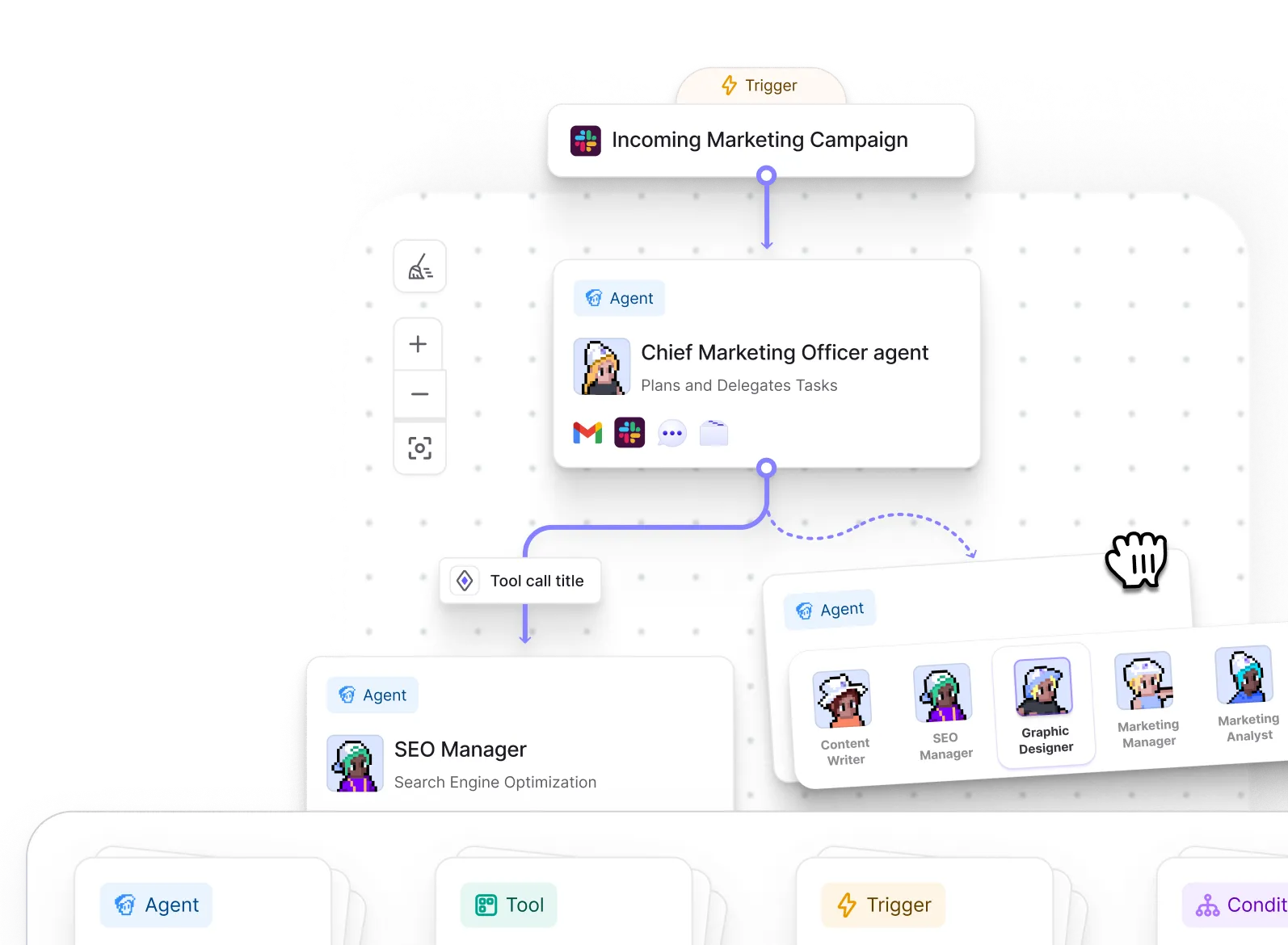
The platform is particularly relevant here because it supports both individual agents and multi-agent Workforces. You can separate research, qualification, writing, and CRM actions instead of asking one prompt to perform the entire process.
Try Relevance AI or read the complete Relevance AI review before building the workflow.
Before You Build: Define a Lead Worth Finding
Automation magnifies weak criteria. Write down the rules before connecting any tools.
At minimum, define:
- target industries
- company size or revenue range
- regions served
- job titles and seniority
- technologies used
- relevant hiring, funding, or growth signals
- exclusions
- what qualifies a lead for human review
Separate firmographic fit from buying evidence. A company can match your target size and industry without showing any reason to buy today.
For example, a useful brief could be:
Find B2B SaaS companies in the US, UK, Canada, or Europe with 20-200 employees. Prioritize companies hiring sales development roles or using HubSpot. Find the Head of Sales, VP Sales, or RevOps lead. Exclude agencies, consultants, and existing customers.
That is far more actionable than "find SaaS leads."
The Recommended Relevance AI Lead Generation Workflow
Use a pipeline with clear inputs and outputs.
Step 1: Start With a Controlled Input
The workflow can start from:
- a scheduled run
- a new row in Google Sheets
- a CRM workflow trigger
- a Slack request
- a manual list of target accounts
For the first version, use a small Google Sheet or a manual company list. It is easier to inspect errors before adding an automatic trigger.
Step 2: Find Matching Accounts and Contacts
Relevance AI's official Apollo integration can search contacts and accounts by criteria such as industry, company size, seniority, title, and location. Apollo requires an account with API access.
Configure the search tool with the ICP fields you defined. Limit the first run to a small number of results. More prospects do not improve the workflow if the matching criteria are wrong.
Step 3: Enrich Each Prospect
Use enrichment to gather the fields the qualification step actually needs. These may include:
- current title and seniority
- company size and industry
- company website
- location
- technology stack
- verified contact details
- recent funding or hiring signals
Do not collect fields merely because an integration makes them available. Every extra call can add cost and create more data to review.
The Apollo integration can enrich both people and organizations. Its enrichment endpoints consume Apollo credits, so test the cost with a small batch.
Step 4: Research the Account
Give a research agent a narrow task and require sources. It might inspect the company website, careers page, product pages, and recent announcements to answer questions such as:
- What does the company sell?
- Who appears to be its target customer?
- Is it hiring for a role connected to the problem we solve?
- Does it use a relevant platform such as HubSpot?
- Is there a specific reason to contact this company now?
The output should contain evidence, not flattering filler. "The company is innovative" is not a buying signal.
Step 5: Score the Lead Against Written Rules
Create a qualification rubric with visible points. For example:
| Criterion | Points |
|---|---|
| Matches target industry | 2 |
| Has 20-200 employees | 2 |
| Uses HubSpot | 2 |
| Hiring sales or RevOps roles | 2 |
| Relevant decision-maker found | 1 |
| Clear trigger event found | 1 |
Ask the agent to return the score, evidence for every awarded point, missing information, and a recommendation. Leads below the threshold should stop or move to a separate review list.
Step 6: Write the Result to HubSpot or Google Sheets
The official HubSpot integration allows Relevance AI agents to retrieve contacts, update properties, create notes, create tasks, and respond to HubSpot workflow triggers.
Store the research summary in a note rather than forcing everything into CRM fields. Keep structured fields for facts such as score, source, role, company size, and status.
If you are testing, write results to Google Sheets first. Relevance AI's Google Sheets integration can read, append, and update rows and can trigger workflows from spreadsheet changes.
Step 7: Notify the Rep in Slack
Send only qualified leads to Slack. A useful notification contains:
- prospect and company
- qualification score
- two or three pieces of evidence
- source links
- CRM record link
- suggested next action
Relevance AI can trigger agents from Slack and post status updates or notifications. Avoid dumping every research field into the channel.
Step 8: Draft Outreach, but Require Approval
An agent can draft an email using the verified evidence. It should not invent a compliment, claim the prospect visited your site, or mention a signal that was not found.
Require human approval before sending. This protects brand reputation and catches mistakes in names, roles, context, and tone.
One Agent or a Relevance AI Workforce?
Use one agent for a small workflow with a few tools. Use a Workforce when the job has stages that need different instructions or quality checks.
A practical sales Workforce could contain:
- Prospect Finder: searches Apollo using ICP filters.
- Account Researcher: gathers evidence and sources.
- Lead Qualifier: applies the scoring rubric.
- CRM Operator: creates or updates HubSpot records.
- Outreach Drafter: prepares a message for approval.
Separating the roles makes failures easier to diagnose. If the leads are wrong, inspect the search and qualification agents instead of rewriting one giant prompt.
A Relevance AI Lead Generation Prompt
Use this as a starting instruction for the qualification stage:
Review the prospect record and research evidence. Score the lead only against the supplied rubric. For each awarded point, quote or summarize the supporting evidence and include its source URL. Do not infer missing facts. Return the total score, qualification status, missing information, and the next recommended action. If the score is below 7, do not create an outreach draft.
Adapt the criteria to your offer. The structure matters more than the exact wording.
Common Mistakes to Avoid
Automating Volume Before Accuracy
Test ten prospects before testing a thousand. Review false positives, missing fields, duplicate records, and total usage.
Letting the Agent Invent Personalization
Require source-backed claims. If the agent cannot find a useful signal, it should say so.
Mixing Research and Sending
Keep prospect research separate from outbound execution. Add an approval gate before an email, LinkedIn message, or CRM sequence starts.
Ignoring Integration Costs
Relevance AI Actions and Vendor Credits are only part of the cost. Apollo enrichment and other connected products may consume their own credits. Read the Relevance AI pricing guide and calculate a cost per qualified lead.
Writing Unstructured Data Everywhere
Decide which facts belong in CRM properties, which belong in notes, and which are temporary. Otherwise the agent can leave a CRM full of inconsistent text.
Is Relevance AI Good for Lead Generation?
Relevance AI is a strong option when lead generation involves research, judgment, and actions across several tools. Its agents can choose tools, while Workforces can divide the job into specialized stages.
It is less compelling if you only need a fixed two-step automation. A conventional workflow tool may be simpler and cheaper for deterministic tasks. Compare Relevance AI vs n8n and Relevance AI vs Make before committing to an agent-first setup.
The best first project is not fully autonomous outbound. It is a research and qualification assistant that gives a salesperson better information and leaves the final decision with them.
Frequently Asked Questions About Relevance AI Lead Generation
Can Relevance AI find leads?
Relevance AI can use integrations such as Apollo to search for contacts and accounts matching criteria. It can then enrich, research, score, and route those prospects through connected tools.
Does Relevance AI integrate with HubSpot?
Yes. Its official HubSpot integration supports CRM actions and HubSpot workflow triggers. Agents can retrieve or update contacts, create notes and tasks, and use CRM activity in a workflow.
Can Relevance AI send cold emails?
Agents can use connected communication tools, but human approval is safer for outbound messages. Start with research and drafting, then add controlled sending only after the workflow is accurate and compliant with applicable laws and platform rules.
Does Relevance AI integrate with Apollo?
Yes. The official Apollo integration supports contact and account search, enrichment, and deal-related actions. Apollo API access and credits may be required.
Should I use one agent or several agents for prospecting?
Use one agent for a simple process. Use a Workforce when prospect discovery, research, qualification, CRM updates, and outreach need separate instructions, checks, or owners.
Keep Reading