Relevance AI Pricing: Plans, Actions, Credits, and Real Costs
Contents
Relevance AI has a free plan, while its current self-serve documentation lists Pro at $29/month and Team at $349/month. Annual billing brings those prices down to $19/month for Pro and $234/month for Team. Enterprise pricing is custom.
For most solo builders and smaller teams, Pro is the best-value paid plan. Free is good for learning the platform and proving one Agent. Team only becomes compelling when you need more users, substantially more capacity, Calling or Meeting Agents, analytics, or other Team-level features.
Relevance AI pricing at a glance
| Plan | Price, usage, and best fit |
|---|---|
| Free |
$0. 200 Actions/month. 1,000 one-time Vendor Credits ($2 value). Best for learning the builder and testing one small Agent. |
| Pro |
$29/month or $19/month billed annually. 2,500 Actions/month. 10,000 Vendor Credits/month ($20 value). Best for solo operators and small production setups. |
| Team |
$349/month or $234/month billed annually. 7,000 Actions/month. 35,000 Vendor Credits/month ($70 value). Best for larger teams, higher-volume deployments, Calling/Meeting Agents, and analytics. |
| Enterprise |
Custom pricing. Custom Actions and Vendor Credits. Best for organization-wide deployments requiring enterprise security, governance, evaluations, and implementation support. |
There is currently an important pricing-page inconsistency. Relevance AI’s main public marketing pricing page is presently focused on its Enterprise offer, while its official pricing documentation continues to list the Free, Pro, Team, and Enterprise tiers shown above.
The prices and allowances in this guide come from Relevance AI’s current self-serve documentation. If you are about to pay, confirm the exact plan and price shown inside your Relevance AI account before completing the purchase.
Before choosing a plan, understand Actions and Vendor Credits
Relevance AI does not give you one generic monthly credit allowance. Usage is split into Actions and Vendor Credits.
An Action is counted whenever a Tool runs. A Tool can contain several internal steps and still count as one Action. But if an Agent calls four separate Tools, that normally means four Actions. Failed Tool runs count as Actions too.
Vendor Credits cover the underlying AI model and eligible Tool costs. Relevance AI says it passes these costs through without a markup.
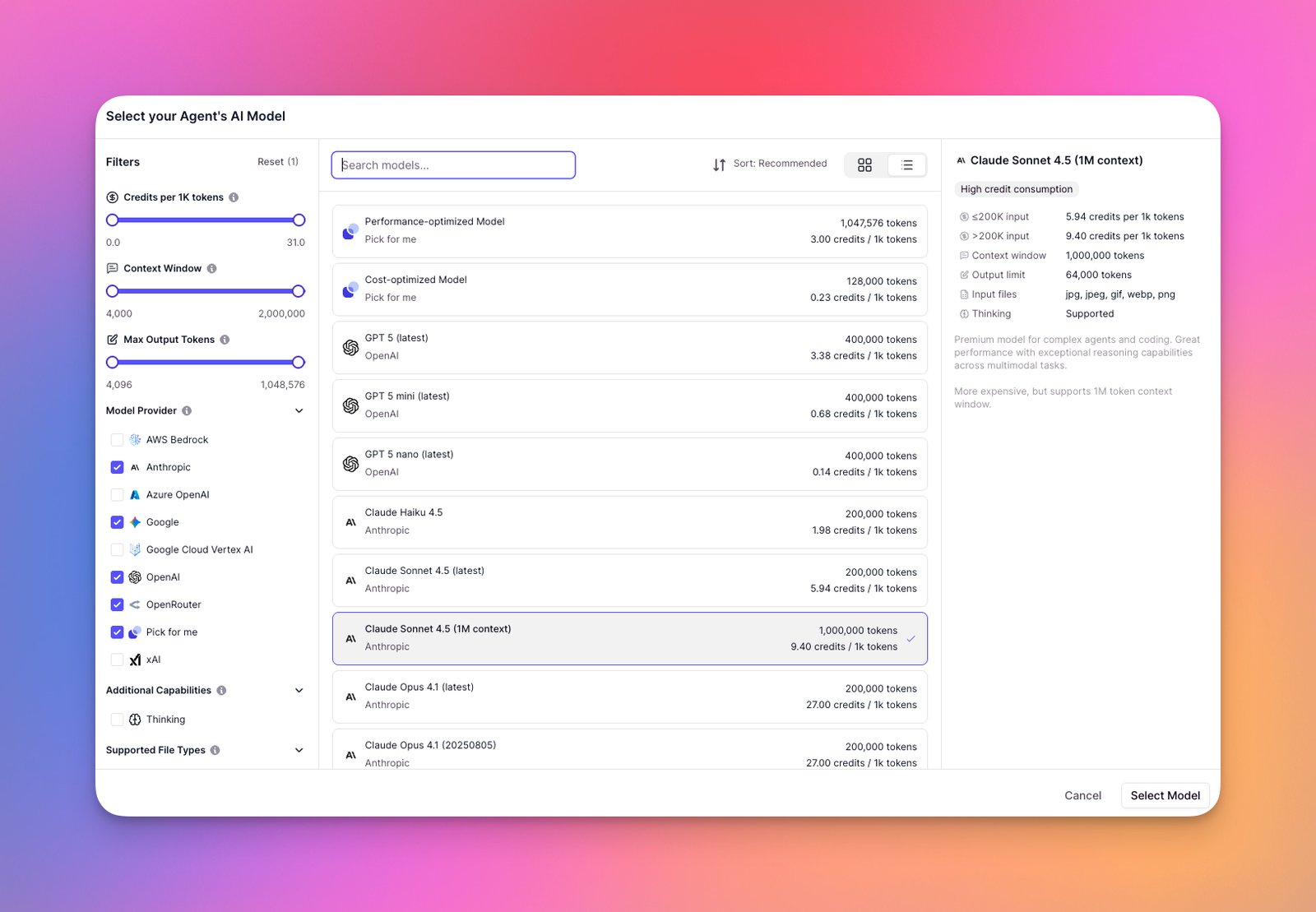
The distinction matters because two workflows can use the same number of Actions while consuming very different amounts of Vendor Credits.
A short classification task using a cheaper model may cost little in Vendor Credits. A long research Agent with a larger model, several prompts, and expensive Tool usage can consume much more even if the Action count is similar.
On paid plans, you can also bring your own model API keys and bypass Relevance AI Vendor Credits for that model usage.
For a deeper explanation, see our Relevance AI Actions and Vendor Credits guide.
Relevance AI Free plan: good for proving the idea
The Free plan is useful enough to test the actual product rather than just clicking through a demo.
You currently get:
- 200 Actions per month;
- 1,000 one-time Vendor Credits;
- unlimited Agents and Tools;
- one Workforce;
- one user and one project;
- 30 days of task history;
- Marketplace access;
- access to Relevance AI’s app integrations and custom API integrations.
The biggest limitation is the Vendor Credit allowance. The 1,000 Vendor Credits are a one-time allocation. They do not refill every month.
Your 200 Free Actions reset monthly, but once the initial Vendor Credits are gone, Free users cannot purchase top-ups. You need to move to a paid plan to get more Vendor Credits.
Free also lacks scheduled tasks, escalations, premium triggers such as WhatsApp, LinkedIn, and Telegram, bring-your-own-LLM support, Calling Agents, and Meeting Agents.
Choose Free if:
- you have never used Relevance AI before;
- you are learning how Agents, Tools, and Workforces fit together;
- you want to clone and modify Marketplace templates;
- you are building one narrow proof of concept before paying.
I would not plan a serious production workflow around Free. Use it to answer one question: is this Agent useful enough that you are willing to keep running it?
Relevance AI Pro: the best plan for most solo builders
Pro currently costs $29 month to month or $19/month when billed annually. Paying annually costs $228 for the year compared with $348 at the monthly rate, a $120 difference.
Pro includes:
- 2,500 Actions per month, or 30,000 per year with annual billing;
- 10,000 Vendor Credits per month, equivalent to $20 of included usage;
- two Build Users;
- unlimited Workforces;
- 90 days of task history;
- scheduled tasks;
- Chat Mode;
- Smart Escalations through email and Slack;
- premium app triggers for WhatsApp, LinkedIn, and Telegram;
- custom triggers;
- bring-your-own-LLM support;
- A/B testing.
This is where Relevance AI becomes much easier to operate as an ongoing system instead of something you manually test.
Scheduling is particularly important. Once an Agent is useful, the next step is often getting it to work without somebody opening the platform every morning and pressing Run.
Pro also lets you use your own LLM API keys. That can be useful when you already manage OpenAI, Anthropic, or other model costs directly.
Choose Pro if:
- one or two people are building your Agents;
- you have one or several Agents worth running regularly;
- you need scheduled tasks or escalations;
- you need premium or custom triggers;
- you want to bring your own model API keys;
- you do not need phone/meeting modes, many users, or enterprise controls.
For most individual builders and small teams, Pro is the plan I would start paying for.
Relevance AI Team: when is the 9 plan worth it?
Team currently costs $349/month or $234/month billed annually. Annual billing comes to $2,808 versus $4,188 at the monthly rate, a difference of $1,380 over twelve months.
Team raises your included usage to 7,000 Actions and 35,000 Vendor Credits per month and adds:
- five Build Users;
- 45 End Users;
- five shared projects;
- Calling Agents;
- Meeting Agents;
- higher concurrency;
- higher Knowledge and Memory capacity;
- an Analytics Dashboard;
- priority support.
Team is a much larger financial commitment than Pro. The important question is therefore not simply whether you want more Actions.
Team makes the most sense when something specific on Pro is stopping you. That could be the number of builders, the number of end users, project limits, Calling or Meeting Agents, analytics, concurrency, or workload capacity.
The current monthly difference between Pro and Team is $320. Relevance AI sells extra Actions on paid plans at $80 per 1,000, so four 1,000-Action top-ups also cost $320.
That does not mean four top-ups automatically make Team cheaper because the two plans include different base allowances and other features. But if you are repeatedly buying several Action top-ups every month, it is worth comparing your real Pro bill with Team instead of evaluating the subscription prices in isolation.
Choose Team if:
- several people need to build or use your Agents;
- you need Calling or Meeting Agents;
- you need the Analytics Dashboard;
- you need more projects or higher system capacity;
- your recurring Pro top-ups are beginning to close the price gap.
Relevance AI Enterprise: mostly a governance decision
Enterprise pricing is custom.
Alongside custom Actions and Vendor Credits, Enterprise adds capabilities aimed at larger deployments, including:
- unlimited users and projects;
- Enterprise triggers for systems such as Salesforce, Snowflake, and Zendesk;
- Agent Evaluations;
- Work Hour Controls;
- multi-organization management;
- single sign-on through SAML;
- role-based access control;
- audit logs;
- a dedicated account manager;
- custom implementation;
- priority early access.
Choose Enterprise when governance, security, formal evaluation, custom rollout support, or organization-wide deployment is driving the purchase.
If you’re still deciding whether the underlying platform is the right fit at all, read our full Relevance AI review before speaking with sales.
How much do Relevance AI top-ups cost?
Paid users can purchase additional Actions or Vendor Credits without upgrading to the next subscription tier.
| Top-up | Current price and purchase increment |
|---|---|
| Actions | $80 per 1,000 Actions. Actions are purchased in increments of 1,000. |
| Vendor Credits | $20 per 10,000 Vendor Credits. Vendor Credits are purchased in increments of 10,000. |
At that rate, a purchased Action costs $0.08. But do not translate that into “each task costs eight cents.” One business task can involve several Tool runs and therefore several Actions.
Top-ups are available only on paid plans, and an Organization admin must purchase them.
Do Relevance AI Actions and Vendor Credits roll over?
They behave differently.
- Included Vendor Credits roll over indefinitely while your subscription remains active.
- Purchased Vendor Credit top-ups also roll over while you remain subscribed.
- Base-plan Actions reset to the plan allowance when the billing period renews.
- Purchased Action top-ups carry over to the next billing cycle.
This distinction matters if your usage varies significantly from month to month. Unused included Vendor Credits can accumulate while you remain subscribed, but you should not expect unused base-plan Actions to accumulate in the same way.
Be careful with automatic Spend Controls
Pro and Team users can configure automatic top-ups for both Actions and Vendor Credits.
You choose a minimum balance and a top-up amount. When the balance falls below your minimum, Relevance AI charges enough to bring the balance up to the minimum threshold plus your specified top-up amount.
For example, Relevance AI documents a case where an account has 1,000 credits remaining, a 10,000-credit minimum, and a 1,000-credit top-up amount. The system charges for 10,000 credits so the resulting balance reaches 11,000. It does not simply purchase another 1,000.
There is currently no stated limit on how many automatic top-ups can occur.
That makes Spend Controls useful for preventing production Agents from suddenly stopping, but I would not enable them blindly. First learn what normal usage looks like, set usage alerts, and make sure an inefficient Agent or unexpected loop cannot repeatedly trigger additional charges.
How to estimate your real Relevance AI cost
The most useful unit is not the number of Agents you create. Agents and Tools are unlimited across the current plans.
Instead, estimate the cost of one real unit of work.
That could be:
- one qualified lead;
- one account research report;
- one support ticket;
- one customer follow-up;
- one CRM enrichment job;
- one content research task.
Then:
- Build a realistic workflow. Do not estimate from a stripped-down demo.
- Count the Tools that normally run. This gives you a rough Action cost.
- Use the model you would really deploy. Model choice changes Vendor Credit consumption.
- Run enough examples to catch retries and edge cases. Failed Tool runs still consume Actions.
- Check the run-level usage breakdown. Relevance AI lets you inspect Tool and LLM costs.
- Multiply by realistic monthly volume.
For example, if processing one lead normally calls three separate Tools, 500 leads would start around 1,500 Actions before retries, additional branches, or other workflow activity.
That calculation still does not tell you the Vendor Credit requirement. You need to measure both meters before deciding whether Free, Pro, or Team gives you enough capacity.
Which Relevance AI plan should you choose?
| Your situation | Plan I’d choose |
|---|---|
| You want to learn the builder and prove one small Agent. | Free |
| You are a solo operator or one of two builders running real Agents. | Pro |
| You need more builders, end users, projects, Calling/Meeting Agents, analytics, or much more capacity. | Team |
| You need SSO, RBAC, audit logs, Agent Evaluations, enterprise triggers, or a managed organization-wide deployment. | Enterprise |
Frequently Asked Questions About Relevance AI Pricing
Does Relevance AI have a free plan?
Yes. Relevance AI’s current documentation lists a $0 Free plan with 200 Actions per month, 1,000 one-time Vendor Credits, unlimited Agents and Tools, one Workforce, one user, and one project. No credit card is required to start.
What happens when I run out of Vendor Credits on the Free plan?
The Free plan’s 1,000 Vendor Credits are a one-time allocation and do not renew. Free users cannot buy Vendor Credit top-ups, so you need to upgrade to Pro or Team to receive more. The 200 included Actions continue to reset each month.
Can I buy more Actions without upgrading?
Yes, if you are already on a paid plan. Extra Actions currently cost $80 per 1,000 and must be purchased in 1,000-Action increments. Free users need to upgrade before buying top-ups.
Can I use my own OpenAI or Anthropic API key with Relevance AI?
Yes, on paid plans. Relevance AI supports bring-your-own-LLM keys, which lets you bypass its Vendor Credits for model usage handled through your own provider account.
Does Relevance AI pricing apply per user?
Free, Pro, and Team subscriptions are applied at the Organization level rather than being simple per-user subscriptions. The plan defines how many Build Users, End Users, projects, Actions, Vendor Credits, and other features the Organization receives.