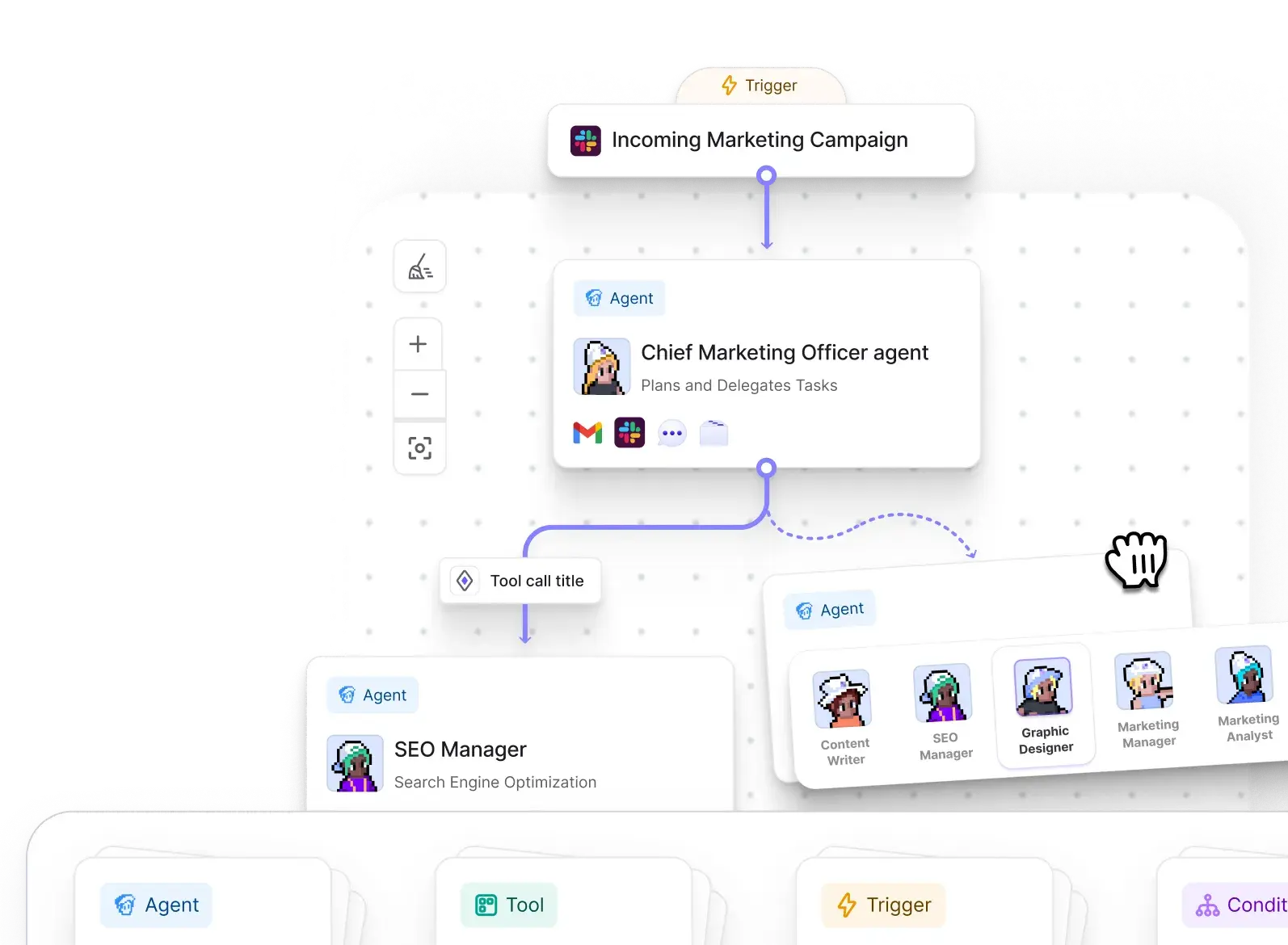
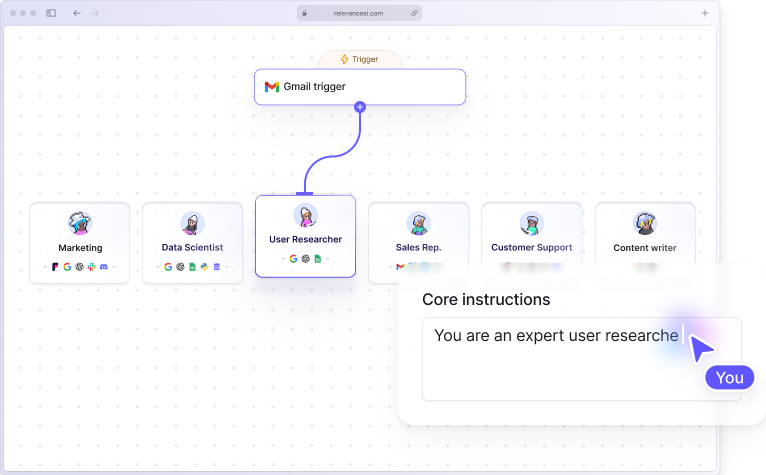
Relevance AI Workforces are useful when one business process needs several specialist AI Agents, different Tools, routing decisions, and approval boundaries. They let you put those pieces on one visual canvas and give each Agent a clearly defined role.
Keep the workflow as one Agent when one Agent can complete the job reliably with a few Tools.
Use a Workforce when:
- the process has several distinct responsibilities;
- different parts of the job need different Agents or Tools;
- work needs to move through conditional or mandatory handoffs;
- some actions should happen automatically while others need human approval;
- or you want to inspect and improve each stage of a larger process separately.
What is a Relevance AI Workforce?
A Relevance AI Workforce is a multi-Agent workflow. Each Agent owns a narrower role, while the Workforce controls how tasks and information move between those roles.
For example, a sales process could use:
- Research Agent to gather account information.
- Qualification Agent to check the account against your criteria.
- Outreach Agent to prepare a message for qualified leads.
- CRM Tool to write the result back to your system.
A content process could use:
- Research Agent → Writing Agent → Review Agent
Specialization makes each responsibility, instruction set, handoff, and failure point easier to inspect.
What can you add to a Relevance AI Workforce?
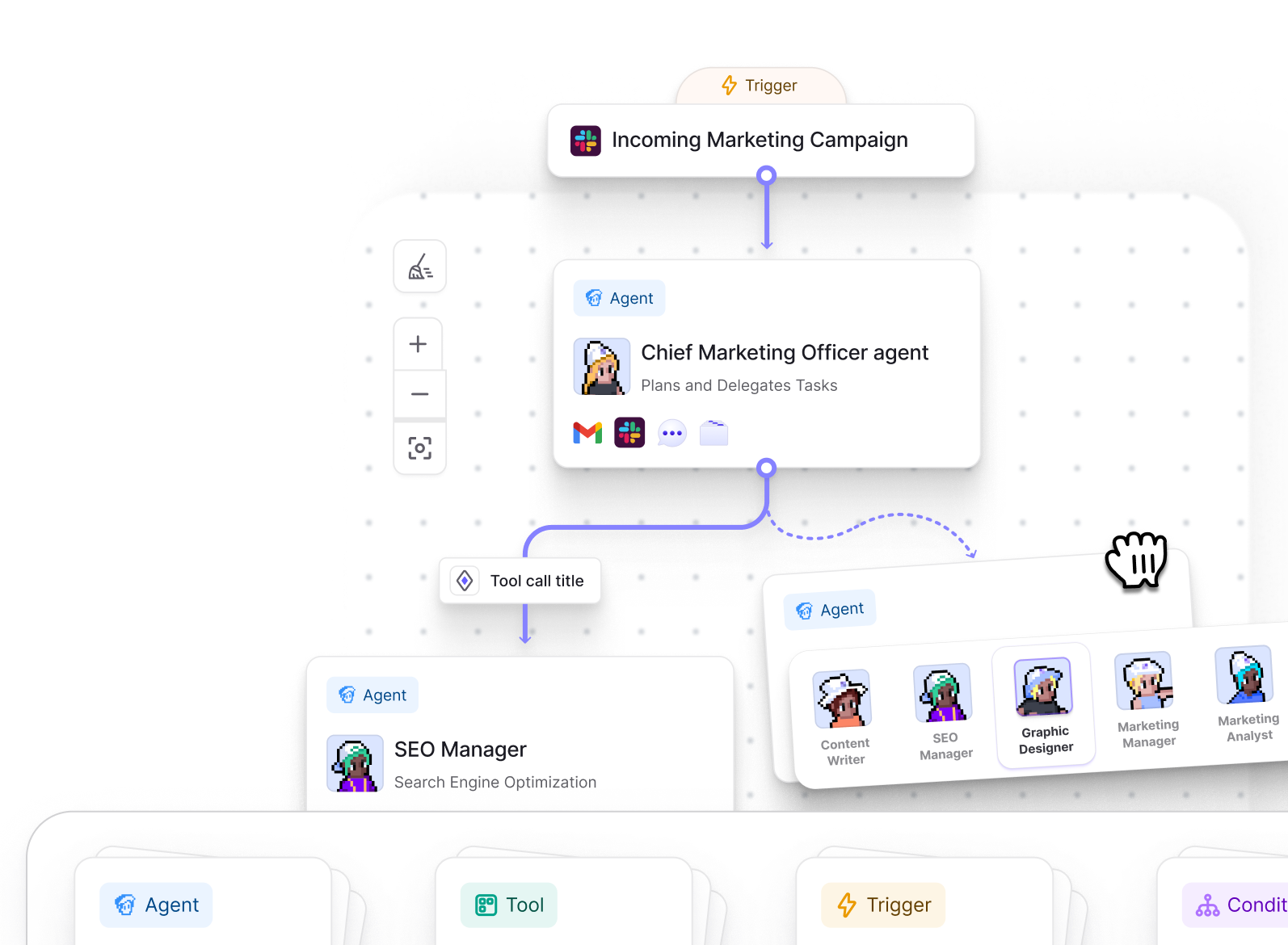
A Workforce can combine Agents with triggers, Tools, and conditions.
| Component | What it does |
|---|---|
| Trigger | Starts the Workforce manually, on a schedule, or after an event in an integrated app. |
| Agent | Handles a role that requires reasoning, judgment, or a specialist set of instructions and Tools. |
| Tool | Performs a specific action such as looking up CRM data, sending a message, calling an API, or processing information. |
| Condition | Creates branching logic so different paths can run depending on the input or result. |
Tools can connect directly to Agents and to other Tools. Use that to keep predictable work deterministic.
For example:
- Research Agent → CRM lookup Tool → Qualification Agent
- Agent → Generate document Tool → Upload document Tool
This keeps fixed actions visible and reserves Agent reasoning for the stages that actually need it.
AI connection vs next step: how handoffs work
Relevance AI gives you two main connection types.
| Connection | When to use it |
|---|---|
| AI connection | Use it when the source Agent needs to decide whether another Agent or Tool is relevant based on the context. |
| Next step | Use it when the next node should always run after the current one finishes. |
Use an AI connection for conditional delegation
With an AI connection, you describe when the source Agent should use the connection in natural language.
For example:
- Call the billing Agent when the customer asks about invoices, payments, refunds, or subscription charges.
- Call the technical specialist when the request requires product or engineering knowledge.
- Use the enrichment Tool when the incoming account is missing required company information.
Clear routing instructions make it easier for the Agent to decide when each specialist is needed.
Use a next step for fixed sequences
A next step always sends the workflow to the connected node.
Examples include:
- Research → Draft → Review
- Generate report → Upload report
- Process support request → Log result in CRM
Use a next step when the following stage should run every time.
Task behavior controls how context moves
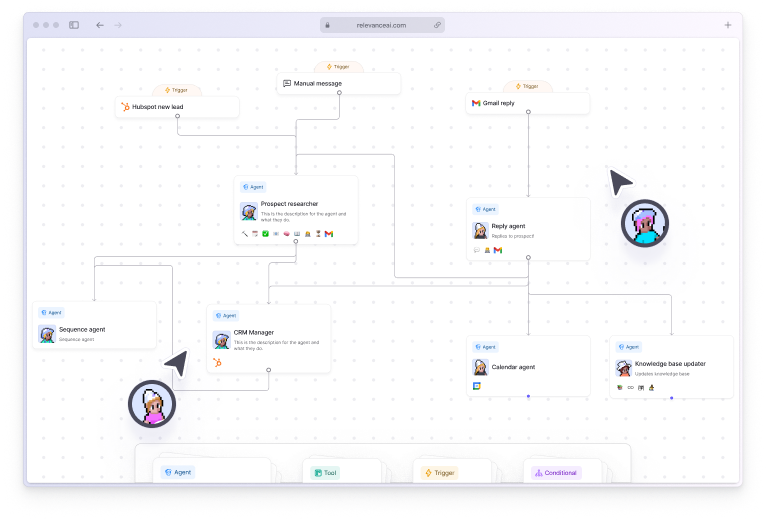
For supported connections, Relevance AI lets you choose between two task behaviors:
- Create a new task: the receiving Agent starts a separate task instance.
- Continue the same task: the receiving Agent continues within the existing task context.
Continuing the same task preserves conversation history, short-term memory, and task metadata. Creating a new task gives the receiving Agent a separate task instance.
Use the same task when several Agents need shared context. Create a new task when the specialist should handle its work separately.
Agent-to-Agent communication is currently one-way
Relevance AI Workforces currently support one-way Agent-to-Agent communication.
If Agent A sends work to Agent B:
- Agent A can send information, instructions, or a request to Agent B;
- Agent B receives the handoff and completes its part;
- Agent B cannot automatically reply to Agent A through that same connection.
Bidirectional Agent communication is not currently supported.
Design around clear directional handoffs when using Workforces. Workflows that require Agents to repeatedly question and respond to one another may need a different structure.
Test that communication pattern before building a large Workforce around it.
Human approvals let you control consequential actions
Each relevant connection can use one of three approval modes:
- Auto run: the Agent completes the action automatically.
- Approval required: the Agent prepares the action and waits for explicit human approval.
- Let agent decide: the Agent proceeds when it has enough context and confidence, but asks for approval or clarification when needed.
You can also set a maximum number of automatic runs as a guardrail.
Approval is useful before actions such as:
- sending an external email;
- changing important customer or CRM data;
- making a purchase or committing resources;
- taking an action with customer or business impact;
- or running a new workflow your team is still validating.
The Workforce Task View lets reviewers inspect pending approval requests, review the proposed action, approve or reject it, provide additional guidance, and see approval history.
When should you use a Workforce instead of one Agent?
| Use one Agent when… | Use a Workforce when… |
|---|---|
| The task has one clear objective. | The process has several distinct responsibilities. |
| A small set of Tools is enough. | Different specialists need different Tools or instructions. |
| There is little meaningful delegation. | Routing and handoffs are part of the job. |
| One approval policy works for the whole task. | Different stages need different approval rules. |
| The output can be tested as one unit. | You need to inspect and improve different stages separately. |
Use additional Agents only when separating responsibilities makes the workflow clearer or more reliable.
Every Agent and handoff adds another instruction set, usage path, and potential failure point.
Relevance AI Workforce pros and tradeoffs
What Workforces do well
- Give specialist Agents clearly separated responsibilities.
- Make multi-step processes visible on one canvas.
- Mix AI reasoning with deterministic Tool chains.
- Support conditional routing and fixed sequences.
- Put approval rules around individual handoffs and actions.
- Let specialist Agents be reused across different Workforces.
Tradeoffs to know
- Agent-to-Agent communication is currently one-way.
- Each additional node and handoff increases workflow complexity.
- AI-directed routing depends on clear instructions.
- Reused Agents are shared components, so edits can affect every Workforce using that Agent.
- Additional Tool calls and Agent work can increase Action and Vendor Credit usage.
How to build a reliable Relevance AI Workforce
- Define the final outcome. Use a concrete result such as “research an inbound lead, qualify it, and prepare a CRM-ready summary.”
- Map the process before opening the builder. Identify the trigger, responsibilities, decisions, exceptions, approvals, and final destination.
- Give each Agent one main role. Separate research, qualification, writing, review, and other responsibilities when specialization helps.
- Keep fixed work deterministic. Use next steps, Tool chains, and conditions when you already know what should happen.
- Add AI connections where judgment matters. Write clear delegation instructions and test the edge cases.
- Add approval rules before deployment. Decide which actions can run automatically and which need a person.
- Test each Agent and Tool separately. Confirm the components work before debugging the complete Workforce.
- Test unusual inputs and failures. Include missing data, Tool errors, uncertain cases, and situations that should trigger approval.
- Review real runs. Use Task View to see which Agent handled each step, what it received, where it delegated, and where the workflow stopped.
When you edit an existing Agent from inside the Workforce Builder, you are editing the shared Agent itself. Relevance AI does not currently provide Workforce-specific versions of an Agent’s settings.
If the same Agent appears in several Workforces, changes to that Agent can affect all of them.
Video walkthrough: Relevance AI has an official step-by-step Workforce tutorial that shows Agents being added and connected on the visual canvas.
How much do Relevance AI Workforces cost?
Current Workforce availability depends on your Relevance AI plan.
| Plan | Current Workforce allowance |
|---|---|
| Free | 1 Workforce, 200 Actions/month, and 1,000 one-time Vendor Credits. |
| Pro | Unlimited Workforces, 2,500 Actions/month, and 10,000 Vendor Credits/month. |
| Team | Unlimited Workforces, 7,000 Actions/month, and 35,000 Vendor Credits/month. |
| Enterprise | Unlimited Workforces with custom Actions, Vendor Credits, users, projects, and enterprise controls. |
Your running cost also depends on what the Workforce does:
- Actions count Tool runs.
- Vendor Credits cover AI model and eligible Tool costs.
A Workforce with more Tool calls, Agent work, retries, or expensive model usage can consume more of both.
See our Relevance AI Actions and Vendor Credits guide for the usage model, or the Relevance AI pricing guide for the full plan comparison.
Are Relevance AI Workforces worth using?
Frequently Asked Questions About Relevance AI Workforces
How many Agents can you add to a Relevance AI Workforce?
Relevance AI currently says there is no hard limit on the number of Agents in a Workforce. It recommends keeping roles clearly defined and avoiding unnecessary complexity.
Can Relevance AI Agents communicate with each other?
Yes, but communication is currently one-way. A source Agent can send information or work to a target Agent, but the target Agent cannot automatically send a response back through the same connection. Bidirectional Agent communication is not currently supported.
What is the difference between an AI connection and a next step?
An AI connection lets the source Agent decide whether the connected Agent or Tool should be used based on context and your instructions. A next step is mandatory and always moves the workflow to the connected node.
Can you require human approval inside a Workforce?
Yes. Relevant connections can use Auto run, Approval required, or Let agent decide. You can also set maximum automatic runs as a guardrail, while approval requests can be reviewed through Workforce Task View.
Can the same Agent be used in several Workforces?
Yes. Relevance AI allows the same Agent to participate in multiple Workforces. Changes to a shared Agent affect that Agent everywhere it is used.