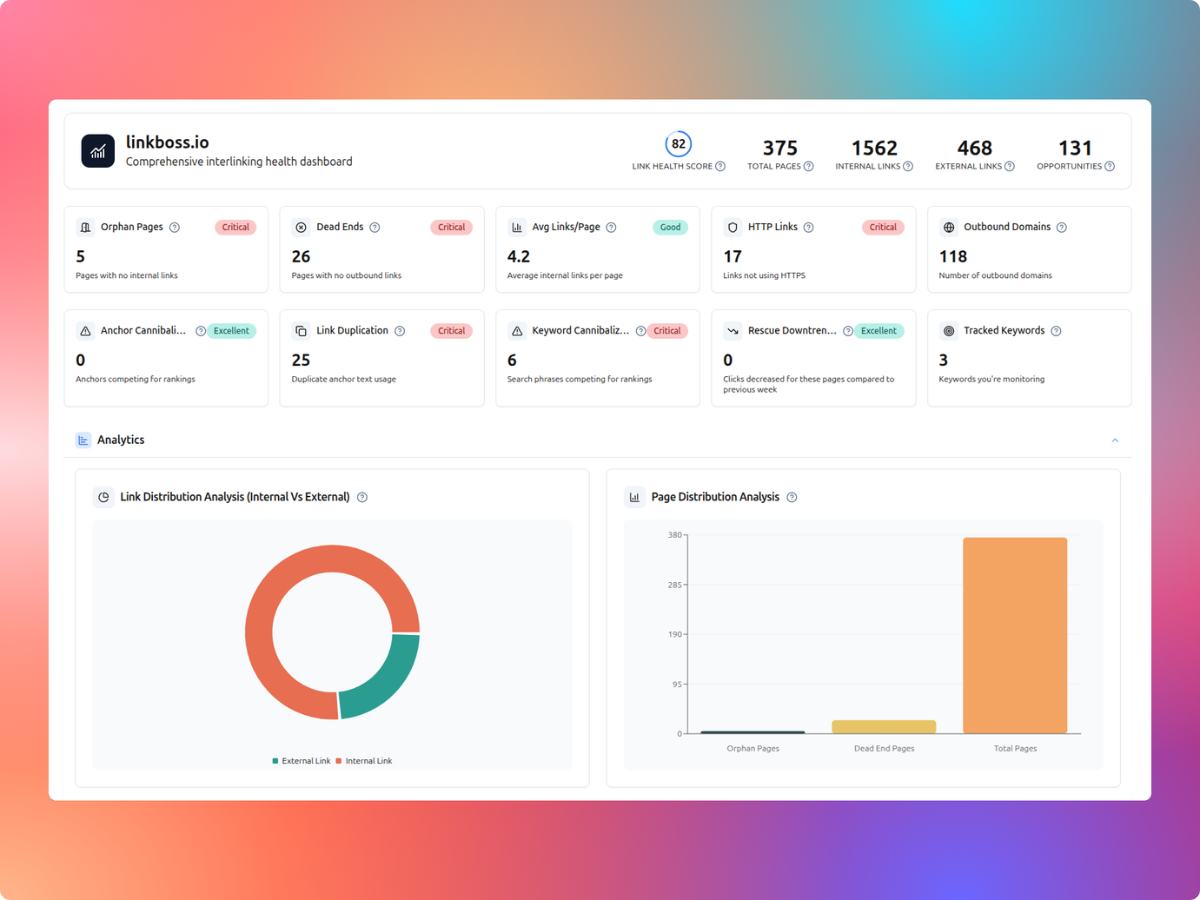
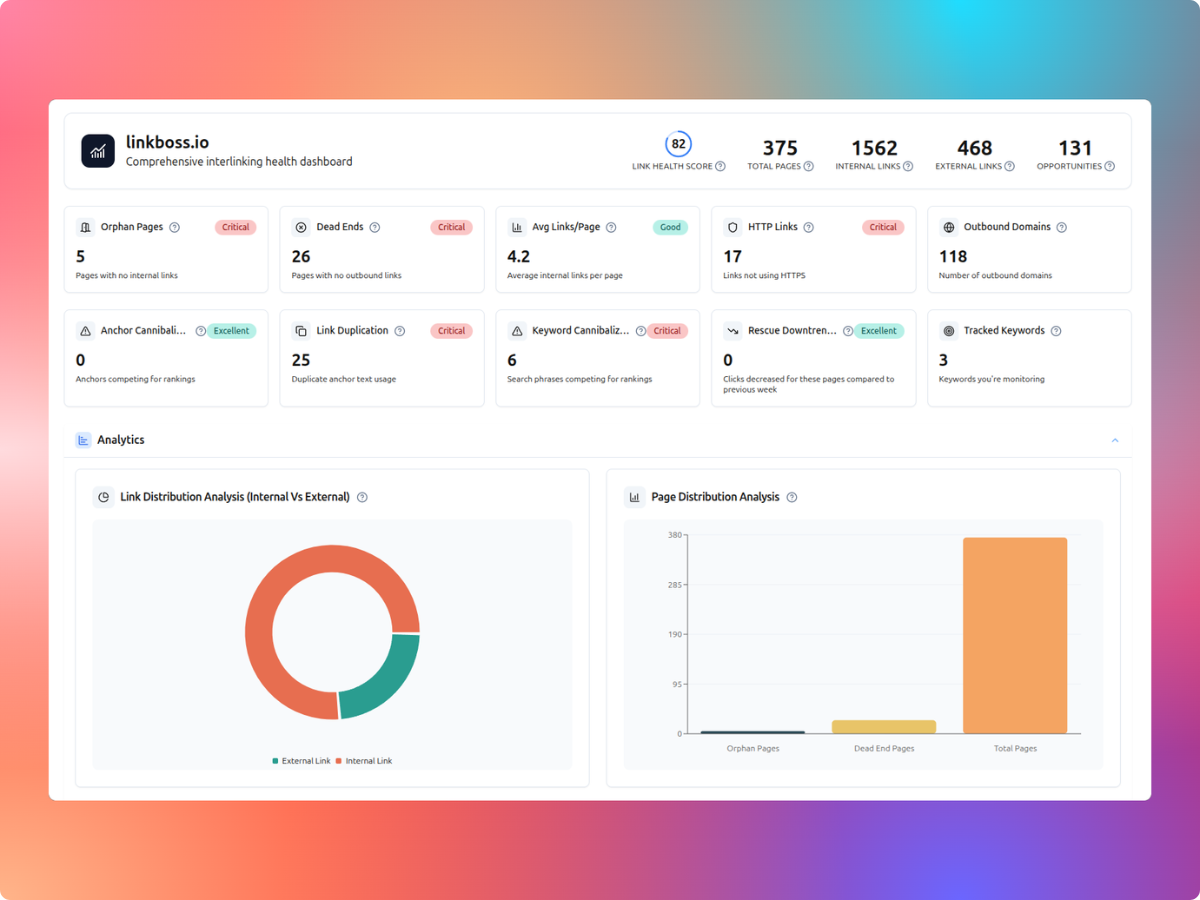
LinkBoss uses Google Search Console data alongside its internal-link reports to help identify pages worth revisiting. Its dashboard advertises search queries, impressions, clicks, click-through rates, average positions, newly discovered keywords and declining pages. You can compare that search-performance context with orphan-page and internal-link data before deciding what to update.
Start with pages that have a real audience and a useful next destination. A page with declining clicks does not automatically have an internal-link problem, and a high-impression query with few clicks may need a better answer, title or snippet rather than another link.
Which LinkBoss reports help prioritize internal links?
| Report or signal | Question it helps answer |
|---|---|
| Search queries | What are people searching for when your site appears? |
| Impressions and clicks | Which topics appear in results, and which attract visits? |
| CTR and average position | Are query results getting clicked, and where do they tend to appear? |
| New and declining keywords | Which search topics are gaining or losing visibility? |
| Links Report | Which posts have few incoming or outgoing internal links? |
| Orphan and dead-end audits | Which useful pages lack an inbound or outbound connection? |
| Anchor Manager | Are similar phrases pointing to competing destinations? |
LinkBoss lists these analytics and health features on its official website and Link Health Monitor page. Its separate Links Report documentation explains source and target link counts and filtering.
Connect the right Search Console property
LinkBoss promotes an integration with Google Search Console for query and page performance data. Before connecting, make sure you have access to the verified property covering the actual site you want to analyze.
- Verify the website in Google Search Console if it is not already available in your account.
- Connect the correct WordPress website to LinkBoss and finish its site-content synchronization.
- Find the Google Search Console connection in the LinkBoss account integration or analytics setup and authorize access to the right property.
- Review the imported reporting dates and compare a sample of figures with Search Console itself.
- Keep the original Google Search Console report available when making decisions; the LinkBoss dashboard is a second analysis layer.
Exact connection labels may change as LinkBoss updates its interface. Do not paste Google login credentials into an unrelated settings field. Use the provider’s normal authorization process.
Read the Search Console numbers correctly
Google defines an impression as an appearance in eligible search results, a click as a qualifying visit from the result, and CTR as clicks divided by impressions. Its average position metric is an average of result positions, not a fixed ranking occupied every day.
These definitions are explained in Google’s original Search Console documentation. Search results and reporting can differ by query, location, device, search appearance and selected date range. The newest data may also be incomplete.
Example: high impressions but a low click-through rate
- Illustrative impressions: 10,000 during the selected reporting period.
- Illustrative clicks: 100.
- Calculated CTR: 100 ÷ 10,000 × 100 = 1%.
- What to investigate: query intent, title and description, page position and whether competing results answer the question more directly.
- Internal-link action: add a relevant route to that page only if it is useful and underlinked. Low CTR alone does not justify automated insertion.
Find useful pages that have weak internal visibility
One of the more actionable combinations is a valuable page that has some proven search interest but very few incoming internal links. LinkBoss’s audit highlights orphan pages and its Links Report shows inbound and outbound link counts.
- Start with a query or page that reflects an important topic for your readers.
- Check whether the content is accurate, current and meaningfully answers that topic.
- Open the site’s Links Report to see how many internal links point to the page.
- Find genuinely related donor pages that can introduce the resource naturally.
- Review the proposed anchor and surrounding sentence before creating any link.
Our LinkBoss orphan-page guide explains how its separate one-click workflow selects donor pages and lets you approve suggested pairs.
Use the Links Report to examine the actual link network
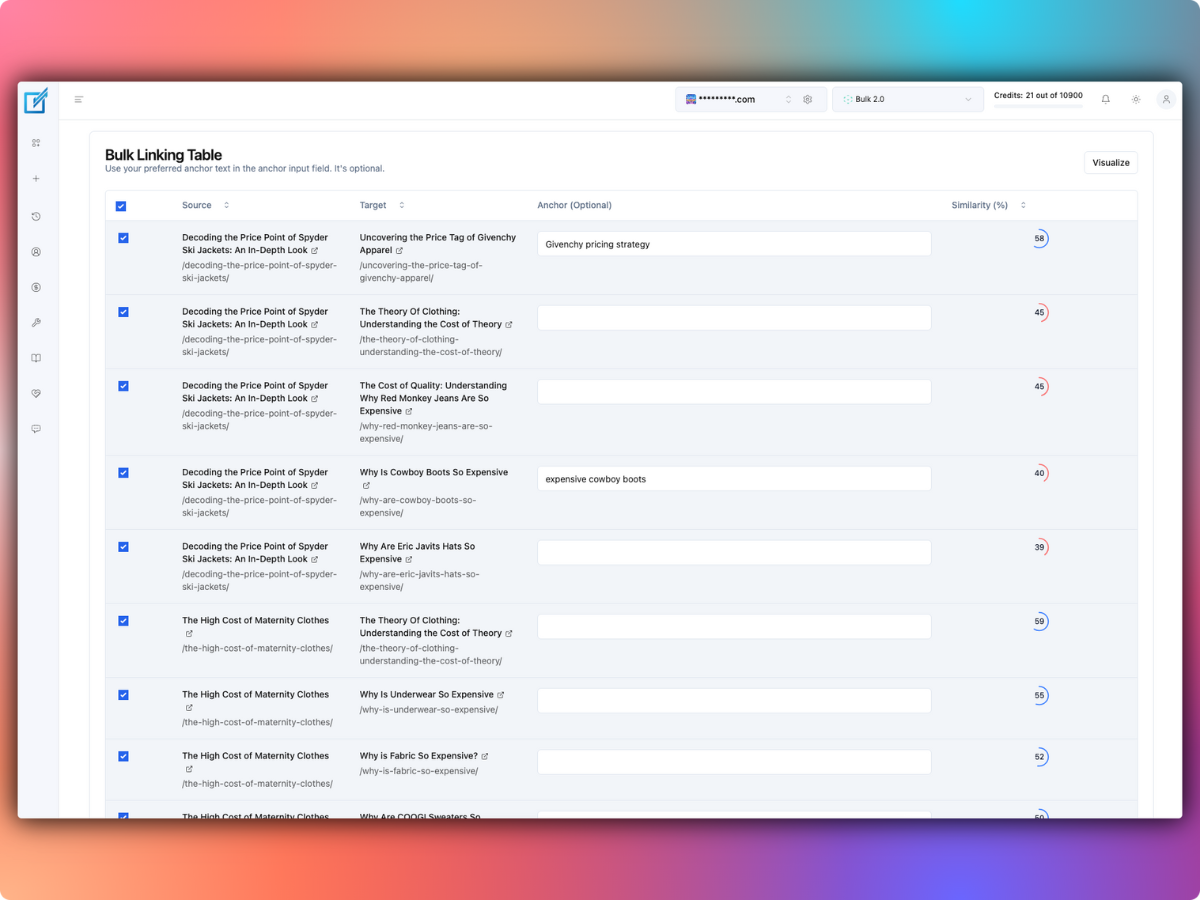
LinkBoss’s Links Report guide describes filtering posts by incoming or outgoing link counts. You can expand a row to inspect linked URLs and anchors, adjust minimum or maximum link-count filters, and send selected URLs into a bulk linking workflow.
For a first audit, sort your most important content by low inbound link counts. Investigate whether each page has suitable related sources. A page may correctly receive only a few links if it covers a narrow topic; link count itself is not a quality score.
Investigate declining pages without assuming links are the cause
LinkBoss advertises week-over-week keyword movements and downtrending page alerts. Those can help you assemble a shortlist for review, but search declines have many possible causes.
- Seasonality: the audience may search for the topic less often during the comparison period.
- Outdated content: product pricing, screenshots or factual details may no longer answer the current query.
- Search layout changes: featured results, AI features or different result types may affect clicks.
- Query or page migration: several URLs may now answer the same question, or a canonical URL may have changed.
- Weak discovery: the page may be valuable but poorly connected to relevant articles in your site.
Use Google’s Performance report to compare periods and examine page and query dimensions. Correct the underlying problem before running automatic link insertion. A link added to an outdated page won’t fix incorrect content.
Check keyword cannibalization and ambiguous anchors
LinkBoss also promotes cannibalization reports and Anchor Manager analysis. When two URLs appear for similar queries, inspect whether they serve distinct intents or unnecessarily duplicate the same answer. A similar keyword on two pages does not automatically prove a harmful conflict.
If two pages genuinely answer different questions, keep them distinct and make their anchors descriptive. For example, “how to generate image alt text” should lead to a practical workflow, while “best image alt-text generators” should lead to a comparison of products.
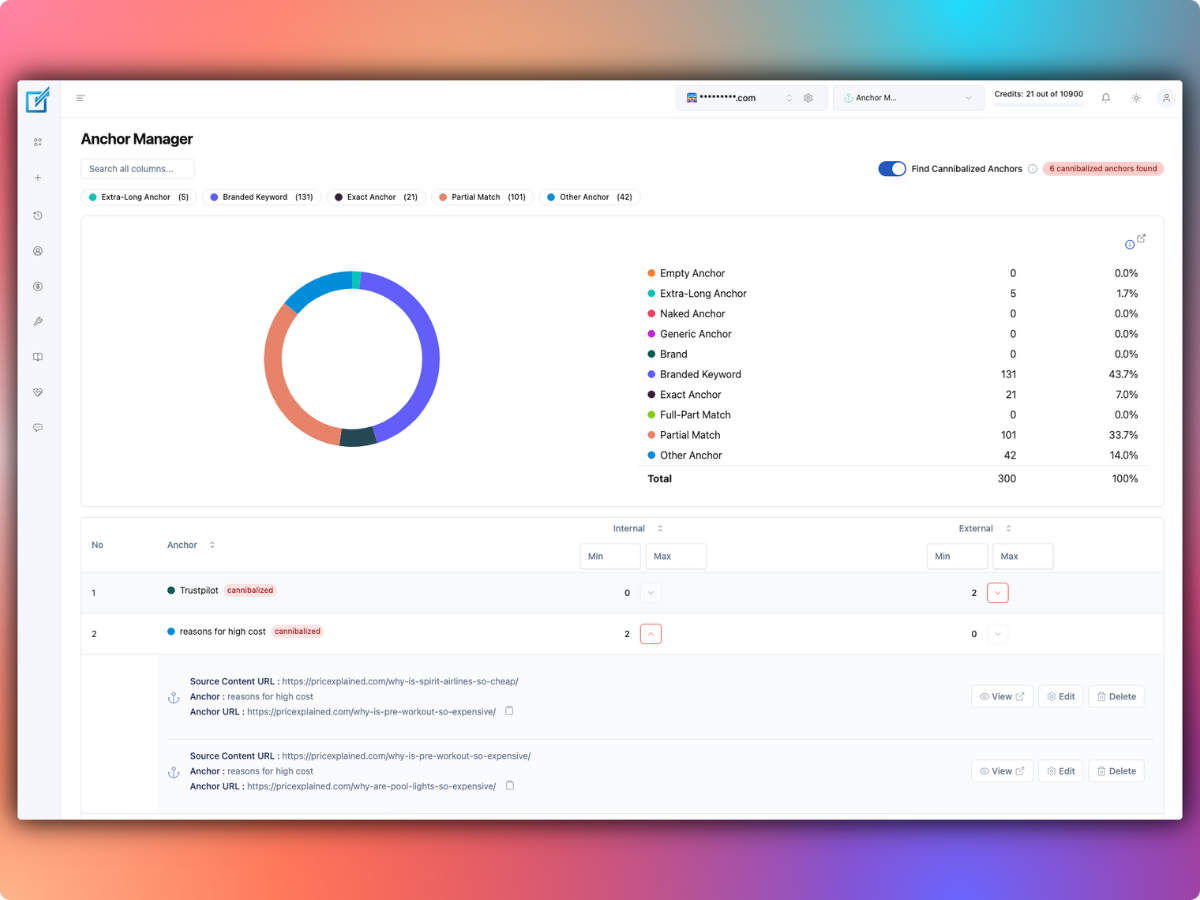
See our Anchor Manager guide for the difference between repetitive anchors and actual content overlap.
A practical weekly link-prioritization routine
For a site publishing several posts each week, a short recurring process is more useful than blindly generating links on every page.
- Review changes: compare Search Console clicks and impressions with a suitable previous period, then shortlist meaningful changes.
- Find candidates: prioritize important pages with weak internal links, newly published guides or current content with clear relevance to other pages.
- Exclude poor destinations: don’t promote outdated, duplicate, redirected or inaccurate content.
- Choose donors: find source pages where a link genuinely answers the reader’s next question.
- Approve a small batch: inspect the actual anchor and target before publishing.
- Measure carefully: record the changes and revisit them later, while recognizing that search results can move for unrelated reasons.
Document the number of pages updated, the dates, the exact destinations and any editorial changes. That record is more actionable than claiming every increase in traffic came from new internal links.
Do analytics and internal-link insertion have the same cost?
LinkBoss advertises free site-health analysis and several reporting features, including Google Search Console-based insights. Creating links is a different operation and may consume credits.
Its standard Launch subscription is listed at $11/month for one site and 200 insertion credits. The vendor describes one credit for an existing-sentence link and two when it generates new context. If 30 planned links use existing phrases and 10 need fresh context, the estimated bill is 30 + (10 × 2) = 50 credits. That is a hypothetical credit estimate, not a prediction of how many suggestions the product will generate.
See our LinkBoss pricing guide for plans and site limits. Confirm the exact current allowance, including monthly expiration, in LinkBoss’s official pricing and FAQ.
Should you use LinkBoss’s GSC reporting?
It’s worth considering when your team spends too much time moving between search-performance reports and internal-link audits. LinkBoss’s value proposition is connecting the two views, so you can prioritize a worthwhile page and then inspect possible link donors in the same workflow.
Google Search Console should still be the reference for its own metrics, and the final decision about anchors belongs to an editor. I would start with the free analytics and site-health reports before purchasing credits for a larger internal-link cleanup.
Explore LinkBoss’s free analytics and site audit.
LinkBoss search analytics FAQs
Does adding internal links guarantee a ranking increase?
No. Relevant links can improve navigation and discovery, but many other factors affect search visibility. Track the change without claiming causation from one before-and-after chart.
Is a page with low CTR always underlinked?
No. CTR concerns clicks from impressions in search results. It can reflect search intent, ranking position or the appearance of the result, not the number of links pointing at the page.
Can I use LinkBoss reports without buying link credits?
LinkBoss advertises free site-health reports and GSC-powered analysis. Insertion uses credits. Confirm any feature-specific limits in your current account.