EmailOctopus Pricing 2026: Starter vs Pro, Costs, and Limits
Contents
EmailOctopus pricing starts at $0 for up to 2,500 subscribers and 10,000 emails per month. When you outgrow the free Starter plan, Pro starts at $10 per month on monthly billing or $9 per month when billed annually.
The plan structure itself is simple. There are only two regular EmailOctopus plans:
- Starter: free forever, with limits on subscribers, sends, automations, forms, reports, users, tags, and fields.
- Pro: one paid plan whose price scales with the number of subscribed contacts you store and the number of emails you need to send.
That last part matters. EmailOctopus does not have one universal price for every 5,000-, 10,000-, or 50,000-subscriber account. Your Pro quote depends on both your subscriber allowance and your monthly email allowance, so the live pricing calculator is the safest place to check the exact cost for your list.
EmailOctopus pricing at a glance
| Plan | Price | Key limit |
|---|---|---|
| Starter | Free | 2,500 subscribers / 10,000 emails monthly |
| Pro monthly | From $10/month | Price scales with subscribers and sends |
| Pro annual | From $9/month | 12 months paid upfront |
There is no separate free trial. Starter is the test account: it remains free as long as you stay within its limits.
For the broader product verdict, see our EmailOctopus review.
How EmailOctopus pricing actually works
EmailOctopus prices Pro around two numbers:
- Subscribers: the maximum number of subscribed contacts stored across your lists.
- Emails: the maximum number of individual email messages you can send during the month.
Your subscriber quota normally determines your tier. If the email volume you need is higher than the sending allowance attached to that tier, you can choose a larger sending quota too.
This is why a static pricing table can be misleading. Two businesses with the same number of subscribers may pay different amounts if one sends a weekly newsletter and the other emails its audience several times a week.
The live EmailOctopus pricing calculator lets you adjust both numbers before you upgrade.
EmailOctopus Starter: what you get for free
Starter is more useful than a conventional software trial because it does not expire.
The free plan supports:
- 2,500 subscribed contacts;
- 10,000 emails per month;
- 100+ email templates;
- drag-and-drop and HTML email editing;
- up to three automations;
- up to five steps per automation, excluding the trigger;
- one landing page;
- one sign-up form;
- one user;
- 10 fields per list, including the default fields;
- 10 tags per list;
- and campaign reports accessible for 30 days.
Starter emails include EmailOctopus branding. You also get live-chat support during the first 30 days after signing up.
There is no credit-card requirement for the free plan.
Who should stay on Starter?
Starter makes sense if:
- your list is comfortably below 2,500 subscribers;
- 10,000 monthly sends cover your normal publishing schedule;
- you only need a few short automations;
- one form and one landing page are enough;
- one person manages the account;
- and EmailOctopus branding does not bother you.
A weekly newsletter to 2,000 subscribers, for example, would use roughly 8,000 sends in a four-week month and still fit inside Starter.
A twice-weekly newsletter to the same audience would need roughly 16,000 sends and would exceed the free monthly email allowance.
EmailOctopus Pro: what you pay for
Pro begins at $10 per month with monthly billing or $9 per month with annual billing.
The paid plan removes or expands several of Starter’s practical limits:
| Feature | What Pro changes |
|---|---|
| EmailOctopus branding | Removed |
| Reports | Available indefinitely |
| Forms | Unlimited |
| Landing pages | Unlimited |
| Users | Unlimited |
| Fields | Up to 50 per list |
| Tags | Up to 50 per list |
| Automation triggers | Up to three triggers in one automation |
| Subscriber profile page | Available |
| Live chat | Ongoing priority access |
The reason to upgrade is therefore not just list size. A smaller organisation may still need Pro for team access, more forms, longer report history, larger contact-data structures, cleaner branding, or more capable automations.
Monthly vs annual EmailOctopus pricing
EmailOctopus gives Pro customers two billing options:
- Monthly: starts at $10 per month and renews each month.
- Annual: starts at the equivalent of $9 per month, saving 10%, with 12 months charged upfront.
The 10% annual discount comes with one important tradeoff that is easy to miss: annual plans are less flexible when your list gets smaller.
If your subscriber count grows, EmailOctopus can upgrade an annual plan during the year and prorate the additional charge for the months remaining in your term.
If your subscriber count falls and you want a cheaper tier, an annual downgrade does not take effect mid-year. It applies when the annual billing period ends.
So I would choose:
- Monthly billing if your list size or sending requirements are still changing substantially.
- Annual billing if your usage is reasonably predictable and you expect to keep EmailOctopus for the full year.
What happens when you exceed your EmailOctopus plan?
Subscriber overages and sending overages work differently.
If you exceed your subscriber allowance
EmailOctopus automatically moves your account to an appropriate higher tier.
You are charged the difference between the old and new tiers immediately. On annual plans, that difference is prorated across the current month and the remaining months in your yearly term.
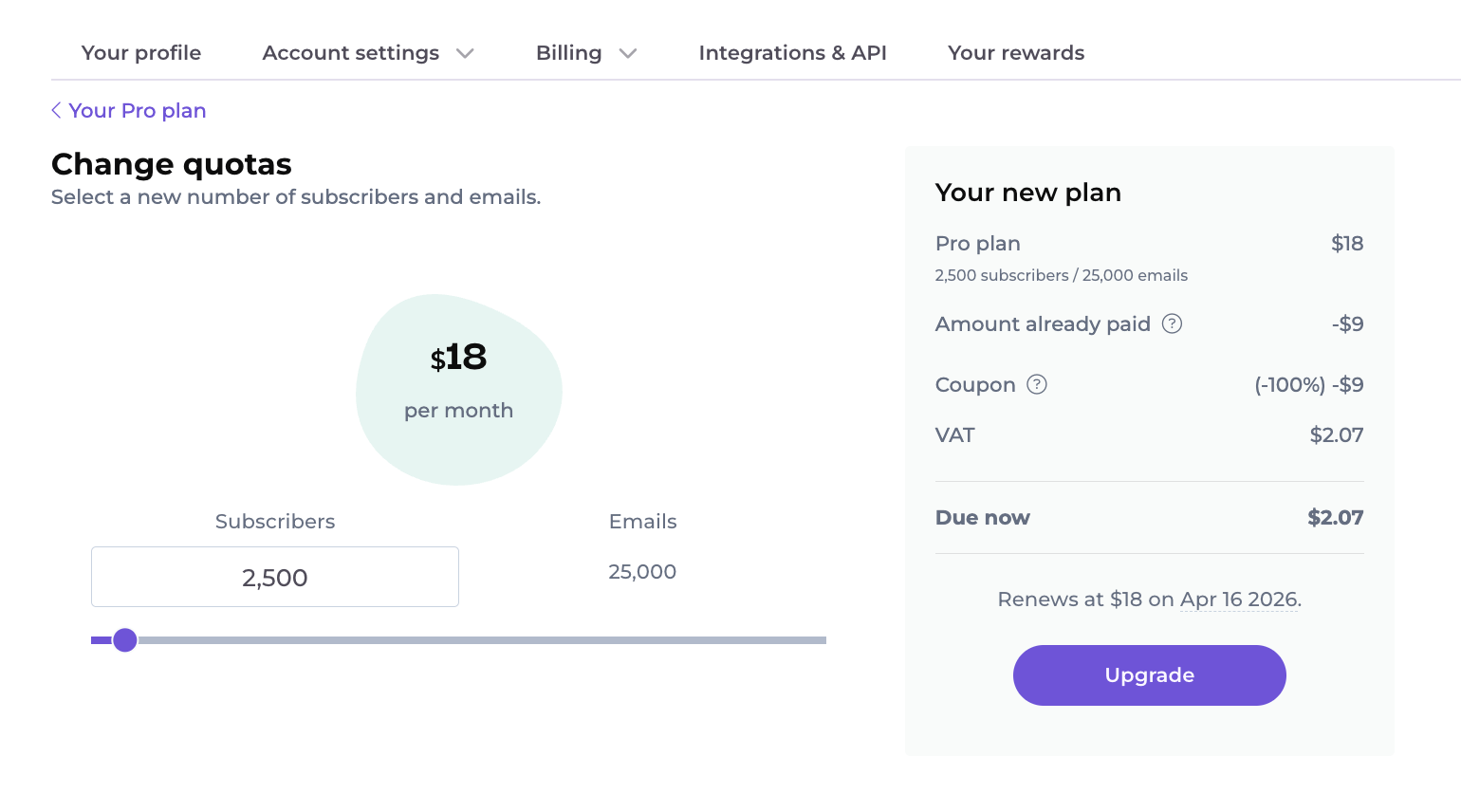
If you need more monthly email sends
EmailOctopus does not automatically increase your sending allowance in the same way. You can manually change your quota to a tier that supports the volume you need.
This distinction matters if you send unusually frequently. Your list may fit comfortably inside one subscriber tier while your campaign volume pushes you into a more expensive sending allowance.
Which contacts count toward EmailOctopus billing?
EmailOctopus charges for subscribed contacts.
These contacts count:
- active subscribed contacts;
- and the same subscribed contact again if that address is stored on another separate list.
These contacts do not count:
- unsubscribed contacts;
- hard bounces, which EmailOctopus automatically unsubscribes;
- complaints, which are also automatically unsubscribed;
- and pending double-opt-in contacts who have not confirmed their subscription.
The duplicate-list rule can increase your bill
EmailOctopus lists are independent.
If one person appears on six different lists, EmailOctopus counts that address as six subscribers for billing purposes.
This makes list architecture surprisingly important to pricing.
If your audiences overlap, EmailOctopus recommends keeping them on one main list and using tags, fields, and segments to organise them.
Separate lists make more sense when they genuinely represent independent audiences, such as different brands with little or no subscriber overlap.
EmailOctopus can automatically lower your price too
EmailOctopus has an Optimise plan pricing setting for downgrades.
When enabled, the system can move you to a smaller eligible tier after your subscribed-contact count falls.
- Monthly plan: the downgrade takes effect at the next monthly billing period.
- Annual plan: the downgrade takes effect at the next annual billing period.
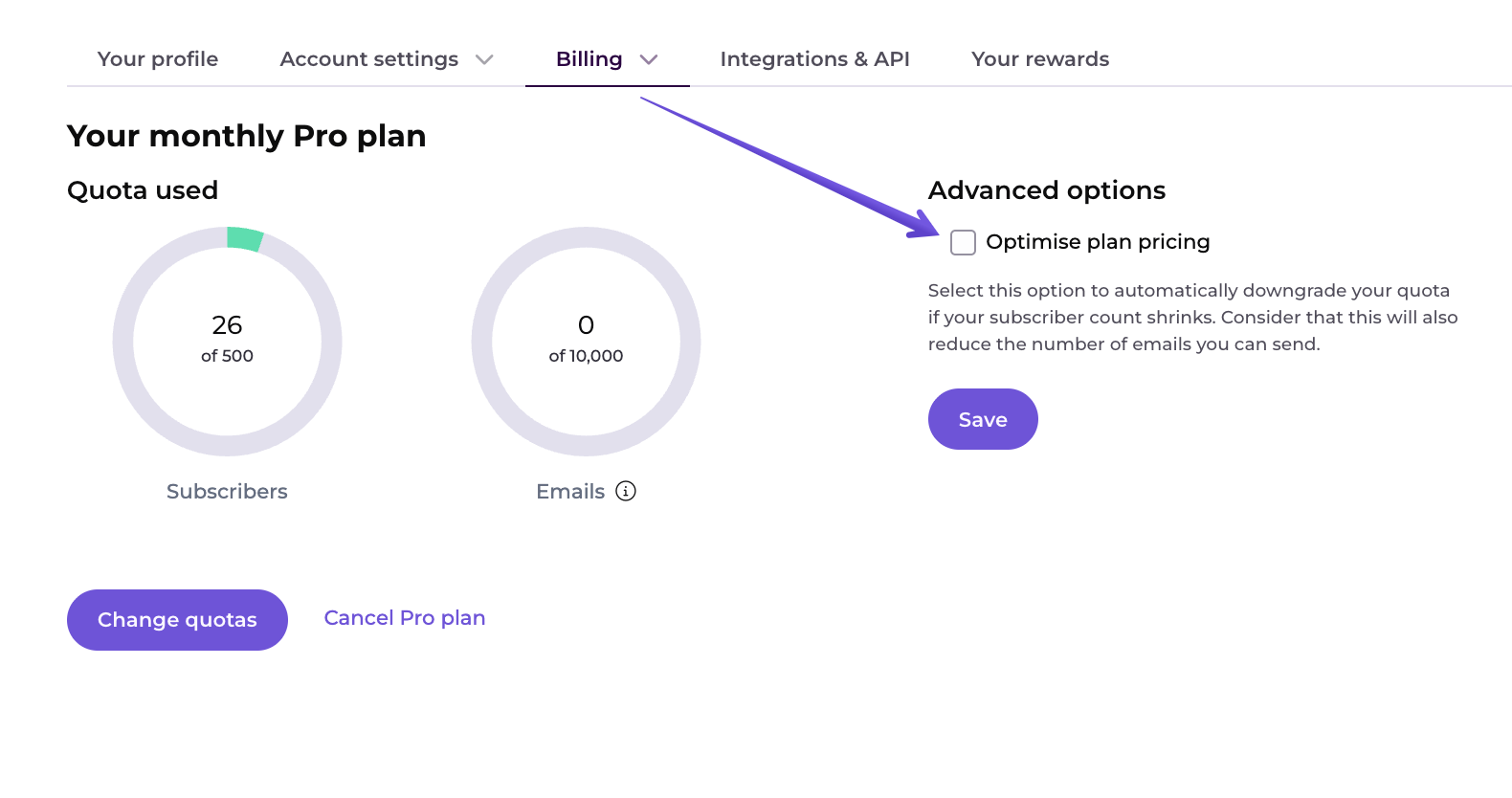
You can also request a smaller eligible quota manually. The change then applies at your next billing date.
EmailOctopus discounts
There are several ways the effective price can be lower than the standard Pro rate.
10% annual billing discount
Choosing annual billing gives you a 10% discount compared with paying month to month.
20% nonprofit discount
Registered charities and nonprofits can request a 20% lifetime discount from EmailOctopus.
You need to contact the company with details of your organisation to request it.
Review credit
EmailOctopus also currently offers a one-time 25% invoice discount, capped at $50, for customers who publish a new review on one of its specified review platforms and submit proof.
The credit applies to the next month’s invoice and is calculated against the base monthly price of the account’s current tier.
Referral credits
EmailOctopus customers also have a referral program. In a USD account, each new paying customer referred through the account’s unique link currently generates a $15 credit toward future invoices.
The referred customer receives $15 off their first paid month too.
EmailOctopus Connect pricing
EmailOctopus Connect is a separate version of the platform for people who want EmailOctopus to send through their own Amazon SES account.
Its pricing is slightly different:
- Connect Starter: free for up to 2,500 subscribers, with unlimited sends from the EmailOctopus side.
- Connect Pro: starts at $8 per month when billed annually.
- Amazon SES: charged separately by AWS for the underlying email delivery.
“Unlimited emails” on Connect therefore does not mean email delivery has zero cost. It means EmailOctopus itself does not apply a monthly sending quota. Amazon still bills the SES account according to the AWS pricing arrangement attached to it.
AWS introduced new SES pricing plans in July 2026, so I would check the current SES pricing separately before choosing Connect instead of regular EmailOctopus.
Can you cancel or downgrade EmailOctopus?
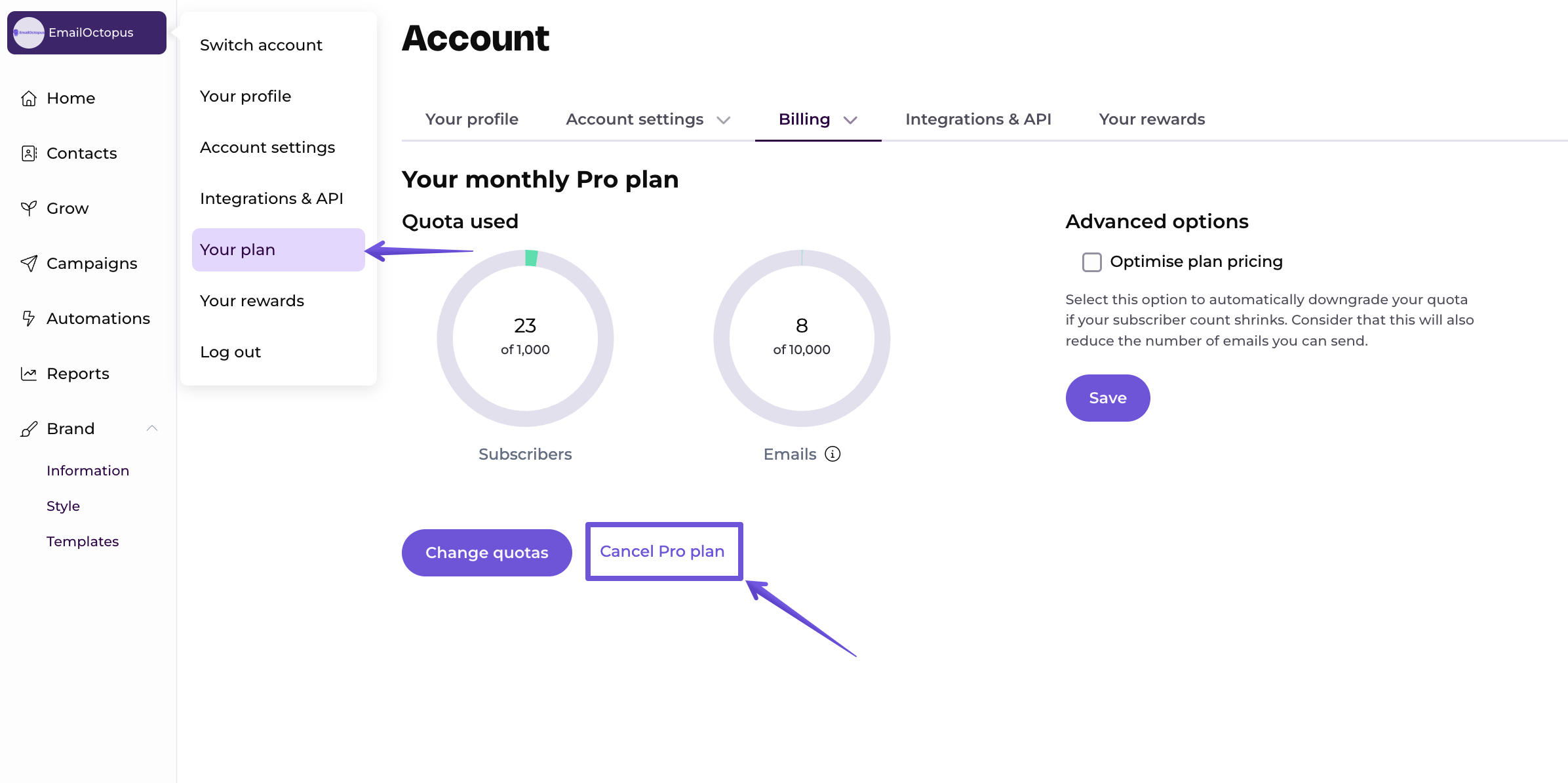
Yes. You can cancel Pro from the Billing section of your account.
Once the paid subscription expires, the account falls back to Starter limitations.
If you have more than 2,500 contacts at that point:
- your contacts are not immediately deleted;
- you cannot send campaigns while the account remains above the Starter limit;
- your automations are paused;
- reports older than 30 days become unavailable;
- and paid account features are restricted.
If you upgrade again later, older reports become accessible again.
EmailOctopus says completely inactive free accounts can be deleted after one year, so log in periodically if you downgrade and intend to keep the account.
Payment methods, currency, and taxes
EmailOctopus charges subscriptions in US dollars.
Its current payment provider accepts:
- Visa;
- Mastercard;
- American Express;
- Discover;
- JCB;
- China UnionPay;
- several other supported card networks;
- and PayPal.
The prices shown on the site do not universally include tax. VAT or other applicable taxes may be added based on your location and whether the account is registered as a business or consumer.
What if you have more than 500,000 subscribers?
EmailOctopus directs accounts with more than 500,000 subscribers to contact its team for custom pricing.
At that size, I would also compare the sending quota, support requirements, deliverability setup, integrations, and migration requirements instead of judging the decision on the headline monthly price alone.
Which EmailOctopus plan should you choose?
- Choose Starter if you have fewer than 2,500 subscribers, send fewer than 10,000 emails per month, and can live with the free-plan limits.
- Choose Pro monthly if you need the paid features but expect your list size or sending volume to change substantially over the next few months.
- Choose Pro annual if your usage is reasonably predictable and the 10% discount is worth paying for a full year upfront.
- Choose EmailOctopus Connect if you specifically want to use your own Amazon SES account and are comfortable managing the additional AWS setup and billing.
- Ask for nonprofit pricing before paying if your organisation qualifies for the 20% lifetime discount.
Frequently asked questions about EmailOctopus pricing
Can I pay for EmailOctopus with PayPal?
Yes. EmailOctopus’s current payment provider supports PayPal as well as major debit and credit card networks. EmailOctopus charges subscriptions in US dollars.
Does EmailOctopus charge VAT?
It can. The prices displayed on the website do not universally include VAT, but applicable taxes may be added according to your location and whether you are buying as a business or consumer. Eligible businesses can provide their tax details during billing.
What happens to my old reports if I downgrade to Starter?
Reports older than 30 days become unavailable while you are on Starter. EmailOctopus says the data is not immediately deleted, and those older reports become accessible again if you upgrade back to Pro.
Does EmailOctopus offer custom pricing?
Yes. EmailOctopus asks customers with more than 500,000 subscribers to contact the company for a custom quote.
Will EmailOctopus delete my contacts if I cancel Pro?
No. If you fall back to Starter with more than 2,500 contacts, the contacts remain in the account, but you cannot send campaigns while you exceed the free-plan subscriber limit. EmailOctopus can delete completely inactive free accounts after one year, so you should continue logging in if you intend to keep the account.