Relevance AI is a good fit for sales teams that want to automate research, qualification, CRM work, scheduling, and follow-up without forcing the entire sales process into one rigid workflow. Its strongest use case is repeatable work around the customer conversation, especially when an agent needs to pull context from several systems, make a judgment, and then hand the result to a rep.
It is less useful when the process itself is unclear, your source data is unreliable, or the real requirement is simply a fixed sequence of app-to-app actions. In those cases, a normal automation platform may be easier to maintain.
Key takeaways
- Useful sales workflows include inbound lead qualification, account research, contact research, personalized outreach, meeting scheduling, post-call actions, CRM updates, deal review, and forecasting.
- Relevance AI can trigger agents from CRM events and let them read or update systems such as HubSpot and Salesforce.
- Start with one narrow sales job before building a multi-agent Workforce.
- Keep human approval around external messages, pricing, negotiation, sensitive CRM changes, and other high-impact actions until the workflow is proven.
- Relevance AI’s own customer stories show the platform being used in production sales motions, but those results should be treated as first-party case-study evidence rather than a guarantee of similar outcomes.
- Your real cost depends on Tool runs, model usage, retries, and how many agents or systems are involved in one completed sales task.
Disclosure: Toolfountain may earn a commission if you buy through some links, at no extra cost to you.
Explore Relevance AI for sales
Where Relevance AI fits in a sales team
The best jobs for a sales agent usually have a clear trigger, a repeatable process, and an output a rep can judge quickly.
Good fit | Poor first use case |
Research a new account from approved sources | Negotiate contract terms autonomously |
Enrich and qualify an inbound lead | Make pricing exceptions without review |
Prepare a rep before a meeting | Own an undefined sales process end to end |
Draft follow-up and proposed CRM updates | Overwrite critical CRM fields without checks |
Route a qualified opportunity to the right rep | Make high-stakes judgment with poor source data |
Relevance AI’s current sales page presents agents for research and enrichment, pre-meeting preparation, post-call actions, meeting scheduling, outbound prospecting, forecast roll-up, deal review, and proposal building.
1. Inbound lead qualification and routing
This is one of the clearest sales workflows Relevance AI has published in detail.
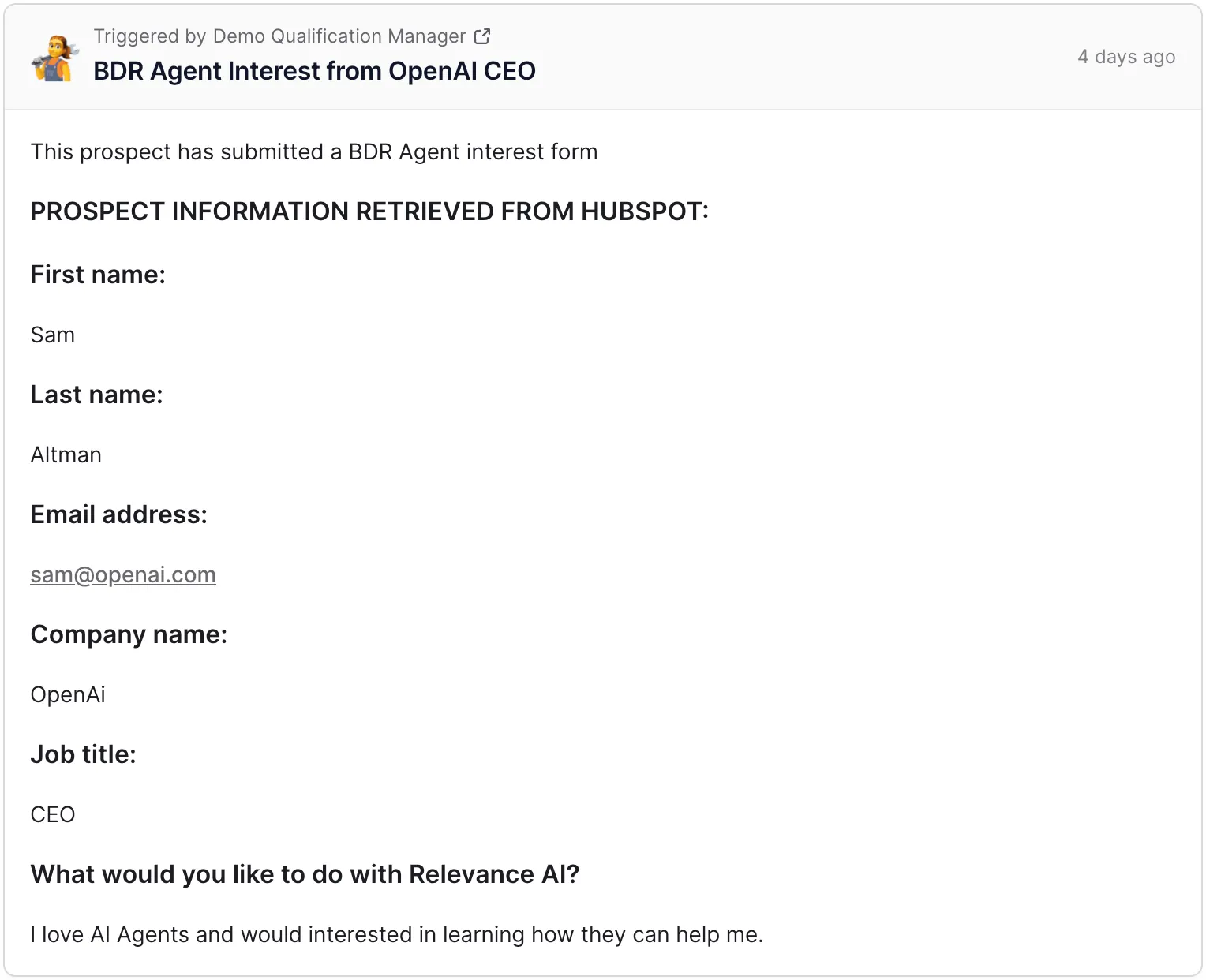
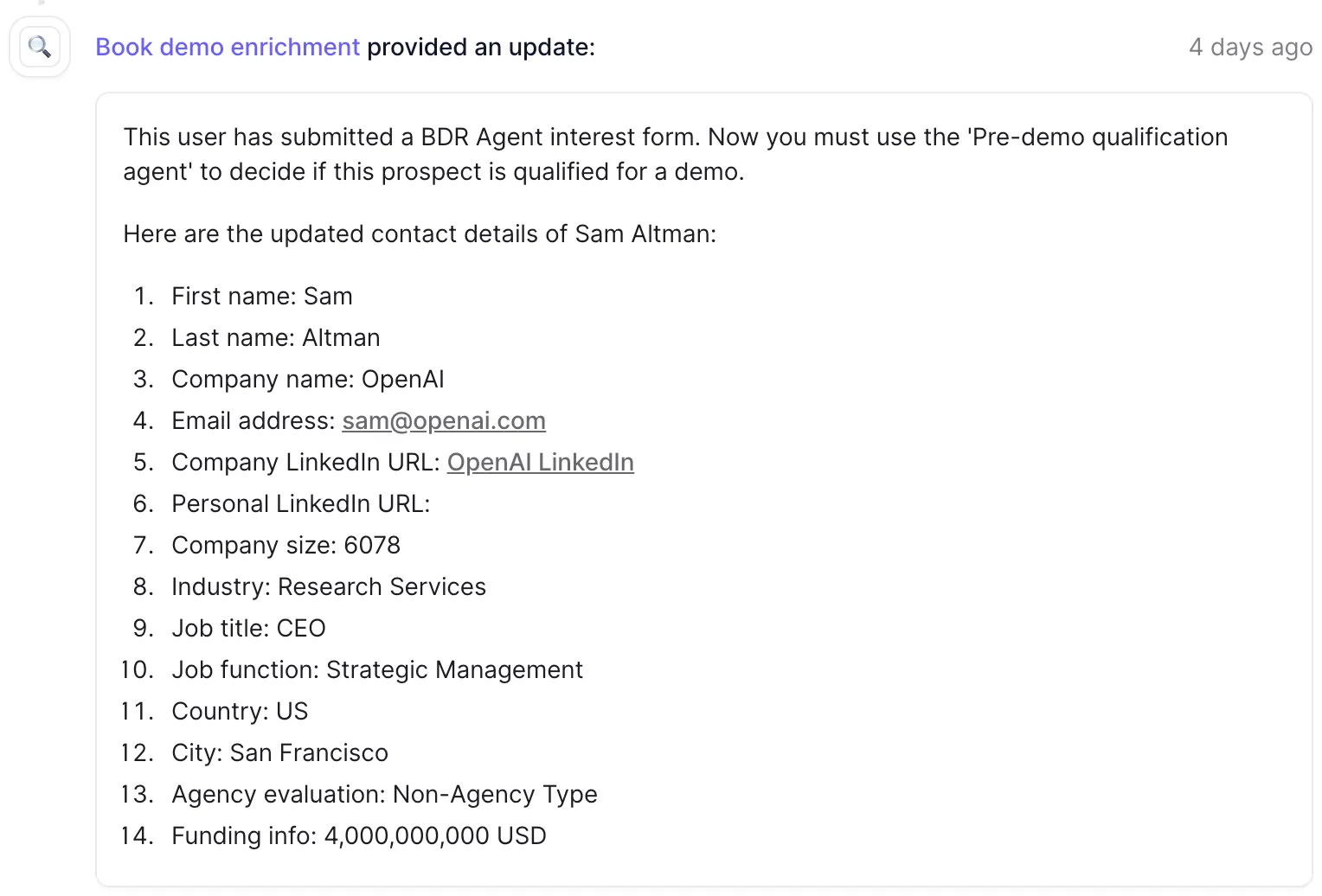
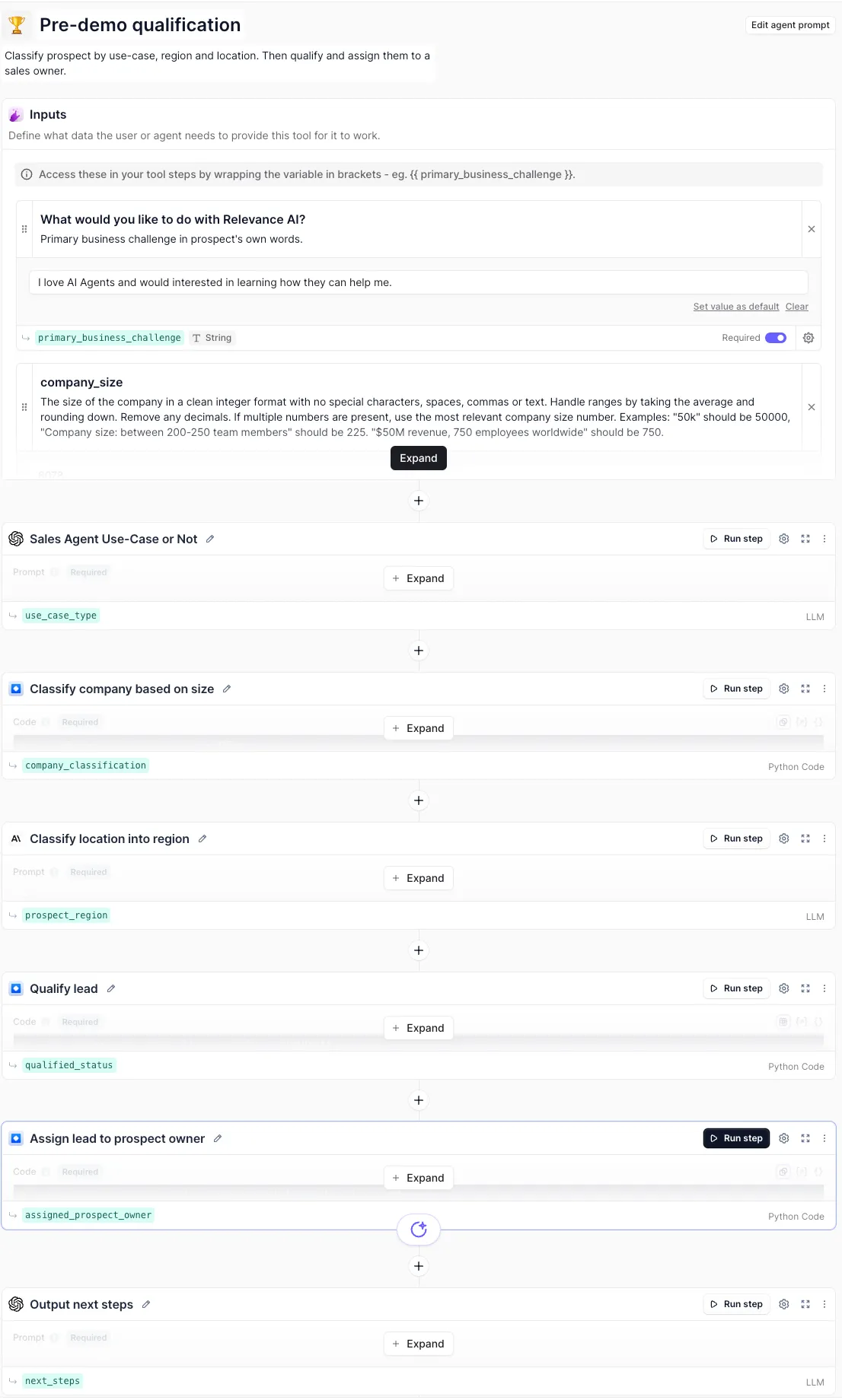
Relevance AI says its own Demo Qualification Manager starts when someone requests a demo. An enrichment agent retrieves the prospect’s information, gathers additional company and role context, and passes that information into a qualification step. The system then evaluates criteria such as use case, company size, seniority, and location before assigning qualified prospects to an appropriate sales rep.
(Source: Relevance AI)
The useful idea here is the sequence. A form submission is only the trigger. The agent does the work between form fill and sales handoff: enrichment, classification, qualification, routing, and eventually scheduling.
(Source: Relevance AI)
Your qualification criteria do not need to match Relevance AI’s. The important part is to make them explicit enough to test. For example, define what information must be present, what disqualifies a lead, which conditions require a human decision, and what evidence the agent should surface with its recommendation.
(Source: Relevance AI)
2. Account and contact research before outreach
Relevance AI’s published BDR workflow separates account research from contact research.
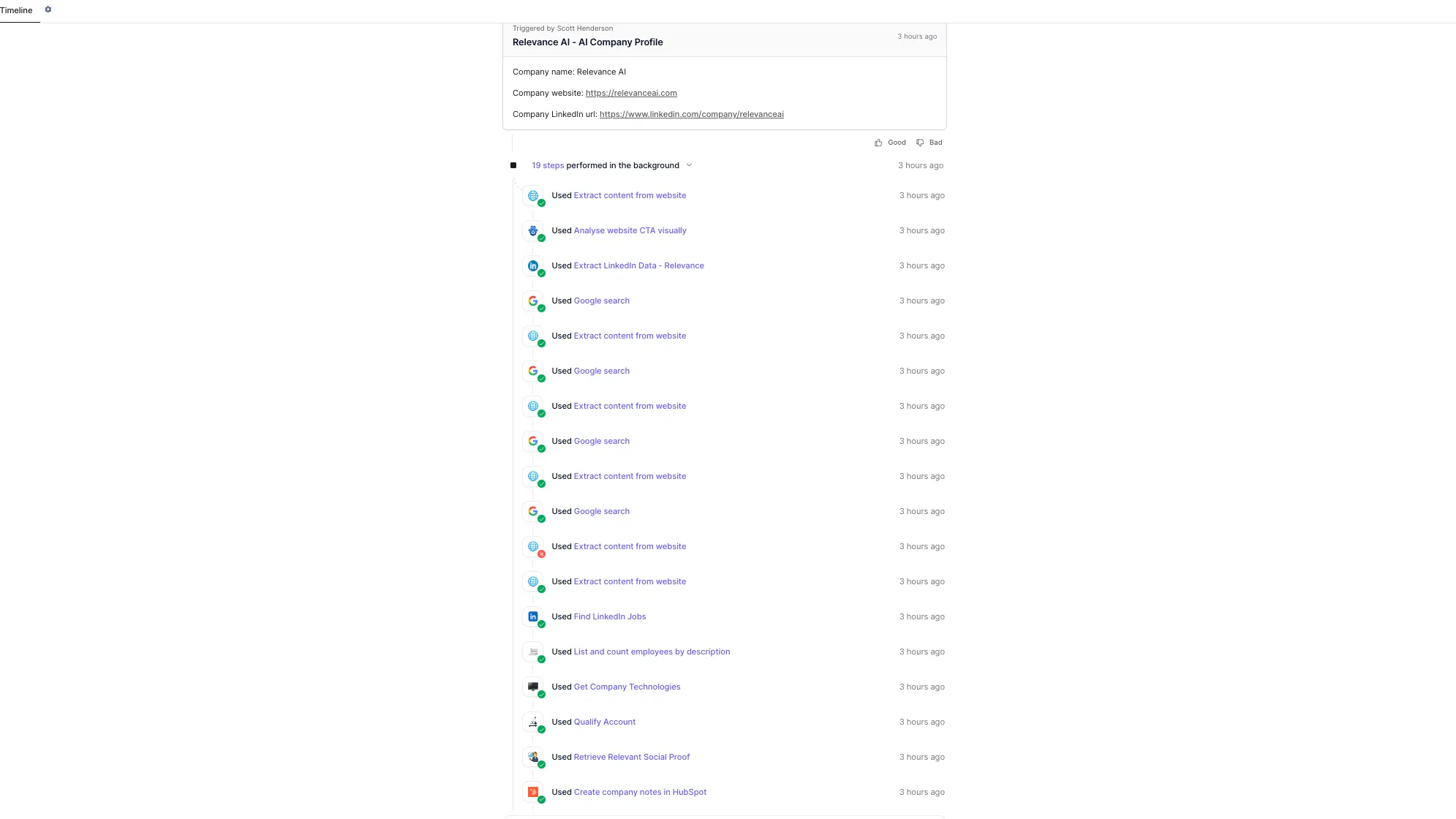
At the account level, the Agent can analyze a company’s website and run additional searches for information such as funding, product releases, customer stories, job openings, and technology signals. The research priorities can be customized around what actually matters to your sales motion.
(Source: Relevance AI)
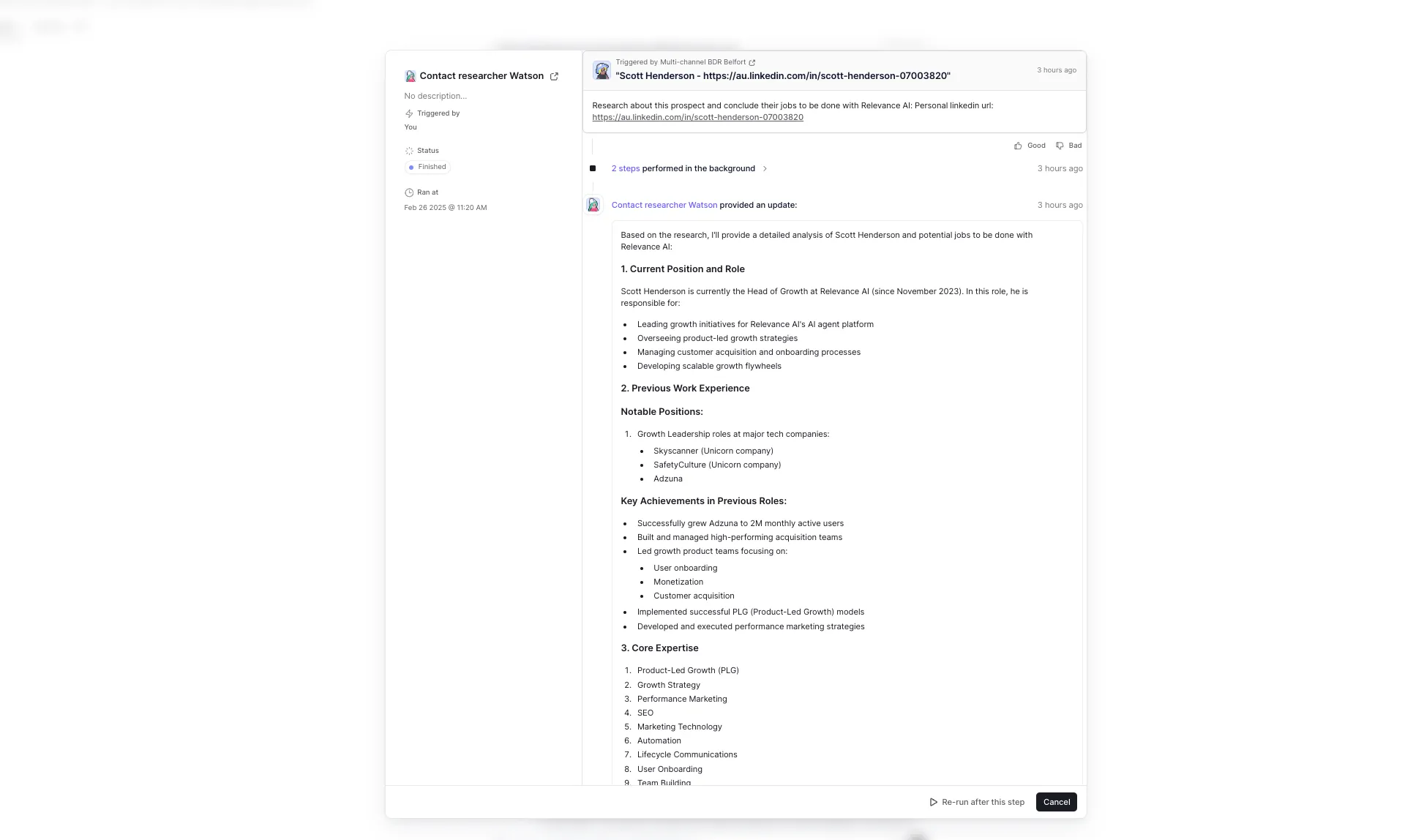
At the contact level, the Agent can combine company context with information about the individual prospect and use that context to prepare more relevant messaging.
(Source: Relevance AI)
The practical safeguard is simple: require source URLs for claims that matter. A useful research agent should help a rep verify why a signal was included rather than returning an impressive-looking paragraph with no evidence behind it.
If prospecting is your main use case, see our Relevance AI lead generation guide for the narrower lead-generation workflow.
3. Personalized outreach and meeting scheduling
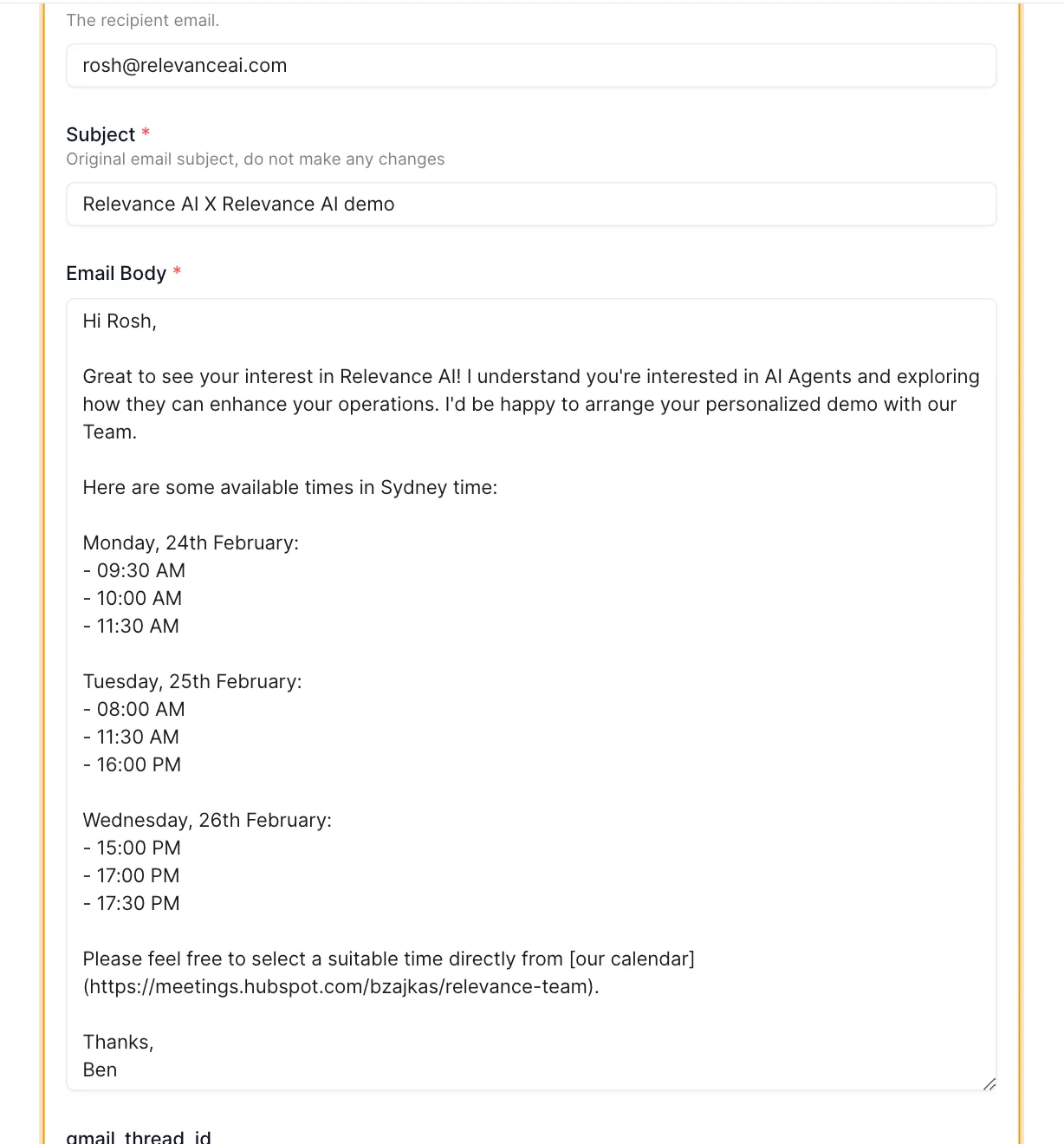
Once a prospect is qualified, an Agent can prepare or send outreach and help find an available meeting time. Relevance AI’s own demo-booking workflow checks existing HubSpot engagement, checks calendar availability, generates a personalized opening, and then emails the prospect.
(Source: Relevance AI)
This is also where approval policy matters most. Relevance AI lets you configure Tool approvals as Auto Run, Approval Required, or let the Agent decide. A new outbound workflow should usually begin with approval before sending until the team has seen enough real outputs to understand the failure modes.
That preference also appears in community discussions about AI sales automation. In one recent r/AI_Agents thread, a team wanted an agent to work across Apollo, Smartlead, Pipedrive, Gmail/Missive, and other systems, but specifically wanted the emails drafted for review rather than sent automatically. That is a sensible first deployment pattern for Relevance AI as well.
4. CRM updates and post-call work
A sales agent becomes much more useful when it can do something with its output instead of leaving another summary for the rep to copy manually.
Relevance AI’s HubSpot integration supports CRM-triggered agents and common actions such as retrieving contact details, updating contact properties, creating notes, creating tasks, marking tasks complete, and retrieving engagement history. Its integration documentation also lists Salesforce alongside HubSpot as a CRM trigger source.
A practical post-call workflow could be:
Call ends → transcript or notes arrive → Agent extracts decisions and next steps → rep reviews proposed CRM updates → approved fields and tasks are written back → follow-up is drafted.
Keep the first version narrow. Updating a call summary and creating a follow-up task is easier to audit than giving the Agent permission to modify every opportunity field it can access.
5. Deal review and forecast preparation
Relevance AI also positions sales agents for deal review and forecast roll-up. These workflows make sense when the Agent is gathering evidence from CRM records, call notes, engagement history, and defined qualification criteria.
The useful output is not “this deal will close.” It is a reviewable summary such as:
- budget confirmed or missing;
- decision-maker identified or unclear;
- timeline supported by evidence or assumed;
- legal or procurement blocker present;
- next action and owner;
- source records behind each conclusion.
Forecast categories and commitments should remain governed by your sales process. The Agent is most useful when it reduces the work required to assemble the evidence.
What this looks like in production
Relevance AI’s customer stories provide two useful examples of how sales teams have deployed agents beyond a demo.
Zembl: inbound qualification before the rep gets involved
In a March 2026 case study, Relevance AI reports that Australian energy consultancy Zembl built an inbound sales workforce that researches leads, collects information, handles Salesforce work, and follows up outside normal business hours. The company started with every outbound email reviewed by a human and gradually increased the number of leads handled as confidence improved.
Relevance AI reports that Zembl’s customer conversion increased 30% without increasing its business-as-usual sales team size, and that average call time fell by roughly 60%. Those are Relevance AI-published customer results, so treat them as evidence of what one implementation achieved rather than an expected result for every sales team.
Qualified: many narrow agents instead of one giant BDR
Relevance AI’s May 2025 Qualified case study describes a different model. Qualified built more than 35 specialized agents across the organization after breaking BDR work into individual jobs. Relevance AI reports $7 million in pipeline generated over six months.
The lesson worth borrowing is the architecture rather than the headline number: identify the actual jobs first, automate the jobs that can be evaluated, and coordinate them only after the individual pieces work.
Which sales integrations matter most?
The right integrations depend on where the truth for each task lives.
Need | Relevant Relevance AI connections |
CRM records and triggers | HubSpot, Salesforce |
Prospect and company data | Apollo, Lusha, Firmable and other sales-data providers |
Gmail, Outlook and sales-engagement tools | |
Scheduling | Google Calendar and Microsoft calendar connections |
Call context | Gong, Avoma and other meeting-data sources where supported |
Internal review | Slack, Microsoft Teams |
Do not choose the workflow because an integration logo exists. Check whether the specific trigger, read action, write action, permissions, and API limits you need are actually available.
Use a single Agent or a Workforce?
Start with one Agent when one job owns the entire task, such as researching a new account and producing a brief.
A Relevance AI Workforce becomes useful when the process has genuine specialist handoffs. An inbound sales setup might use separate agents for enrichment, qualification, outreach, and CRM operations because each job has different instructions, tools, and approval rules.
Relevance AI’s own Zembl case study illustrates this progression. Their original inbound Agent eventually gained specialist agents for Salesforce work, SMS follow-up, and energy comparisons as the scope grew.
Guardrails I would add before putting a sales Agent live
- Require approval for external communication first. Review real outputs before enabling automatic sending.
- Protect critical CRM fields. Start with notes, tasks, and clearly mapped fields before expanding write access.
- Require evidence for research. Keep source URLs or source records attached to material claims.
- Define stop conditions. Make the workflow stop when a prospect opts out, a rep takes ownership, required data is missing, or the Agent reaches a case outside its scope.
- Test with Evals. Relevance AI’s Evals can run reusable Checks against Agents and Workforces and monitor live quality.
- Watch permissions. The Agent can only be as safe as the systems and credentials you connect to it.
How I would implement the first sales Agent
- Pick one measurable job. Example: enrich and qualify new demo requests.
- Write the human process down. Include sources, qualification rules, output format, and exceptions.
- Connect only the systems needed for that job. Do not give the Agent your entire sales stack by default.
- Make the output reviewable. Include the evidence behind qualification and routing decisions.
- Keep approval on consequential actions. Draft the email or CRM change before executing it.
- Run normal and bad cases. Test missing fields, conflicting data, poor-fit leads, duplicate contacts, and Tool failures.
- Measure a completed business outcome. Track accurate qualification, rep review time, time-to-response, exception rate, and cost per completed lead rather than raw Agent activity.
- Scale only after the job is stable. Then add another specialist or connect the proven Agents through a Workforce.
What does Relevance AI cost for sales automation?
The plan price is only one part of the calculation. Relevance AI separates usage into Actions, which count Tool runs, and Vendor Credits, which cover model and eligible tool usage.
A sales workflow that researches a prospect, enriches a record, updates the CRM, and sends outreach can therefore consume several Actions plus variable model or third-party usage. Failed Tool runs also count as Actions.
Build one representative sales workflow and inspect its real usage before estimating monthly spend. Our Relevance AI Actions and Vendor Credits guide explains the billing mechanics, and the Relevance AI pricing guide covers the plans.
Is Relevance AI worth it for sales teams?
Yes, if your sales team has repeatable work that still requires context and judgment. Research, qualification, routing, CRM preparation, scheduling, and post-call actions are much better starting points than trying to automate the relationship itself.
The platform is especially useful when one sales task spans several systems and you want to control how much autonomy each step gets. If every step is fixed and predictable, a simpler workflow automation tool may be enough.
Start with one job, keep a human around the risky actions, and expand only after the output is consistently useful.
Explore Relevance AI for sales
Frequently asked questions on Relevance AI for sales teams
Can Relevance AI qualify leads automatically?
Yes. Relevance AI has published its own demo-qualification workflow in which agents enrich prospects, apply qualification criteria, assign qualified leads to sales reps, and move qualified prospects into scheduling. Your own rules and data sources still need to be configured and tested.
Can Relevance AI update HubSpot?
Yes. Relevance AI’s HubSpot documentation lists actions for retrieving contacts, updating properties, creating notes and tasks, completing tasks, and retrieving engagement history. HubSpot workflows can also trigger a Relevance AI Agent.
Can Relevance AI send sales emails automatically?
Yes, when the workflow has an email Tool or relevant integration and automatic execution is enabled. Relevance AI also supports approval-required Tool use, which is the safer starting point for a new outbound workflow.
Can several Relevance AI sales agents work together?
Yes. Relevance AI Workforces connect specialized Agents, Tools, conditions, and handoffs. This is useful when research, qualification, CRM work, and outreach need different roles or approval policies.
Should Relevance AI replace sales reps?
That is not the strongest use case. Relevance AI is better suited to the research, preparation, administration, routing, and follow-up around customer conversations. High-trust conversations, negotiation, coaching, and sensitive judgment are better kept human-led.