Relevance AI uses two separate usage meters: Actions and Vendor Credits. An Action is counted when an Agent or Workforce runs a Tool. Vendor Credits cover the underlying AI model and eligible Tool costs.
The distinction matters because two workflows that complete the same number of tasks can cost very different amounts. One might call a single Tool and a small model. Another might call six Tools, retry a failed API request, and send a large context window to a more expensive model.
Relevance AI Actions vs Vendor Credits at a glance
| Usage meter | What consumes it |
|---|---|
| Actions | Each Tool run, including a Tool run that fails. |
| Vendor Credits | AI model and eligible paid-Tool usage, based on the underlying cost. |
What counts as an Action in Relevance AI?
An Action is one run of a Tool. That Tool could send an email, call an API, update a CRM, process data, run code, or execute a multi-step workflow.
| What happens | Actions used |
|---|---|
| Agent sends one email through one Tool | 1 |
| One Tool executes five internal steps | 1 |
| Agent separately calls research, scoring, CRM and email Tools | 4 |
| A Tool runs and fails | 1 |
Failed Tools still consume Actions
This is one of the easiest details to miss when estimating production usage. A Tool does not need to succeed for the Action to count.
Pay particular attention to integrations with occasional API failures, rate limits, retries, or an Agent that repeatedly chooses the wrong Tool. A workflow that looks like three Actions on paper can use more when a Tool retries several times.
What do Vendor Credits pay for?
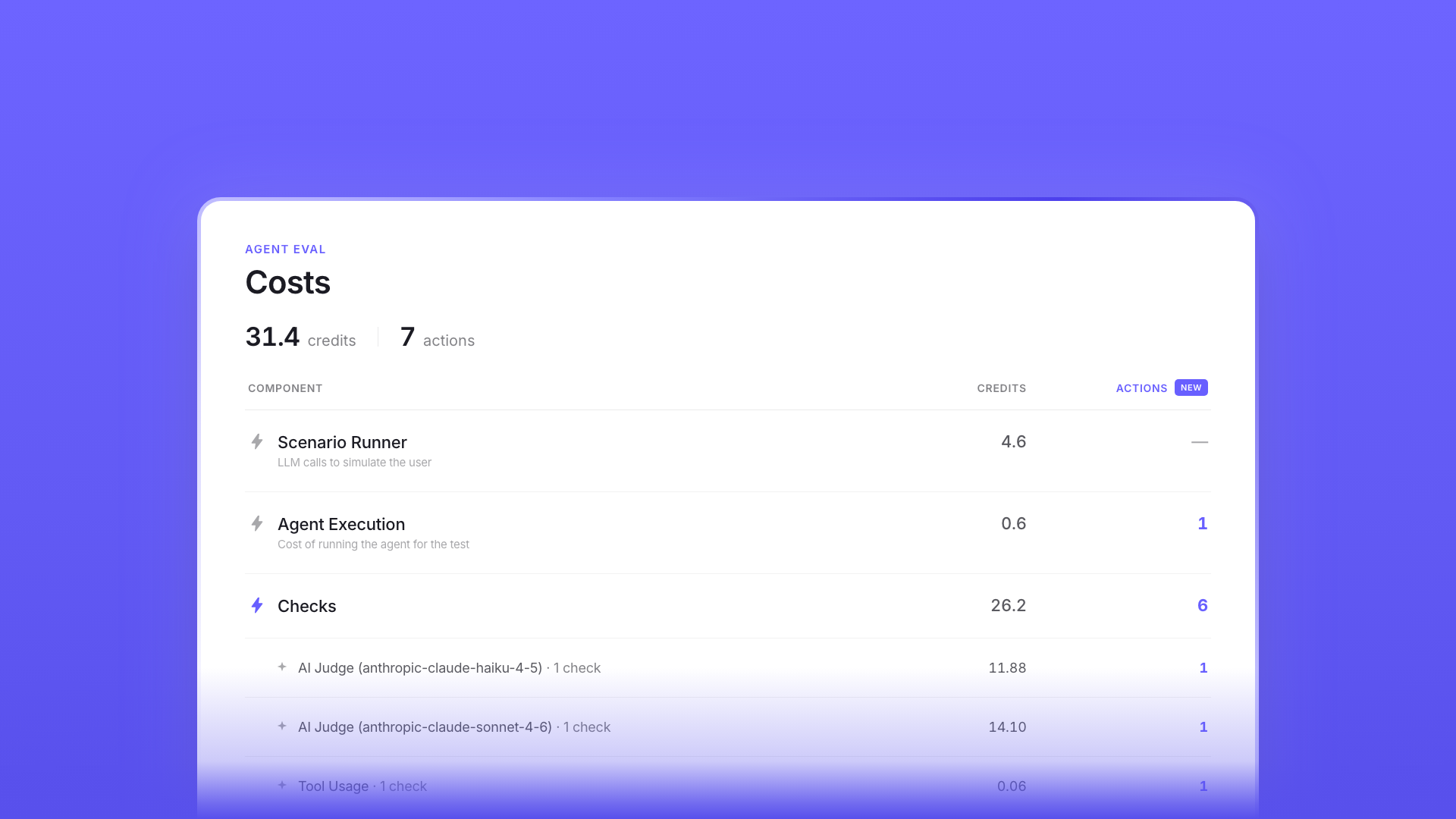
Vendor Credits cover the underlying cost of AI models and eligible paid Tools. The exact amount can vary with the model, input size, output length, number of model calls, reasoning requirements, and any paid Tool usage inside the workflow.
That means an Action count alone cannot tell you the total cost of a task. A classification Agent using a small model can consume much less than a research Agent sending long context to a larger model.
Paid plans can bring their own model API keys
Pro, Team and Enterprise users can use supported external model API keys. When you do that, the model provider bills the model usage directly, while Relevance AI still counts normal Actions when Tools run.
How many Actions and Vendor Credits do the plans include?
| Plan | Included usage |
|---|---|
| Free | 200 Actions/month and 1,000 one-time Vendor Credits. |
| Pro | 2,500 Actions/month and 10,000 Vendor Credits/month. |
| Team | 7,000 Actions/month and 35,000 Vendor Credits/month. |
| Enterprise | Custom Actions and Vendor Credits. |
The current pricing page expresses Vendor Credits in dollar value in some places and raw credit units in the feature table. The practical point is the same: Free gets a one-time allocation, while Pro and Team receive recurring included Vendor Credits.
What rolls over and what resets?
- Included Vendor Credits: roll over while the subscription remains active.
- Purchased Vendor Credit top-ups: also roll over while subscribed.
- Included plan Actions: reset to the plan allowance at renewal.
- Purchased Action top-ups: carry into the next billing cycle.
Do not build a budget around unused included Actions accumulating indefinitely. Base plan Actions reset. Vendor Credits behave differently.
How much do extra Actions and Vendor Credits cost?
| Top-up | Current price |
|---|---|
| 1,000 extra Actions | $80 |
| 10,000 extra Vendor Credits | $20 |
Top-ups are available on paid plans. Actions must be purchased in blocks of 1,000 and Vendor Credits in blocks of 10,000.
How to estimate Relevance AI usage before you upgrade
- Pick one real unit of work. One lead, support ticket, document, meeting, account, or customer request.
- List the Tools that normally run. Count Tool executions, not every step hidden inside a Tool.
- Run a realistic sample. Use the models, prompts, inputs and connected apps you expect in production.
- Record the Actions. Include normal branches and failed Tool retries.
- Record Vendor Credit use. This is where model choice and context size become visible.
- Multiply by realistic monthly volume. Then add headroom for testing and unusual cases.
Example: 500 leads per month
If each qualified lead normally uses one research Tool, one CRM Tool and one outreach Tool, that is three Actions per lead. At 500 leads, the base workload is 1,500 Actions before retries or extra branches.
That fits inside Pro’s current 2,500 monthly Action allowance. You still need sample runs to estimate Vendor Credits because the Action count does not reveal model spend.
How to reduce Relevance AI usage costs
- Use smaller models for simple classification, extraction and routing tasks.
- Combine closely related steps into one reusable Tool when that Tool remains easy to test and maintain.
- Fix repeated Tool failures instead of treating retries as normal.
- Trim unnecessary prompt and Knowledge context.
- Use BYOK on paid plans when direct model billing fits your setup.
- Review Agent-level usage after workflow changes.
- Set usage alerts or hard limits for unpredictable projects.
Should you combine Tools to save Actions?
Sometimes, but do not optimize the bill at the expense of maintainability. One multi-step Tool execution can count as one Action, which makes grouping related operations attractive.
Keep operations separate when separation makes them easier to reuse, test, approve, retry, or debug. A single giant Tool that does everything may use fewer Actions but become harder to operate safely.
Related reading
Relevance AI Actions and Vendor Credits FAQs
What counts as one Action in Relevance AI?
One Tool run counts as one Action. A Tool can contain several internal workflow steps and still use one Action when it runs once.
Does a failed Relevance AI Tool use an Action?
Yes. Relevance AI’s current documentation says failed Tool runs still count as Actions, so retries can increase usage.
Do Vendor Credits roll over?
Included and purchased Vendor Credits currently roll over while the subscription remains active. Base plan Actions reset at renewal.
Can I use my own OpenAI or Anthropic API key?
Paid plans support bring-your-own model API keys for supported providers. The provider bills that model usage directly, while normal Tool Actions still apply.
Can Free users buy top-ups?
No. Current documentation says Action and Vendor Credit top-ups are available on paid plans.