

If you’ve ever pasted a paragraph into an AI tool expecting a cleaner, sharper rewrite — only to get something that feels off — you’re not imagining it.
Rewriting existing content should be easier than starting from scratch. In theory, the ideas are already there. The structure exists. You just want clearer phrasing, better flow, or a slightly different angle.
Instead of improving what you wrote, many tools spit out versions that sound strangely robotic, subtly change your meaning, or polish the text so aggressively that it no longer sounds like you. The result is content that technically reads “better,” but feels less human, less precise, or outright wrong.
This guide is focused on what actually matters when you’re working with existing content:
- Rewrite quality: Does it genuinely improve clarity and flow?
- Tone control: Can you keep your voice, or at least choose one intentionally?
- Meaning preservation: Does the rewrite stay true to the original intent?
- Real user experience: How the tool behaves in real workflows, not demos
What does “rewriting existing content” actually mean?
A lot of disappointment with AI rewriting tools comes from mismatched expectations. People ask for a rewrite, but the tool delivers something else entirely. To see why that happens, it helps to separate three closely related (but very different) tasks.
Rewriting vs paraphrasing vs editing
Rewriting means keeping the same core idea while changing the structure, flow, and presentation of the content. Sentences may be reordered. Paragraphs may be merged or split. The logic stays intact, but the way the idea unfolds is different.
Paraphrasing keeps the same structure and swaps in different wording. The sentence order stays the same. The rhythm is mostly unchanged. You get a surface-level variation, not a new way of expressing the idea.
Editing focuses on improving clarity, grammar, and readability without making major structural changes. The content remains recognizably the same, just cleaner and tighter.
When rewriting makes sense (and when it doesn’t)
AI rewriting can be genuinely useful, but only in the right situations.
Good use cases
Some common scenarios where it actually makes sense:
- Refreshing old blog posts
When the ideas are still valid, but the writing feels dated, clunky, or overly long, rewriting can modernize the flow without reinventing the topic.
- Simplifying dense content
If a piece is technically sound but hard to read, a rewrite can break up long sentences, improve transitions, and make the message easier to follow.
- Adjusting tone for a new audience
The same idea might need to sound more conversational, more professional, or more beginner-friendly depending on who you’re writing for.
- Repurposing long content into shorter formats
Turning a long article into a summary, email, landing page, or social post often requires structural changes.
When to be careful
There are also cases where rewriting needs a much lighter touch or human oversight throughout.
- Highly technical, legal, or medical content
Small wording changes can introduce inaccuracies, oversimplify important details, or alter meaning in subtle but serious ways.
- Claims that depend on exact wording
If a statement is carefully phrased to avoid overpromising, maintain compliance, or preserve nuance, rewriting it blindly can create problems.
In short, the more precise the original wording needs to be, the more deliberate you have to be about how (and whether) you rewrite it.
Common ways AI rewriting goes wrong
Sometimes and at a glance, the output often looks fine. It’s grammatically correct, well-structured, and even polished. But once you read closely, the cracks start to show.
Here are the most common ways AI rewriting goes wrong.
- Meaning drift
The rewrite starts close to the original, then slowly veers off. A qualifier disappears. An assumption gets added. The idea still sounds reasonable, but it’s no longer the same idea you started with.
- Subtle factual changes
Numbers, cause-and-effect relationships, or technical distinctions get softened or altered. Nothing jumps out as “wrong” immediately, but accuracy takes a quiet hit.
- Loss of author voice
Personal phrasing, rhythm, and intent get flattened. What once sounded confident, direct, or nuanced turns generic.
These issues are exactly why rewriting tools can’t be judged by surface polish alone. What matters is how well they preserve meaning, structure, and voice under real use.
And that’s where proper evaluation comes in.
How we evaluated these AI rewriting tools
Every tool in this guide was assessed using the same practical, user-focused criteria. Each tool was evaluated on:
- Rewrite quality
Does the output genuinely improve clarity, flow, or structure — or does it just swap words around?
- Tone control
Can you guide how the rewrite sounds, or are you stuck with a default “AI voice”?
- Meaning preservation
How well does the tool hold onto the original intent without drifting or oversimplifying?
- Flexibility
Can it shorten, expand, or adjust intent when needed, or does it only work one way?
- Ease of use
Is the interface intuitive enough to fit into an existing workflow without friction?
- Value for money
Do the results justify the cost for someone who actually rewrites content regularly?
Quick comparison of the best AI tools for rewriting content
NB: Freemium here means the tool has a limited and basic free plan. To access more features, you’ll need to subscribe to a paid plan.
NB: Freemium here means the tool has a limited and basic free plan. To access more features, you’ll need to subscribe to a paid plan.
| Tool | Best for | Rewrite quality | Tone control | Ease of use | Pricing model | Free plan | Overall score |
| Writesonic | Marketing teams rewriting blog and web copy | High | High | Medium | Freemium | Yes | 8.3 |
| Jasper | Brand-led teams rewriting at scale | High | High | Medium | Paid | No | 8.5 |
| Copy.ai | Fast rewrites for business content | Medium | Medium | High | Freemium | Yes | 7.6 |
| Anyword | Performance-focused marketing rewrites | Medium | Medium | Medium | Paid | No | 7.4 |
| Wordtune | Sentence-level clarity and tone tweaks | High | Medium | High | Freemium | Yes | 8.1 |
| Grammarly | Light rewriting and clarity edits | Medium | Low | High | Freemium | Yes | 7.2 |
| Rytr | Budget-friendly general rewrites | Medium | Medium | High | Freemium | Yes | 7.3 |
| QuillBot | Academic and paraphrase-heavy rewrites | Medium | Low | High | Freemium | Yes | 7.0 |
| HIX.AI | Multi-style rewrites across formats | Medium | Medium | Medium | Freemium | Yes | 7.5 |
| INK | SEO-aware content rewrites | Medium | Medium | Medium | Paid | No | 7.2 |
| Sudowrite | Creative rewriting and expansion | High | Medium | Medium | Paid | No | 7.8 |
| TextCortex | Knowledge-based business rewrites | Medium | Medium | Medium | Freemium | Yes | 7.4 |
| Smodin | Simple paraphrasing and rewrites | Low | Low | High | Freemium | Yes | 6.5 |
| Paraphraser.io | Quick paraphrase-style rewrites | Low | Low | High | Freemium | Yes | 6.2 |
| Rephrase.ai | Short-form sentence rewrites | Low | Low | Medium | Freemium | Yes | 6.1 |
| NeuralText | SEO content rewriting workflows | Medium | Medium | Medium | Paid | No | 7.3 |
| Frase | Content refreshes tied to SEO research | Medium | Medium | Medium | Paid | No | 7.4 |
| Chimp Rewriter | Bulk spinning and automation | Low | Low | Low | Paid | No | 5.8 |
| Spinbot | One-click article spinning | Low | Low | High | Free | Yes | 5.4 |
| Article Rewriter Tool | Basic sentence rewording | Low | Low | High | Free | Yes | 5.6 |
| Peppertype | Marketing copy rewrites | Medium | Medium | High | Paid | No | 7.5 |
| Tool | Best for | Rewrite quality | Tone control | Ease of use | Pricing model | Free plan | Overall score |
| Writesonic | Marketing teams rewriting blog and web copy | High | High | Medium | Freemium | Yes | 8.3 |
| Jasper | Brand-led teams rewriting at scale | High | High | Medium | Paid | No | 8.5 |
| Copy.ai | Fast rewrites for business content | Medium | Medium | High | Freemium | Yes | 7.6 |
| Anyword | Performance-focused marketing rewrites | Medium | Medium | Medium | Paid | No | 7.4 |
| Wordtune | Sentence-level clarity and tone tweaks | High | Medium | High | Freemium | Yes | 8.1 |
| Grammarly | Light rewriting and clarity edits | Medium | Low | High | Freemium | Yes | 7.2 |
| Rytr | Budget-friendly general rewrites | Medium | Medium | High | Freemium | Yes | 7.3 |
| QuillBot | Academic and paraphrase-heavy rewrites | Medium | Low | High | Freemium | Yes | 7.0 |
| HIX.AI | Multi-style rewrites across formats | Medium | Medium | Medium | Freemium | Yes | 7.5 |
| INK | SEO-aware content rewrites | Medium | Medium | Medium | Paid | No | 7.2 |
| Sudowrite | Creative rewriting and expansion | High | Medium | Medium | Paid | No | 7.8 |
| TextCortex | Knowledge-based business rewrites | Medium | Medium | Medium | Freemium | Yes | 7.4 |
| Smodin | Simple paraphrasing and rewrites | Low | Low | High | Freemium | Yes | 6.5 |
| Paraphraser.io | Quick paraphrase-style rewrites | Low | Low | High | Freemium | Yes | 6.2 |
| Rephrase.ai | Short-form sentence rewrites | Low | Low | Medium | Freemium | Yes | 6.1 |
| NeuralText | SEO content rewriting workflows | Medium | Medium | Medium | Paid | No | 7.3 |
| Frase | Content refreshes tied to SEO research | Medium | Medium | Medium | Paid | No | 7.4 |
| Chimp Rewriter | Bulk spinning and automation | Low | Low | Low | Paid | No | 5.8 |
| Spinbot | One-click article spinning | Low | Low | High | Free | Yes | 5.4 |
| Article Rewriter Tool | Basic sentence rewording | Low | Low | High | Free | Yes | 5.6 |
| Peppertype | Marketing copy rewrites | Medium | Medium | High | Paid | No | 7.5 |
Best AI rewriting tools
1. Writesonic

(Source)
Best for:
Content teams and solo writers who want to rewrite and refresh SEO content (blog posts, landing pages, product pages) while keeping a tight workflow around research and optimization.
Key rewriting features:
Writesonic’s strength is that rewriting isn’t treated like a “swap synonyms” button. It’s built into a broader content workflow, so you can rewrite and fix structure, clarity, and search intent in one pass.
- Content refresh + restructure: good at rewriting sections with a cleaner flow (not just rewording).
- Style guidance (“writing styles”): helpful when you want a consistent voice across rewrites.
- Long-form rewrite support: handles multi-section content without collapsing formatting as often as simpler paraphrasers (you still need to watch tables and custom formatting).
Rewrite quality:
The output typically reads clean and professional, but it can lean a bit “content platform” unless you give it voice constraints. A light human pass is still normal (tighten phrasing, re-insert your voice, confirm any specifics). Some reviews describe results as natural/professional but still needing human editing. G2
Tone & control:
Tone control is one of the better parts of the experience, especially if you’re consistent with instructions and keep examples of your voice nearby. It’s not magical, but it’s more steerable than basic rewriters because you can combine:
- your rewrite intent (refresh, simplify, reposition),
- a defined style/voice,
- and length constraints (shorten/expand sections).
Accuracy & meaning preservation:
For normal marketing/blog content, it tends to preserve meaning well if your input is clear. The main risk is the usual AI one: small factual slips or nuance drift when it tries to “improve” claims. Some users explicitly mention needing to fact-check outputs due to occasional inaccuracies. G2
Ease of use:
It’s generally straightforward once you’re in, but the platform is now more than “just a rewriter,” so there can be a bit of initial overwhelm (more menus, more options, more “SEO suite” energy). If all you want is quick paraphrasing, it may feel heavier than necessary.
Pricing
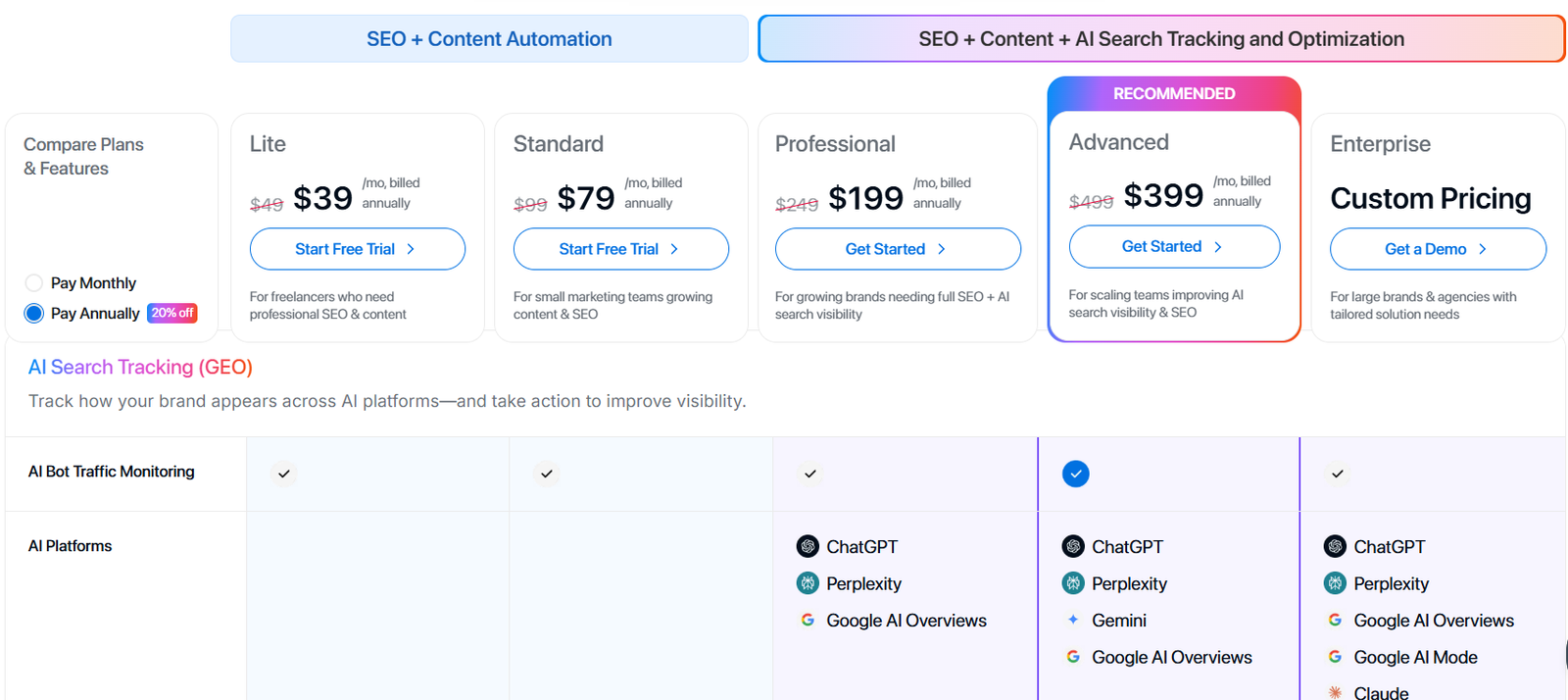
Lite
- $49/month billed monthly or $39/month billed annually
- Built for freelancers/solo users; includes AI Article Writer with 15 AI article generations/month (and core SEO/content features).
Standard
- $99/month billed monthly or $79/month billed annually
- Includes 30 AI article generations/month, plus more workflow capacity (e.g., more writing styles).
Professional
- $249/month billed monthly or $199/month billed annually
- Includes 50 AI article generations/month and unlimited writing styles (positioned for growing brands).
Advanced
- $499/month billed monthly or $399/month billed annually
- Higher-scale tier for teams scaling content + visibility workflows.
Enterprise
- Custom pricing
- For larger orgs needing tailored rollout/support and enterprise-grade controls.
Free plan/trial
- The pricing page emphasizes starting a free trial, rather than a permanent free plan.
What users like
Across reviews, a few themes show up repeatedly:
- Output feels natural/professional (with final human polishing). G2
- Versatility/speed, but not “publish-with-zero-editing.” G2
Limitations
- Can still introduce minor factual/meaning drift, so you need a verification pass for anything sensitive. G2
- If you only want lightweight paraphrasing, the platform complexity may feel like extra friction.
Overall score: 7.8/10
Verdict:
Ideal if you’re rewriting content as part of a broader refresh/optimization workflow; skip if you want a minimal tool with zero platform overhead.
2. Jasper
(Source)
Best for:
Content creators, marketers, and small teams who want AI rewriting that stays on brand and supports long-form output.
Jasper is a purpose-built AI content platform designed to help with blog refreshes, landing pages, email sequences, and marketing campaigns while preserving meaning and maintaining brand voice.
Key rewriting features:
Jasper’s rewriting workflow combines AI prompts, brand voice memory, and structural templates. It also supports SEO-optimized rewrites with templates and campaign tools.
How it handles rewrites:
Users can insert existing content into the editor and prompt Jasper to restructure, refine tone, or tailor for a target audience — which helps avoid generic outputs and keeps meaning consistent.
Rewrite quality:
Jasper’s output usually reads naturally and stays fairly close to the source meaning, especially when brand voice and audience inputs are set up first. It’s stronger when you prompt clearly and confirm brand context before rewriting.
Tone & control:
Offers strong control via Brand Voices and audience settings. You can guide rewrites for casual, professional, persuasive, or technical tones — and save those settings for consistent rewrites across sections.
Accuracy & meaning preservation:
Jasper generally preserves meaning well, but still benefits from human review for factual correctness or niche technical details — especially in longer rewrites.
Ease of use:
The interface combines an editor with templates and tools like SEO mode and campaign builders. There’s a learning curve, but beginners find the guided templates helpful.
Pricing
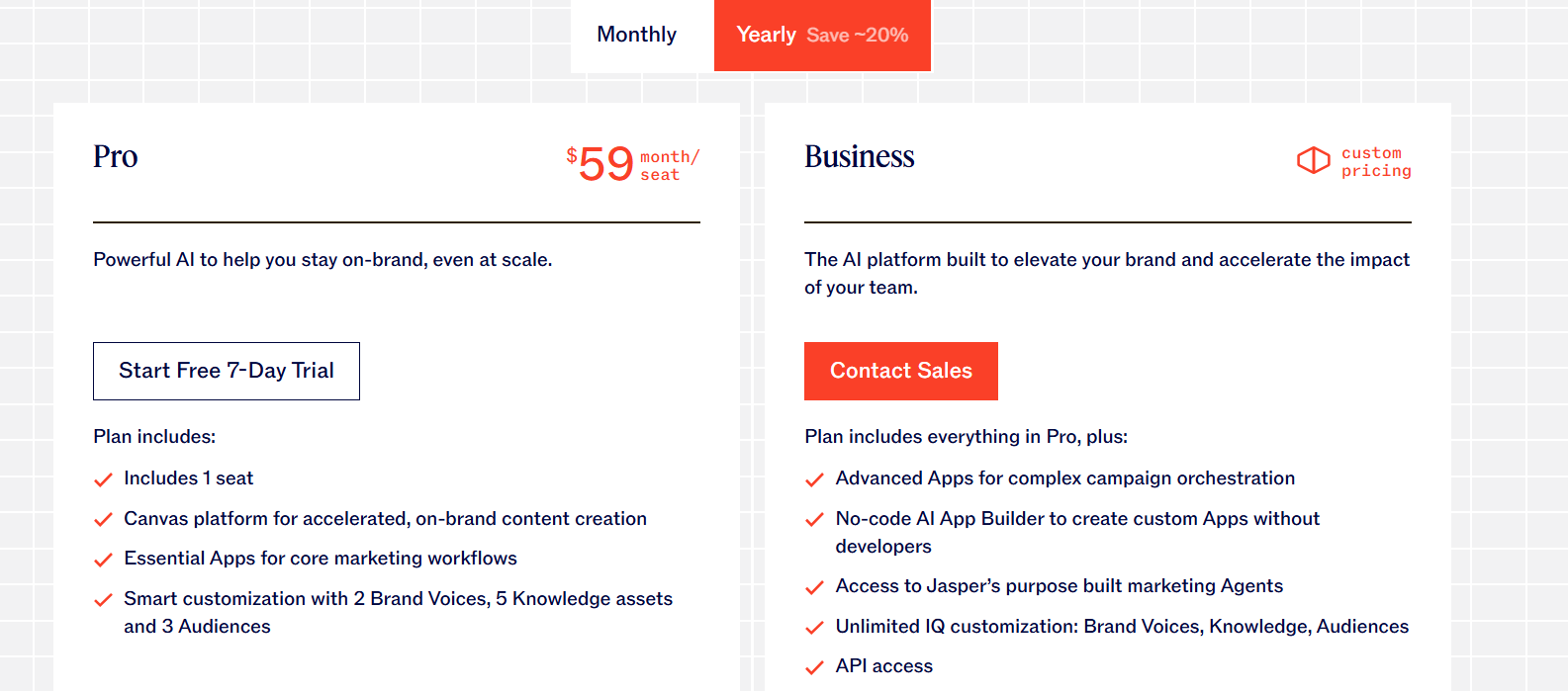
Jasper’s pricing is subscription-based and does not include a permanently free tier — but you can start with a 7-day free trial of paid plans.
Free trial
- 7-day free trial available on the Pro plan.
Pro plan
- ~$59/month when billed annually (~$69/month month-to-month).
- Multiple seats (team support), Brand Voices, expanded content templates, SEO-optimized workflows (Surfer SEO integration), priority support, and advanced writing tools.
Business plan
- Custom pricing (contact sales).
- Tailored for larger teams and enterprises; includes unlimited customization, API access, enterprise governance controls, dedicated support, and advanced collaboration features.
What users like:
- Rewrites that feel more human and brand-consistent than many generic tools.
- Strong tone control and templates for marketing-focused tasks.
- Expanded collaboration options on Pro/Business plans.
Limitations:
- No forever-free plan (only trial).
- Can require fine-tuned prompting for the best rewrite quality.
- Pricing can add up for larger teams without careful seat management.
Overall score: 8.5/10
Verdict:
Great pick for marketers, blog refreshes, and brand-consistent rewrites; less ideal if you want a free forever tool or purely simple paraphrasing.
3. Copy.ai
(Source)
Best for:
Marketers, content creators, and small teams who want versatile rewriting plus automation workflows without starting from scratch.
Copy.ai supports rewriting existing content, generating variations for different channels, and building simple repeatable content tasks — all from a single workspace.
Key rewriting features
Copy.ai combines a chat assistant, rewrite tools, and workflow builder so you can:
- Paste content and ask for structural rewrites
- Iterate tone and style with simple prompts
- Build repeatable content workflows for bulk refreshes
- Leverage 90+ writing templates to reframe existing text.
Copy.ai’s workflows are especially useful when you want to chain rewrite steps (e.g., tone shift → expand → shorten) without leaving the app.
Rewrite quality:
The output typically feels natural and varied, with better structural rewrites than basic paraphrasing tools. It’s generally strong for short–medium length rewrites and creative tasks, although you’ll still want to check technical accuracy on factual content.
Tone & control:
Tone control is workable via simple prompts and Brand Voice settings. You can shift everything from formal to conversational, or tailor content for different audiences without third-party prompt tricks.
Accuracy & meaning preservation:
Copy.ai does an adequate job preserving meaning when prompts are clear, but it’s not specialized for deeply technical or precision-dependent rewrites. Always review sensitive claims manually.
Ease of use
The UI is intuitive: paste, prompt, rewind, and iterate. Beginners can get useful rewrites quickly, and the workflow builder smooths repetitive tasks once you’re acclimated.
Pricing
(Source)
Free plan
- Forever free account with access to many rewrite and content tools.
- Includes up to 2,000 words per month, unlimited projects, chat AI, templates, and basic Brand Voice features.
Chat plan
- $29/month when billed monthly (often ~$24/month if billed annually).
- Includes unlimited words, 5 user seats, priority support, multilingual content support, access to all templates, rewrite tools, and workflow builder.
Enterprise (custom pricing)
- Custom-quoted plan for larger teams and organizations with higher seat counts, API access, private Infobase, advanced workflows, and dedicated support.
What users like
- Creative and versatile toolset that handles both rewrites and copy generation.
- Workflow automation that speeds up repetitive content tasks.
- Free tier lets you try most basic features without a credit card.
Limitations
- Free plan’s 2,000-word limit can be restrictive for large rewrites.
- Not as precise as specialist tools for highly technical or academic content.
- Some outputs may need editing for tone consistency on long rewrites.
Overall score: 8.2/10
Verdict:
A well-rounded choice if you want flexible rewriting plus content workflows — especially useful for marketers and small teams. For academic or technical precision, pair with expert review.
4. Anyword
(Source)
Best for:
Marketers, copywriters, and teams who want data-backed AI rewriting and performance-oriented content that goes beyond simple paraphrasing — especially for ads, landing pages, email copy, and conversion-focused marketing content.
Anyword is built around predictive performance scoring and optimization insights, meaning it evaluates how different versions might perform with audiences before you publish.
Key rewriting features:
Anyword combines traditional rewrite/paraphrase functionality with:
- Predictive performance scores that estimate how engaging or impactful different rewrites will be.
- Brand voice & audience tuning so AI learns what resonates with your specific audience.
- Templates and content wizards for blog, ad, email, and page rewrite.
- Analytics and optimization tools tailored to marketing workflows.
This makes it particularly strong when your rewrite goal involves performance (clicks, conversions, engagement) as well as wording.
Rewrite quality:
Rewrites typically stay on message and integrate performance insights, but as with other generative tools, human oversight is still recommended.
Tone & control:
Anyword offers good control over brand voice and audience style, letting you steer tone (e.g., friendly, professional) and tailor outputs to specific channels or campaigns.
Accuracy & meaning preservation:
The tool tends to preserve general meaning well but sometimes prioritizes persuasive performance suggestions over strict semantic fidelity, so reviewing factual claims is still necessary.
Ease of use:
The platform is focused on marketing flows, so the UI assumes some familiarity with campaign structures. Beginners can learn quickly with templates and guided workflows.
Pricing
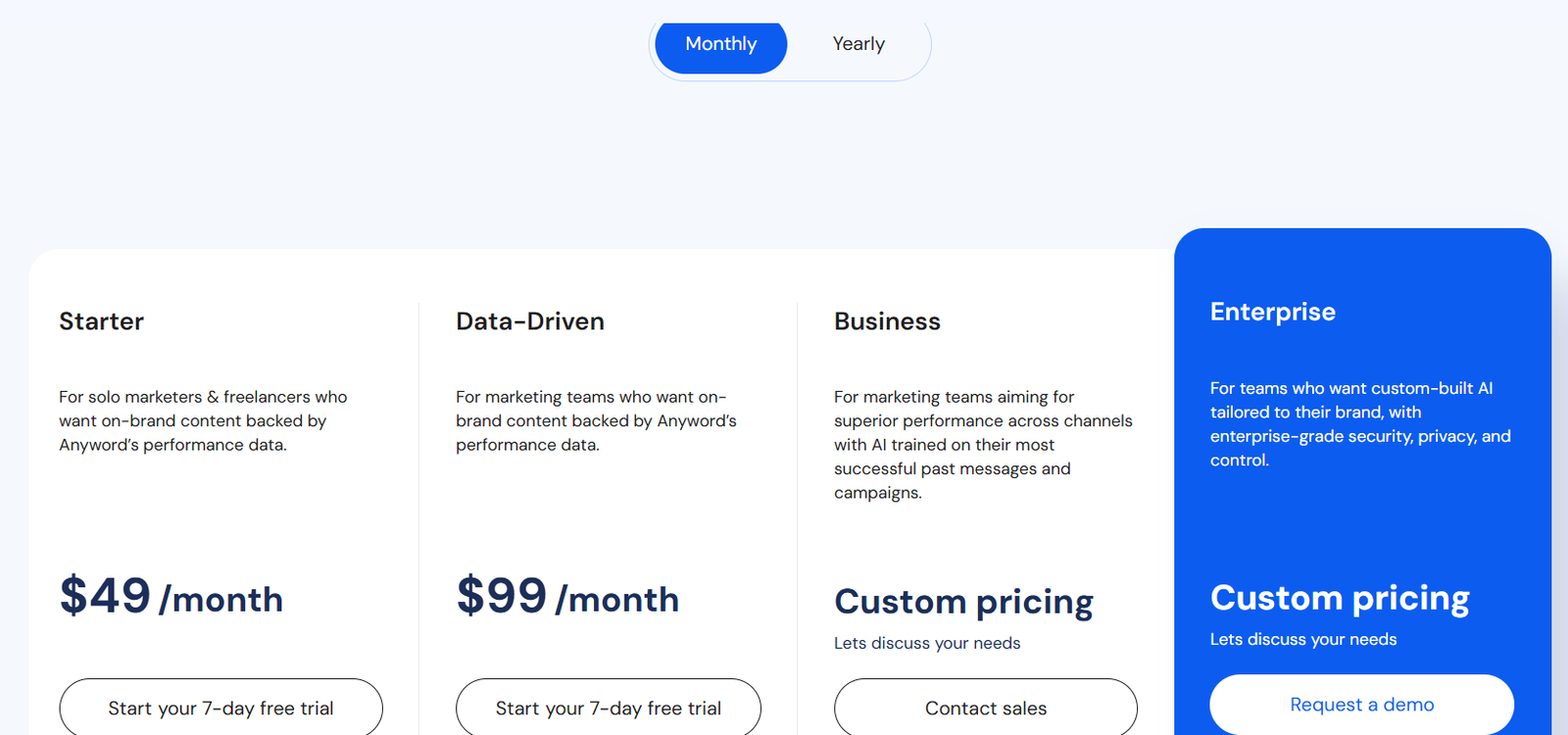
(Source)
Free trial
- 7-day free trial available (word credit limit applies).
- No long-term free tier — you must upgrade after the trial expires.
Starter plan
- $49/month (varies by region and billing cycle).
- Ideal for solo marketers or freelancers. Includes unlimited copy generation with basic performance features, predictive scoring, and core rewrite tools.
Data-Driven plan
- $99/month (annual discounts available).
- Adds robust performance insights, predictive analytics, benchmarking, and multiple seats.
Business plan
- Custom pricing — tailored plans with advanced features like A/B testing, custom AI models, and deeper analytics.
Enterprise
- Custom pricing and dedicated support for large organizations, private models, and security controls.
What users like
- Predictive performance scoring helps select the best version of a rewrite before publishing.
- Brand-voice tuning keeps rewrites aligned with audience expectations.
- Useful mix of marketing and rewrite tools in one platform.
Limitations
- No forever free plan; the tool is primarily paid.
- Pricing can feel steep for small teams without heavy content needs.
- Focus on marketing optimization means it’s less precise for heavily technical or academic rewrites.
Overall score: 8.0/10
Verdict:
Anyword is a strong choice when your rewriting goals include performance and conversion metrics, especially for marketing and sales copy — but it’s less ideal if you need deep accuracy for technical, legal, or scientific rewrites.
5. Wordtune
(Source)
Best for:
Writers, editors, and professionals who want clarity-focused AI rewriting with flexible controls and daily usable limits.
Wordtune is an AI-powered writing assistant that helps rewrite, rephrase, simplify, and clarify text. It’s designed to support everyday writing tasks across browser, document editors, and messaging platforms, with real-time suggestions and tone options.
Key rewriting features
- Rewrite suggestions that rephrase sentences for clarity or style.
- Creative enhancements like examples, explanations, or stylistic tweaks.
- Grammar and fluency suggestions alongside rewrite options.
Rewrite quality:
Outputs are generally natural and readable, often improving flow and eliminating awkward phrasing. It performs especially well for structural rewording rather than heavy creative reinterpretation.
Tone & control:
Users can adjust style (e.g., casual, formal, concise) with simple UI buttons, and the suggestions adapt accordingly.
Accuracy & meaning preservation:
Wordtune preserves the core meaning reliably when you’re rewriting prose or simplifying sentences, but still benefits from human review for any highly technical or fact-critical content.
Ease of use:
It integrates across Chrome, Google Docs, Outlook, and other environments, letting you rewrite text wherever you type. The UI shows live suggestions and alternative phrasings inline.
Pricing
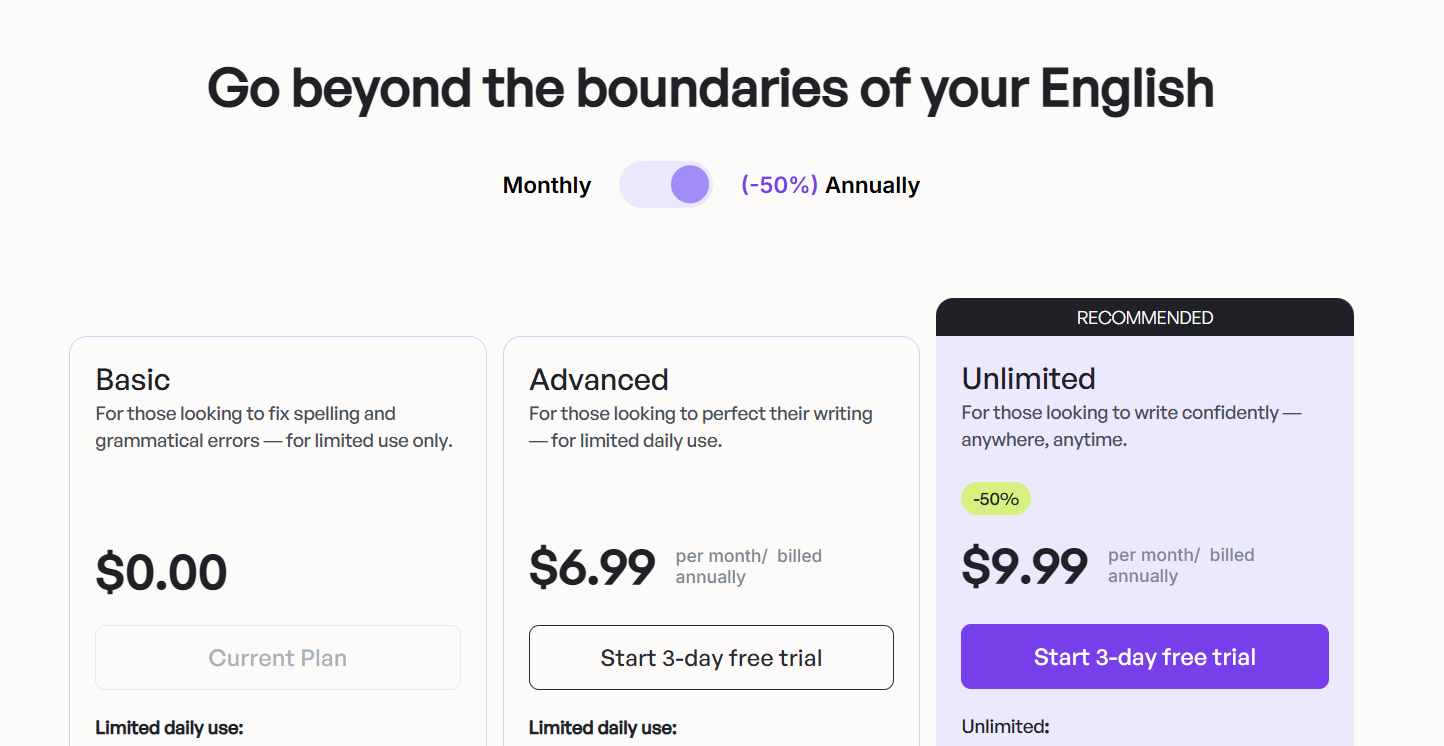
(Source)
Free plan
- Forever free tier: Up to ~10 rewrites daily, three AI summaries per day, unlimited basic grammar/typing corrections, and spell checks — great for occasional use or testing before upgrading.
Advanced plan (Paid)
- Typically around $6.99/month (billed monthly) or lower when billed annually.
- Includes increased daily rewrite limits, more AI summaries, advanced suggestions like fluency boosts and vocabulary enhancements.
Unlimited plan (Paid)
- Around $9.99/month (billed monthly) or lower on annual billing.
- Removes nearly all usage caps so you can rewrite without limits and craft longer texts with full feature access.
What users like:
- Rewrites tend to sound natural and readable rather than robotic.
- Integrates smoothly into browsers and editors you already use.
- Flexible plan options let occasional users start free.
Limitations:
- Free limits can feel restrictive if you rewrite large sections often.
- Not a specialist for deeply technical or highly precise legal/academic rewrites.
Overall score: 8.3/10
Verdict:
Wordtune is a solid choice for everyday rewriting, clarity improvement, and tone refinement — especially for email, blog refreshes, and general prose. For heavily technical content, pair with domain expertise.
6. Grammarly
(Source)
Best for:
Writers, professionals, and teams who want AI-augmented proofreading plus sentence-level rewrites and tone refinement alongside grammar and clarity suggestions.
Grammarly is one of the most widely used AI writing assistants. While it started as a grammar and spelling corrector, its latest AI capabilities include robust rewrite suggestions, tone adjustments, and real-time clarity improvements across browsers, editors, and apps.
Key rewriting features:
Grammarly’s AI adds tools that help you:
- rewrite full sentences with improved readability
- adjust tone (formal, casual, confident, etc.)
- enhance clarity and word choice
- generate text using built-in AI prompts
Rewrite quality:
The output is generally natural and fluent, especially for prose, business copy, or emails. Grammarly’s AI is tuned to maintain meaning while improving sentence structure.
Tone & control:
Users can choose tone goals (e.g., formal vs casual) and the assistant suggests rewrites accordingly, helping content stay consistent with audience expectations. Tone insights and readability prompts are visible inline as you work.
Accuracy & meaning preservation:
Grammarly’s AI tends to preserve meaning reliably in general writing and business contexts. For niche academic or legal material, it’s still best to double-check revisions manually.
Ease of use:
The interface is user-friendly, with browser extensions and native integrations for Google Docs, Word, Outlook, and more. Suggestions appear in real time as underlines or in a sidebar panel.
Pricing
(Source)
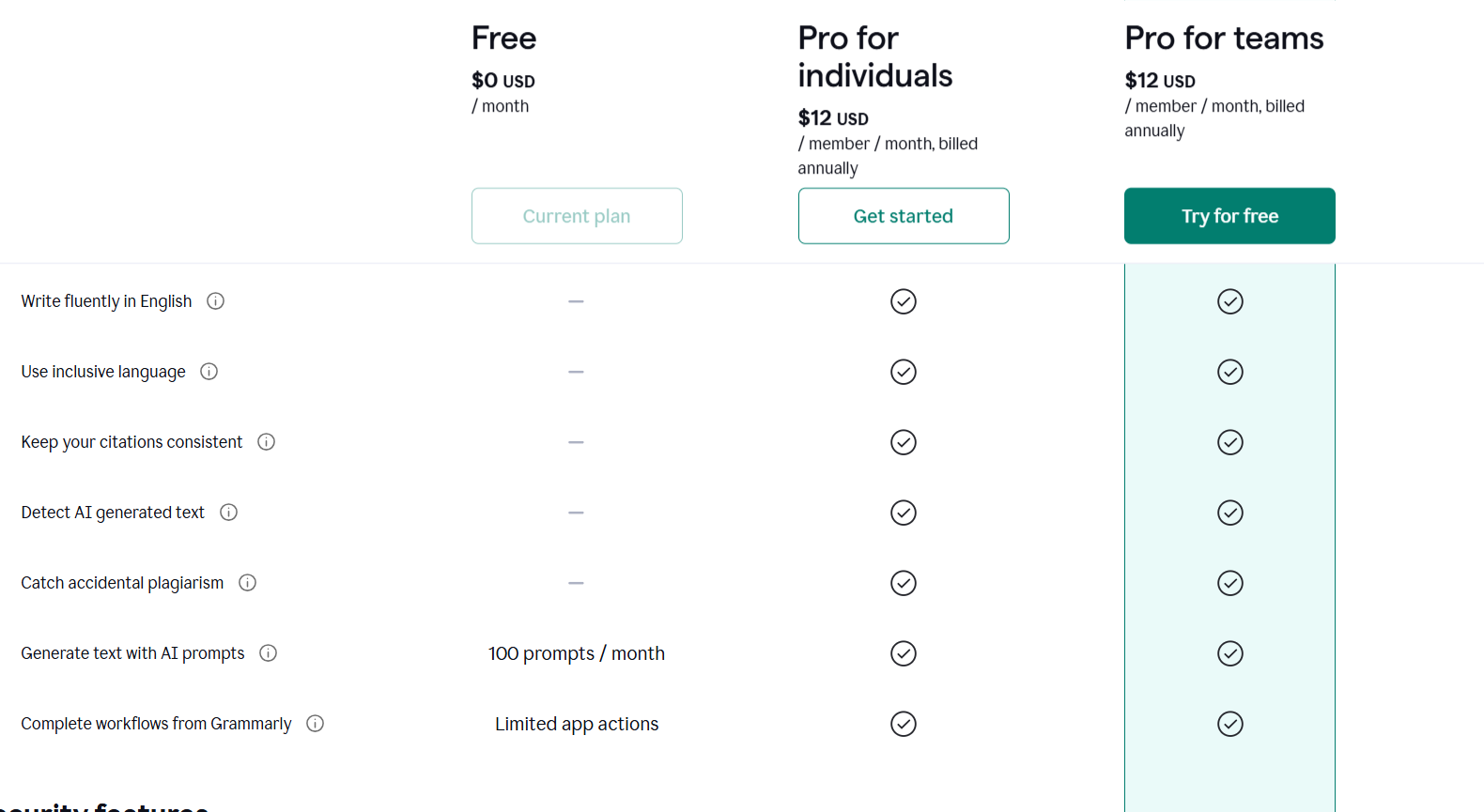
Grammarly offers a tiered subscription model with both free and paid options.
Free plan
- $0/month — basic grammar, spelling, and punctuation checks; tone detection; and up to ~100 AI writing prompts per month.
Pro plan (individual)
- $12/month when billed annually (about $144/year).
- ~$30/month when billed monthly.
- Includes everything in Free, plus full-sentence rewrites, advanced clarity and tone suggestions, plagiarism detection, and up to ~2,000 AI prompts per month.
What users like:
- Easy inline rewriting suggestions that improve clarity and flow.
- Built-in tone detection and adjustment help tailor writing for diverse audiences.
- Works across apps and editors via extensions and integrations.
Limitations:
- Not specialized for deep semantic rewriting like long-form blog restructures.
- Free tier has limited AI prompts and feature caps.
- Best results often depend on how well you set goals and tone preferences before rewriting.
Overall score: 8.1/10
Verdict:
Grammarly is a strong choice for everyday rewriting, clarity edits, and professional communication, especially when paired with grammar and tone tools. For heavy creative rewrites or technical accuracy tasks, combine with more specialized rewriting tools.
7. Rytr
(Source)
Best for:
Budget-conscious writers, small teams, and freelancers who want fast, general-purpose rewriting and content generation without heavy technical complexity.
Rytr is an AI writing assistant that helps with rewrites, paraphrasing, clarity improvements, and new text generation across multiple use cases (emails, social copy, blog intros, outlines, etc.).
Key rewriting features:
Rytr includes tools for:
- rewording or paraphrasing sentences or sections
- expanding or shortening text while preserving meaning
- tone selection (formal, casual, persuasive, etc.)
- rich text editing and templates for 40+ use cases
Rewrite quality:
For short-to-medium content, outputs generally feel natural and readable, though longer or highly nuanced technical rewrites may need extra human edits afterward.
Tone & control:
Tone selection and use case templates give reasonable control over style and intent, helping tailor rewrites for specific audiences.
Accuracy & meaning preservation:
Rytr does a solid job preserving meaning for most general writing tasks, but it’s not designed as a precision tool for highly technical or legal content. Expert review is still recommended when accuracy matters most.
Ease of use:
The platform is straightforward and beginner-friendly, with a clean editor and quick results. There’s no steep learning curve.
Pricing
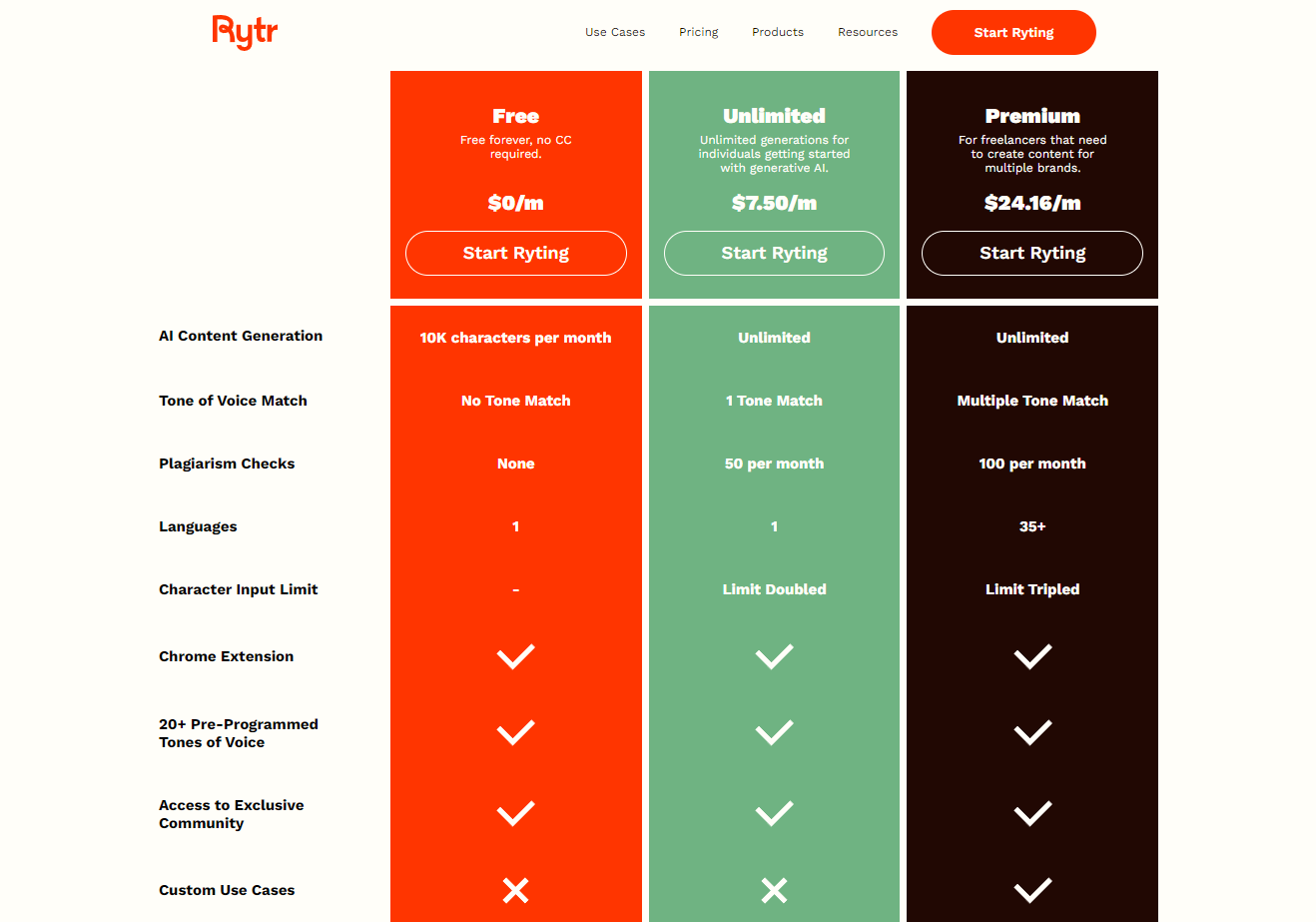
Rytr offers a free tier and affordable paid plans that scale with usage needs:
Free plan
- $0/month — Forever free.
- Includes access to core rewrite and content tools with a 10,000 characters per month generation limit.
Unlimited plan
- $7.50/month (standard monthly rate).
- Removal of character caps, unlimited content generation, access to all tone and use case features, and template creation.
Premium plan
- $24.16/month (standard monthly rate).
- Everything in Unlimited, plus priority support and potentially dedicated account services for heavier users.
What users like:
- Very affordable pricing with a real free tier that lets you test core features.
- Easy to generate rewrites and varied copy quickly.
- Supports multiple tones and languages.
Limitations:
- Free plan’s character limit may feel restrictive for larger rewrites. G2
- Not as strong for deeply technical or high-precision editing.
- Outputs occasionally need manual tuning for higher-stakes copy.
Overall score: 7.8/10
Verdict:
Rytr is a cost-effective everyday rewriting tool that’s great for marketers, bloggers, and small teams needing quick rewrites or content generation on a budget. For niche technical or enterprise workflows, pair with a more specialized solution.
8. QuillBot
(Source)
Best for:
Students, researchers, and writers who need reliable paraphrasing and sentence-level rewriting with minimal setup and a strong focus on meaning retention.
QuillBot is one of the most well-known rewriting tools, especially in academic and educational contexts.
Key rewriting features:
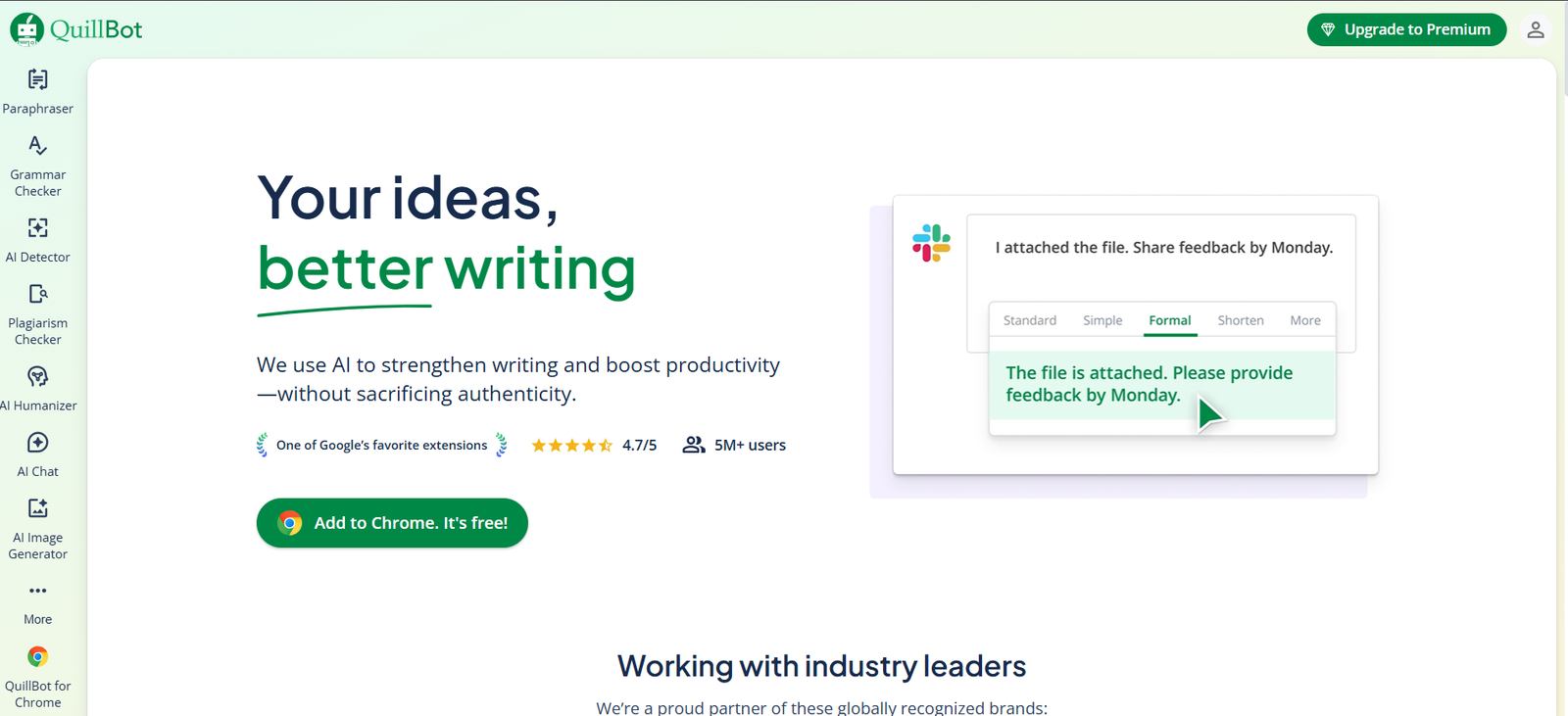
QuillBot focuses on controlled rewriting through modes rather than free-form prompts:
- Multiple paraphrasing modes (Standard, Fluency, Formal, Simple, Creative, etc.)
- Sentence and paragraph-level rewrites
- Built-in summarizer and grammar checker
- Synonym slider to control how aggressive the rewrite is
This mode-based approach helps reduce surprises compared to more “creative” AI writers.
Rewrite quality:
For sentence and paragraph rewrites, the output is usually clear and readable. It doesn’t try to be flashy or overly polished, which works in its favor for academic or explanatory text. However, it struggles with long-form restructuring and can feel mechanical if overused.
Tone & control:
Tone control is indirect and mode-based rather than prompt-driven. You can choose how conservative or creative the rewrite is, but you can’t fine-tune voice or intent beyond that.
Accuracy & meaning preservation:
This is one of QuillBot’s strongest areas. Because it stays close to the original structure, it’s less likely to introduce factual errors or meaning drift — making it safer for technical, academic, or informational content than many generic rewriters.
Ease of use:
Very easy to use. Paste text, choose a mode, adjust the synonym slider, and rewrite. The UI is clean and fast, with browser extensions available for common writing tools.
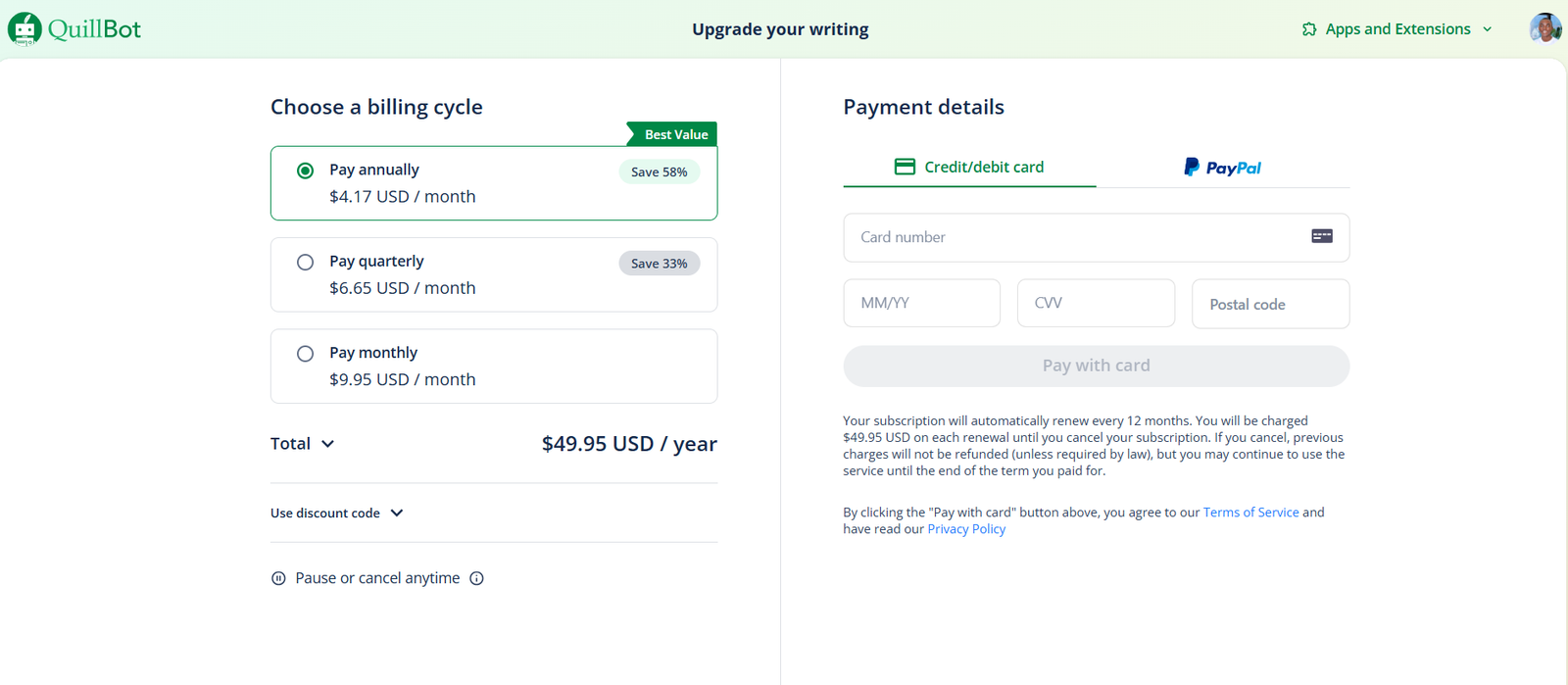
Pricing
(Source)
Free plan
- Free forever
- Limited paraphrasing modes
- Character limits per rewrite
- Access to basic summarizer and grammar checker
Premium plan
- Starts at $9.95/month (monthly billing)
- $4/month when billed annually
- Unlocks all paraphrasing modes
- Higher or unlimited character limits
- Faster processing and full tool access
What users like:
- Strong meaning preservation
- Simple, predictable paraphrasing behavior
- Useful for academic and explanatory writing
Limitations:
- Not designed for full article rewrites or restructuring
- Tone control is limited compared to marketing-focused tools
- Output can sound repetitive if used heavily
Overall score: 7.6/10
Verdict:
A dependable choice for academic and informational rewriting where accuracy matters more than creativity. Skip it if you need deep structural rewrites or strong voice control.
9. HIX.AI
(Source)
Best for:
Writers, marketers, and content creators who want an all-in-one AI writing and rewrite platform with a variety of tools, including chat, text generation, paraphrasing, and a “humanizer” aimed at making AI output read more naturally.
HIX.AI is a suite of writing helpers that includes content generation modules, browser extension tools, and a rewrite/paraphrasing tool that can adjust tone and phrasing. As part of this suite, its rewriting features are best for general drafts, structural rewrites, and style adjustments rather than deep, precision-focused editing.
Key rewriting features:
HIX.AI combines several writing components that can support rewriting tasks:
- Content rewriter/paraphrasing tool that restructures or rephrases input text.
- Chat interface and editor to refine existing content or ask for variations.
- Humanizer/Bypass tool aimed at making AI-generated text sound more human-written, although effectiveness varies by detection method.
- Browser extension and integrations that let you trigger rewrites inline with your workflow.
Rewrite quality:
Outputs are functional for general purpose rewriting, especially structural rewords or tone tweaks, but can feel less polished or nuanced compared with dedicated rewriting models, and usually need human review for clarity and higher-stakes content.
Tone & control:
Tone adjustment and rewrite direction depend on prompts and tool choice within the suite. It can steer phrasing for casual vs formal tones but doesn’t offer the same depth of voice consistency control found in more specialized rewriting tools.
Accuracy & meaning preservation:
Meaning preservation is mixed: it can retain core ideas in many cases, but the “humanization” features, especially those marketed to bypass AI detectors — are not a guarantee of factual accuracy or style fidelity, and outputs should always be checked for the original intent.
Ease of use:
HIX.AI’s dashboard and browser tools are relatively straightforward to use, but the wide array of models and settings can be overwhelming for users looking for a simple rewriting interface.
Pricing

Free plan
- $0/month — Basic access to HIX.AI’s rewrite and chat tools with usage limits.
HIX AI pro plan
- $7.99/month (billed yearly) — Includes access to GPT-3.5, HIX Editor, basic writing and rewrite tools, and a limited word quota.
HIX AI Unlimited plan
- $11.99/month (billed yearly) — Larger word quotas and priority support, suitable for regular general writing and rewrites.
What users like:
- Broad suite of writing and rewrite tools in a single platform.
- Browser extension and model flexibility — can trigger rewrites and suggestions across apps.
- Humanizer/paraphrase features can help simplify or reframe content quickly.
Limitations:
- Mixed user experiences with pricing and value relative to features.
- Rewrite quality and humanization claims are inconsistent, especially for complex or technical text.
- Billing and support issues reported by some users. Trustpilot
Overall score: 6.8/10
Verdict:
HIX.AI is a wide-ranging writing suite that can handle basic rewrites and tone adjustments, but it’s not a specialist for high-accuracy rewriting — better for general drafts and simple rewording than deep editorial refinement.
10. INK
(Source)
Best for:
Content marketers, SEO-focused writers, and creators who want an AI writing assistant that blends rewriting with built-in SEO scoring and optimization.
INK is an all-in-one content platform that combines AI-assisted writing, SEO guidance, readability suggestions, and topic relevance scoring. Its rewrite/paraphrase tools operate alongside SEO scoring to help you update content in a way that supports discoverability as well as clarity.
Key rewriting features:
INK’s rewriting capabilities are part of a broader AI writing + SEO suite that lets you:
- rephrase or restructure existing text through its AI editor
- refine tone and clarity with semantic SEO feedback
- balance readability and keyword relevance in rewrites
- see live SEO scoring as you edit or rewrite content
The system is designed to help optimize content for audiences and search engines at the same time.
Rewrite quality:
Outputs tend to be clear and SEO-driven rather than purely creative or stylistic, which can be an advantage if your priority is meaning + search performance. However, the focus on optimization can make rewrites feel slightly formulaic if you’re solely after creative rewording.
Tone & control:
Steering tone is possible via command prompts and editing suggestions, but it’s less granular than tools focused solely on tone control. Its strength lies more in guiding rewrites toward readability and search relevance than deep stylistic shifts.
Accuracy & meaning preservation:
Meaning preservation is generally solid for non-technical content, and the additional SEO scoring helps retain topic relevance. Still, for highly technical or nuanced claims, human review remains important.
Ease of use:
Some users find the multi-feature dashboard takes a moment to learn, but once you’re familiar, it’s easy to rewrite, score, and optimize in one place without switching apps or tools.
Pricing
INK offers a freemium experience with a trial and paid tiers designed for solo creators through teams.
Free plan / trial
- Free trial: 5-day trial with 10,000 words and full access to features without a credit card.
Professional plan
- $39/month (billed annually).
- Unlimited AI writing and SEO articles, unlimited SEO scoring, full access to templates, AI content generation, and rewriting tools.
Enterprise plan
- $99/month (billed annually).
- Includes 3 paid user seats, advanced team management, performance tracking, premium support, and all Professional features.
What users like
- Built-in SEO scoring and optimization alongside rewriting helps align rewrites with discoverability goals.
- Unlimited generation and templates on paid plans.
- Good for integrated workflows where search and content quality both matter.
Limitations
- SEO-centric focus may feel overly structured if you want purely stylistic rewrites.
- Free access is limited to trial and lighter-use tiers.
- Some learning curve due to breadth of features.
Overall score: 7.9/10
Verdict:
INK works best when your rewriting goals include SEO optimization and readability scoring. If you primarily want creative or tone-driven rewrites without SEO considerations, pairing it with a tool more focused on stylistic control may help.
11. Sudowrite
(Source)
Best for:
Creative writers, fiction authors, and storytellers who want expressive, imaginative rewrites.
Sudowrite is very deliberately not a general-purpose rewriting tool. It’s built for fiction and creative prose, and that shows in how it rewrites: prioritizing mood, imagery, pacing, and narrative voice over strict factual or structural fidelity.
Key rewriting features:
Sudowrite’s rewriting tools are framed around creative improvement:
- Paragraph and scene rewriting with stylistic variation
- “Describe” and “Expand” tools to enrich prose and imagery
- Rewrite options focused on showing vs telling
- Brainstorming tools for plot, dialogue, and character beats
Rewrite quality:
For creative prose, the output can feel impressively human: expressive, varied, and often more vivid than the original. For non-fiction, marketing, or instructional content, however, the rewrites tend to wander or embellish unnecessarily.
Tone & control:
Tone control is creative-first. You can guide emotional direction and narrative style, but you cannot reliably enforce restraint, neutrality, or conservative phrasing. Sudowrite assumes you want imaginative reinterpretation.
Accuracy & meaning preservation:
This is not Sudowrite’s strength. While it preserves creative intent, it does not reliably preserve factual meaning. It may add details, shift emphasis, or subtly change implications, which is unacceptable for technical, academic, or client-facing factual content.
Ease of use:
The interface is clean and writer-friendly, especially for long-form creative work. The learning curve is low if you’re a fiction writer, but the toolset may feel confusing if you’re coming from SEO or marketing workflows.
Pricing
(Source)
Free trial
- Limited trial available for new users to test core features.
Hobby & Student plan
- $10/month
- Lower monthly word allowance
- Access to core rewrite and creative tools
- Best for light or experimental use
Professional plan
- $22/month
- Higher monthly word limits
- Full access to rewrite, expand, describe, and brainstorming tools
- Suitable for regular fiction writers
Max plan
- $44/month
- Highest word limits
- Intended for heavy or daily creative writing
- All features unlocked
What users like
- Rewrites often sound surprisingly human and expressive
- Excellent for improving prose quality and creativity
- Strong support for fiction workflows
Limitations
- Not suitable for factual, technical, or marketing rewrites
- Meaning drift is common outside creative contexts
- Word limits can be restrictive for long projects
Overall score: 7.9/10
Verdict:
Sudowrite excels at creative rewriting and prose enhancement, but it’s the wrong tool for accuracy-dependent or professional content. Ideal for fiction writers; skip it for blogs, SEO, or client work.
12. TextCortex
(Source)
Best for:
Professionals, business writers, and teams who want controlled rewrites with strong context retention, especially for business, technical, and knowledge-heavy content.
Key rewriting features:
TextCortex’s rewriting is built around contextual understanding:
- Paragraph and document rewriting with context awareness
- Sentence rephrasing and clarity improvements
- Tone adjustment (formal, concise, professional, etc.)
- Knowledge-base and memory features for consistent rewrites
- Browser extension for rewriting across tools (Docs, Notion, email, etc.)
Rewrite quality:
The output is generally clean, restrained, and professional. It doesn’t try to over-polish or embellish, which helps avoid the “AI voice” problem.
Tone & control:
Tone control is solid but conservative. You can guide rewrites toward clearer, more professional phrasing, but you won’t get dramatic stylistic shifts. This is intentional as TextCortex prioritizes reliability over flair.
Accuracy & meaning preservation:
This is one of TextCortex’s strongest areas. Because it rewrites with broader context in mind, it’s less likely to introduce meaning drift than tools optimized for creativity or marketing copy. Still, factual review is recommended for high-stakes material.
Ease of use:
The UI is straightforward, and the browser extension makes it easy to rewrite content wherever you’re working. There’s a short learning curve if you use advanced features like memory or knowledge bases, but basic rewriting is friction-free.
Pricing
(Source)
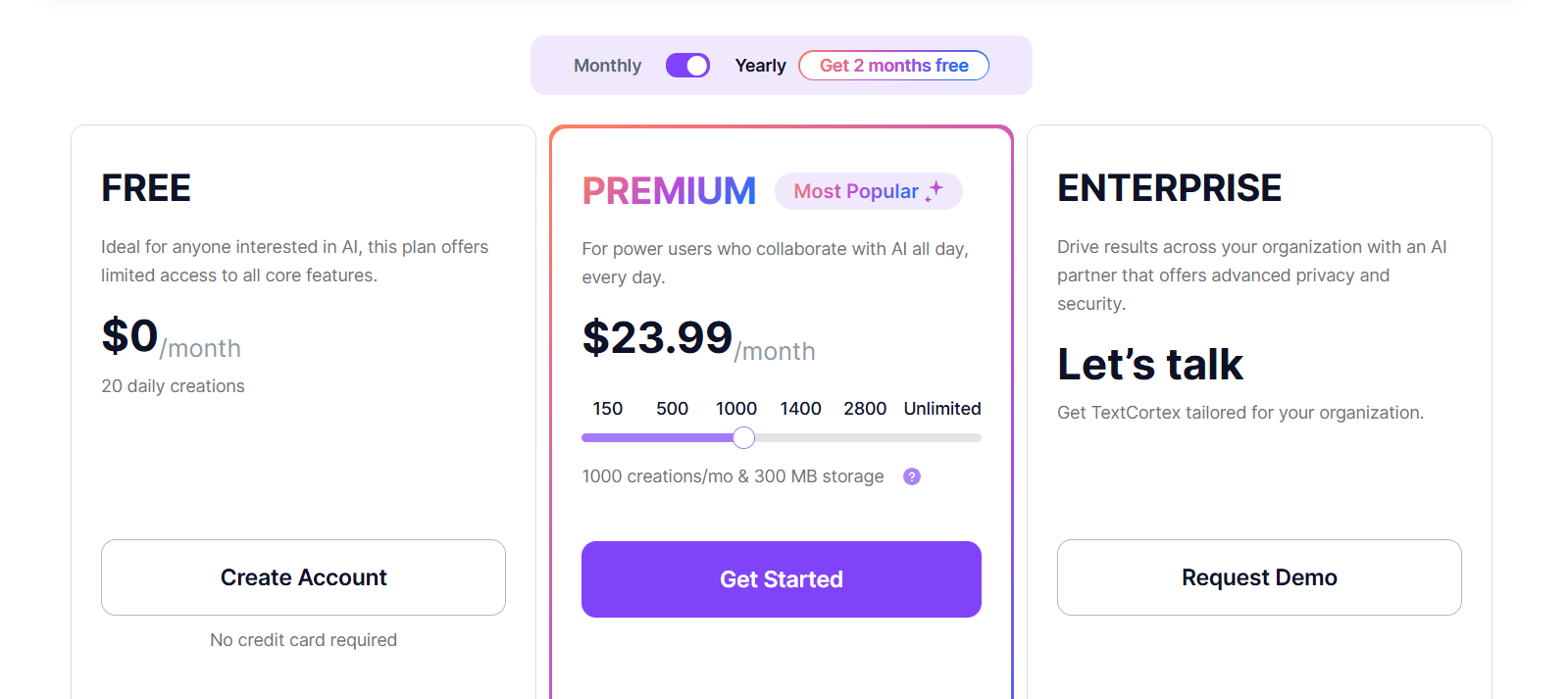
TextCortex pricing is tiered and credit-based, with variations depending on billing cycle and region.
Free plan
- Free forever
- Limited monthly credits
- Access to basic rewriting, paraphrasing, and browser extension
- Suitable for light or occasional rewriting
Premium plan
- Starts around €23.99/month (when billed monthly; cheaper on annual plans)
- Higher monthly credit limits
- Full access to rewriting, tone control, summaries, and extensions
- Intended for regular professional use
Enterprise plan
- Custom pricing
- Advanced security, integrations, and dedicated support
What users like:
- Strong meaning preservation and context awareness
- Professional, non-flashy rewrite output
- Useful browser extension for everyday work
Limitations:
- Not ideal for creative or highly persuasive rewrites
- Credit system can feel restrictive for heavy users
- Tone control is more restrained than marketing-focused tools
Overall score: 8.0/10
Verdict:
TextCortex is a dependable choice for business and knowledge-based rewriting where accuracy and clarity matter more than creativity. Skip it if you want bold stylistic changes or imaginative rewrites.
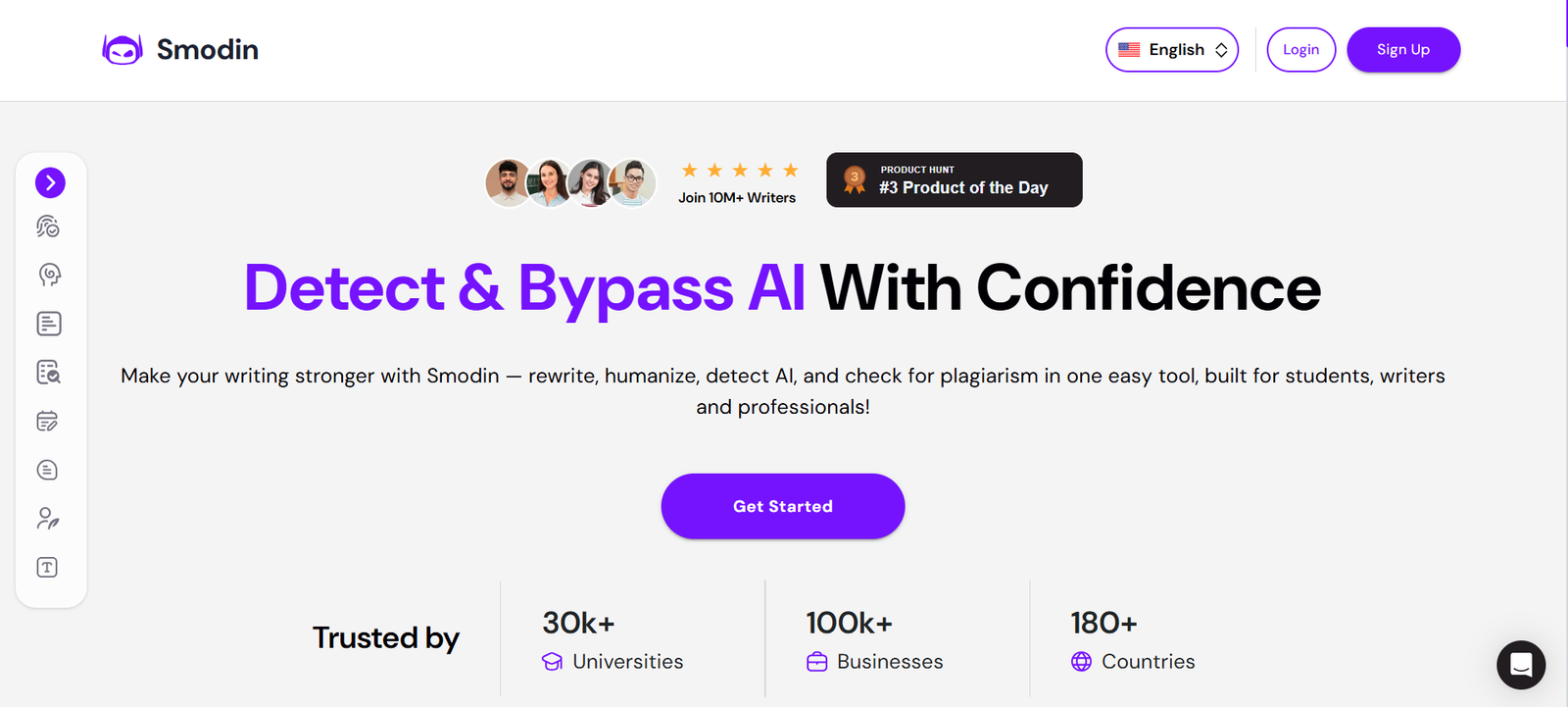
13. Smodin
(Source)
Best for:
Students and casual users who want quick paraphrasing or rewriting for short text without a complex interface.
Smodin is a lightweight AI rewriting and paraphrasing tool that focuses on speed and accessibility. It’s commonly used for short rewrites, basic paraphrasing, and quick language simplification, especially in academic or personal contexts.
It’s functional, but very much a baseline tool in this category.
Key rewriting features:
Smodin’s rewriting capabilities are straightforward and minimal:
- Sentence and paragraph rewriting
- Paraphrasing with adjustable intensity
- Multi-language support
- Basic summarization and text generation tools
Rewrite quality:
The output is serviceable for short passages but often feels mechanical. Rewrites can sound stiff or repetitive, especially when applied to longer text. It’s usable for quick paraphrases, but rarely polished enough to publish without editing.
Tone & control:
Tone control is limited. You can influence how aggressive the paraphrasing is, but you can’t reliably steer voice, intent, or stylistic direction. This makes it unsuitable for brand-sensitive or persuasive writing.
Accuracy & meaning preservation:
Because Smodin tends to stay close to the original wording, it usually preserves surface meaning. However, awkward phrasing or small logic issues can appear, especially when paraphrasing more complex ideas. Human review is still necessary.
Ease of use:
Very easy to use. Paste text, select rewrite options, and generate output. There’s almost no learning curve, which is one of its main advantages.
Pricing
Smodin offers both free access and subscription tiers, with usage limits increasing by plan.

Free plan
- Free forever
- Limited daily or monthly rewrites
- Word/character limits per input
- Access to basic rewriting and paraphrasing tools
Writing plan
- Starts around $9/month (billing varies by region and cycle)
- More rewrite limits
- Longer text support
- Removal of most daily caps
Reviewing plan
- Starts at $15/month
- Higher usage limits
- Full access to rewriting, paraphrasing, summarization, and language tools
Ultimate plan
- Starts at $18/month
- Highest usage limits
- Full access to rewriting, paraphrasing, summarization, and language tools
- Priority processing
What users like
- Very fast and simple to use
- Works for quick paraphrasing tasks
- Free tier allows basic testing without commitment
Limitations
- Rewrite quality is inconsistent
- Weak tone and voice control
- Not suitable for professional, marketing, or long-form rewriting
Overall score: 6.6/10
Verdict:
Smodin is fine for quick, low-stakes paraphrasing, but it falls short for polished or professional rewriting. Useful as a basic utility, not as a primary rewriting tool.
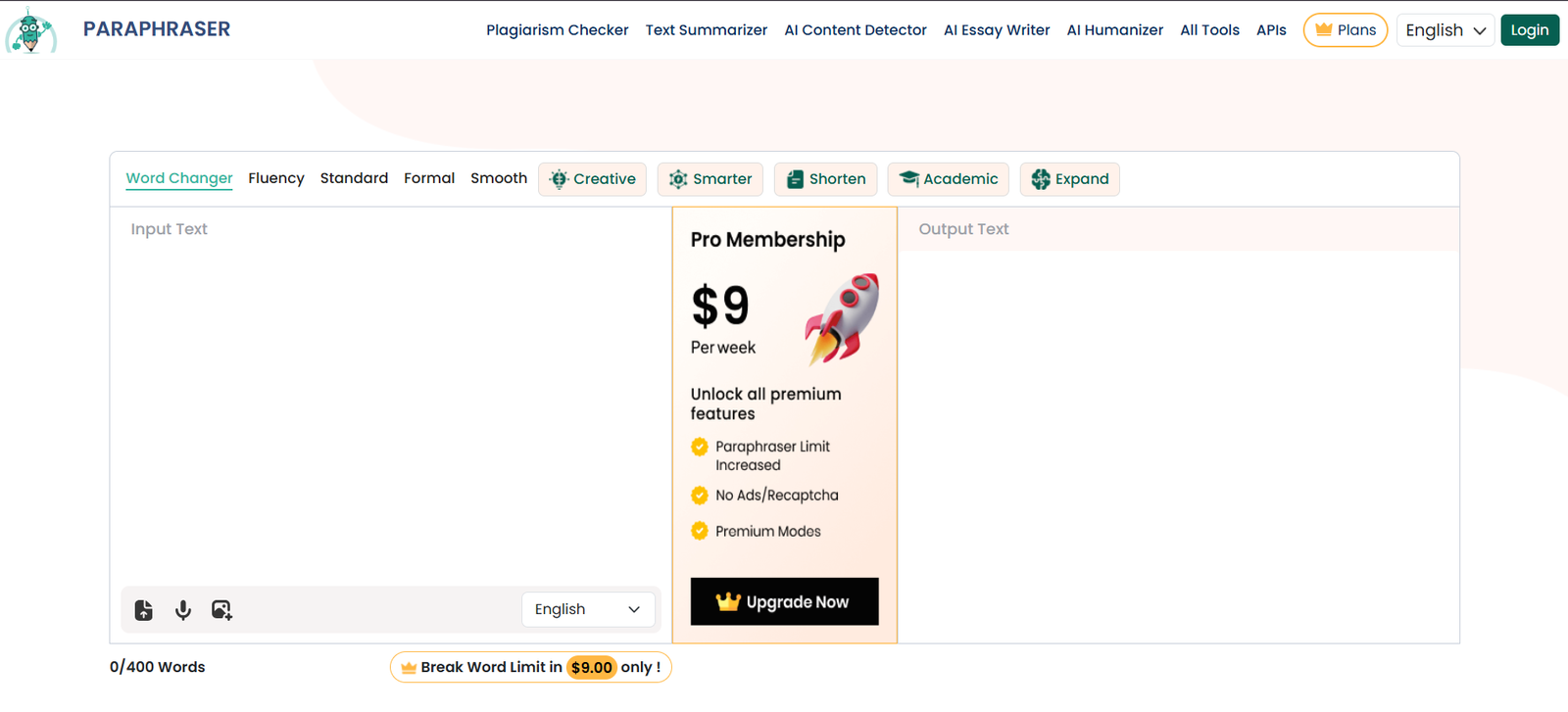
14. Paraphraser.io
(Source)
Best for:
Users who need quick, no-frills paraphrasing for short passages and don’t need tone nuance or structural rewriting.
Paraphraser.io is a lightweight paraphrasing tool that prioritizes speed and accessibility. It’s commonly used for short rewrites, basic rewording, and quick alternatives rather than thoughtful content refinement.
Key rewriting features:
The toolset is intentionally minimal:
- Sentence and paragraph paraphrasing
- Multiple rewrite modes (e.g., Fluency, Standard, Creative, Academic. Availability varies by plan.)
- Basic synonym replacement and rewording
- Support for multiple languages
There’s little support for long-form restructuring or intent-driven rewriting.
Rewrite quality:
Outputs are hit-or-miss. For simple sentences, rewrites can be acceptable. For anything longer or nuanced, phrasing often becomes awkward or repetitive. It’s generally not publish-ready without manual cleanup.
Tone & control:
Tone control is shallow and mode-based. You can select a style, but you can’t reliably guide voice, persuasion level, or audience intent. This limits its usefulness for brand or client work.
Accuracy & meaning preservation:
Because the tool stays close to the original sentence structure, surface meaning is usually preserved. However, clarity can suffer, and complex ideas may come out distorted or overly simplified. Human review is required.
Ease of use:
Extremely easy to use. Paste text, select a mode, and rewrite. No setup or learning curve.
Pricing
(Source)
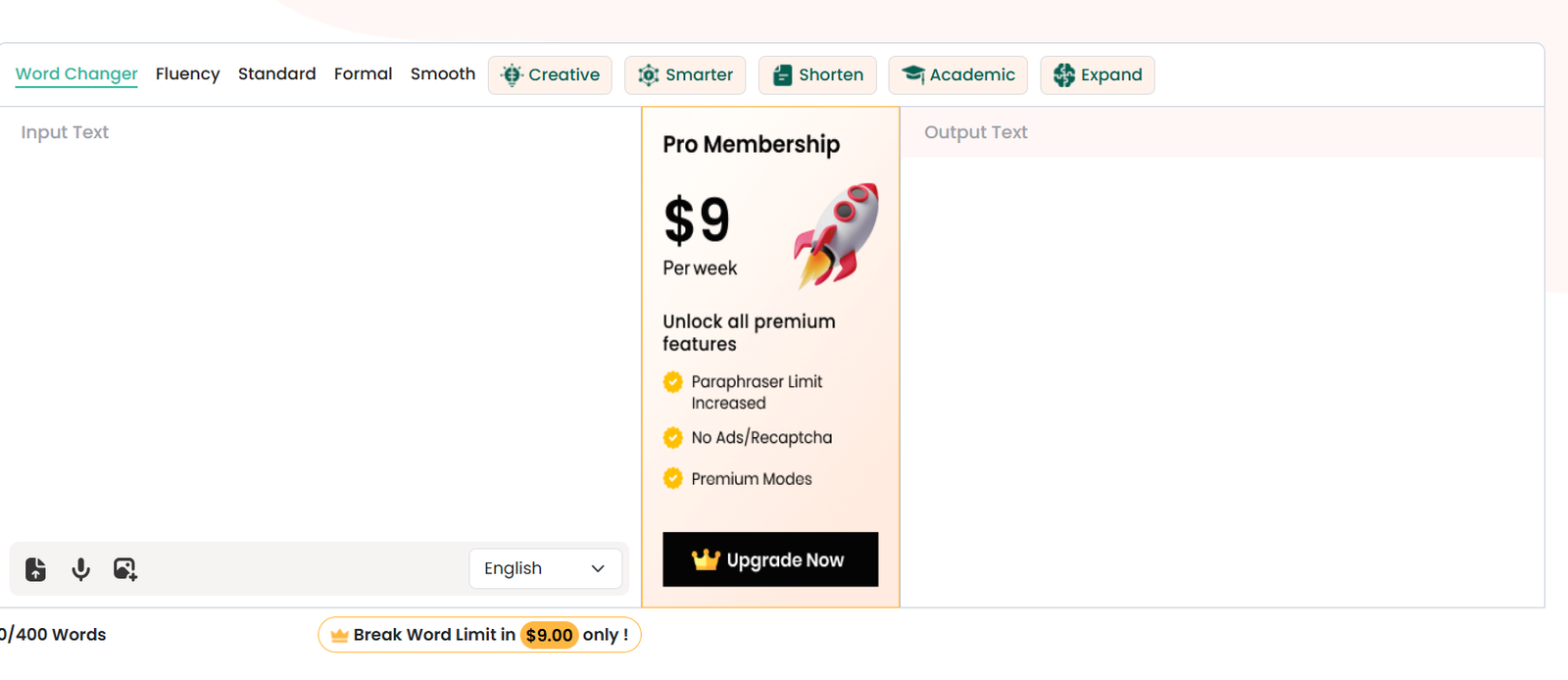
Paraphraser.io offers a free tier and paid subscription with expanded limits and modes.
Free plan
- Free forever
- Limited rewrite modes
- Word/character limits per input
- Slower processing
- Suitable for occasional, short paraphrasing
Pro membership
- Starts around $9/week
- Unlocks all rewrite modes
- Higher or unlimited word limits
- Faster processing
- Intended for frequent use
What users like:
- Very fast and simple
- Free tier allows quick testing
- Works for basic paraphrasing needs
Limitations:
- Weak rewrite quality for long or nuanced text
- Limited tone and intent control
- Not suitable for professional or client-facing content
Overall score: 6.2/10
Verdict:
Paraphraser.io works as a basic paraphrasing utility, but it’s not built for quality rewriting. Fine for quick, low-stakes use. However, skip it for serious writing or editing workflows.
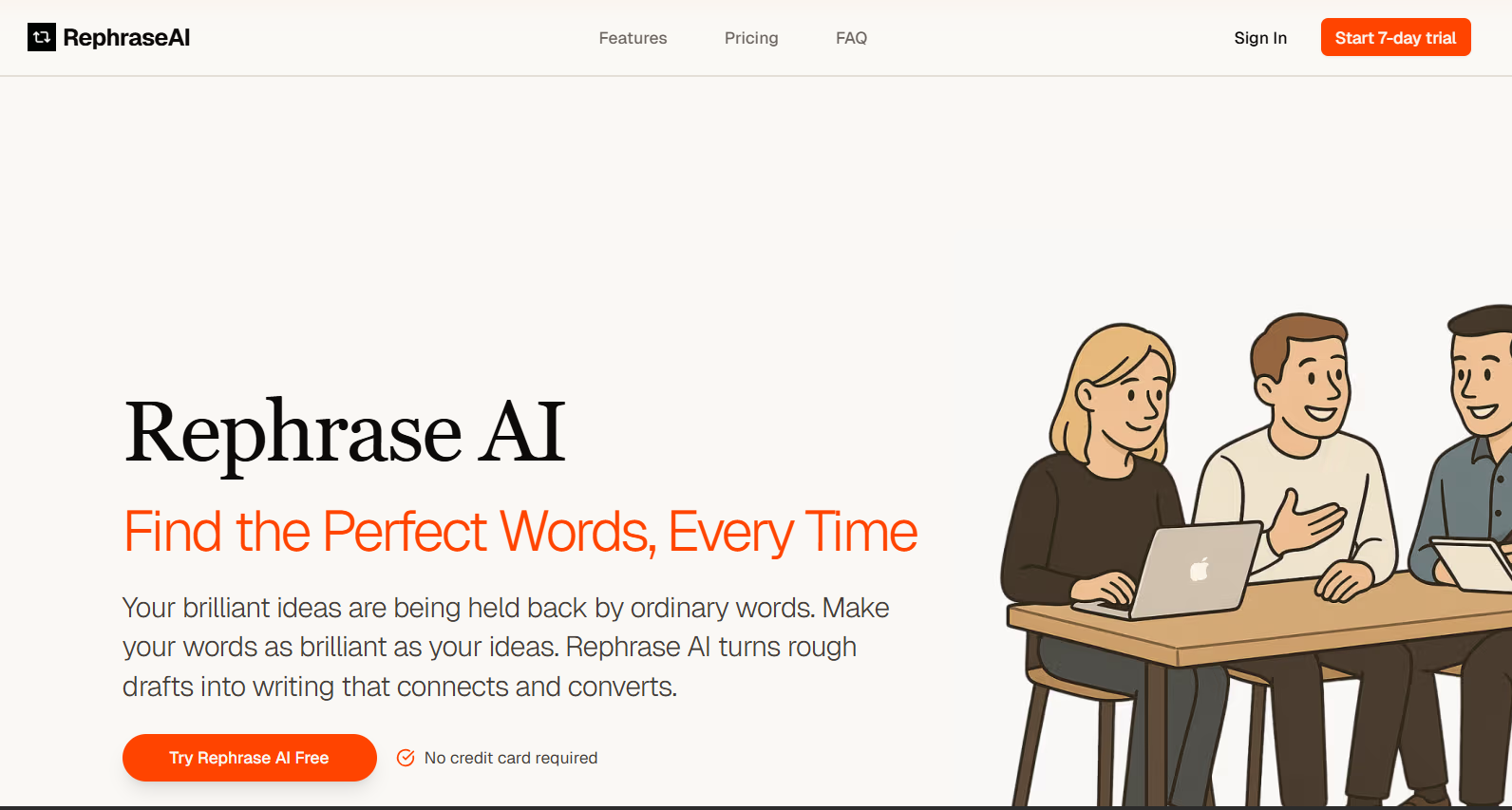
15. Rephrase AI
(Source)
Best for:
Teams or developers who need sentence rewriting and text variation, rather than hands-on editorial rewriting.
Rephrase.ai is not really built for writers in the traditional sense. It’s more of a programmatic text rephrasing engine designed for generating variations at scale.
If you’re expecting a polished editor or nuanced rewrite controls, this tool will feel limited.
Key rewriting features:
Rephrase.ai focuses on automation and scalability:
- Sentence-level rewriting and rephrasing
- Text variation generation via API
- Support for short-form copy and snippets
- Emphasis on speed and consistency over style
There’s little support for long-form rewriting or structural changes.
Rewrite quality:
For short sentences, rewrites are acceptable and usually readable. For paragraphs or nuanced content, quality drops quickly. Output often feels generic and lacks rhythm, making it unsuitable for publish-ready content without editing.
Tone & control:
Tone control is minimal. You get variations, but there’s no reliable way to enforce brand voice, persuasion level, or stylistic intent beyond basic rewording.
Accuracy & meaning preservation:
Surface meaning is usually preserved because rewrites stay close to the original sentence structure. However, subtle nuance can be lost, and the tool isn’t designed to protect complex claims or careful phrasing.
Ease of use:
If you’re a developer or working with APIs, setup is straightforward. For writers or editors, the experience is less friendly as there’s no rich editor or workflow designed around human revision.
Pricing
(Source)
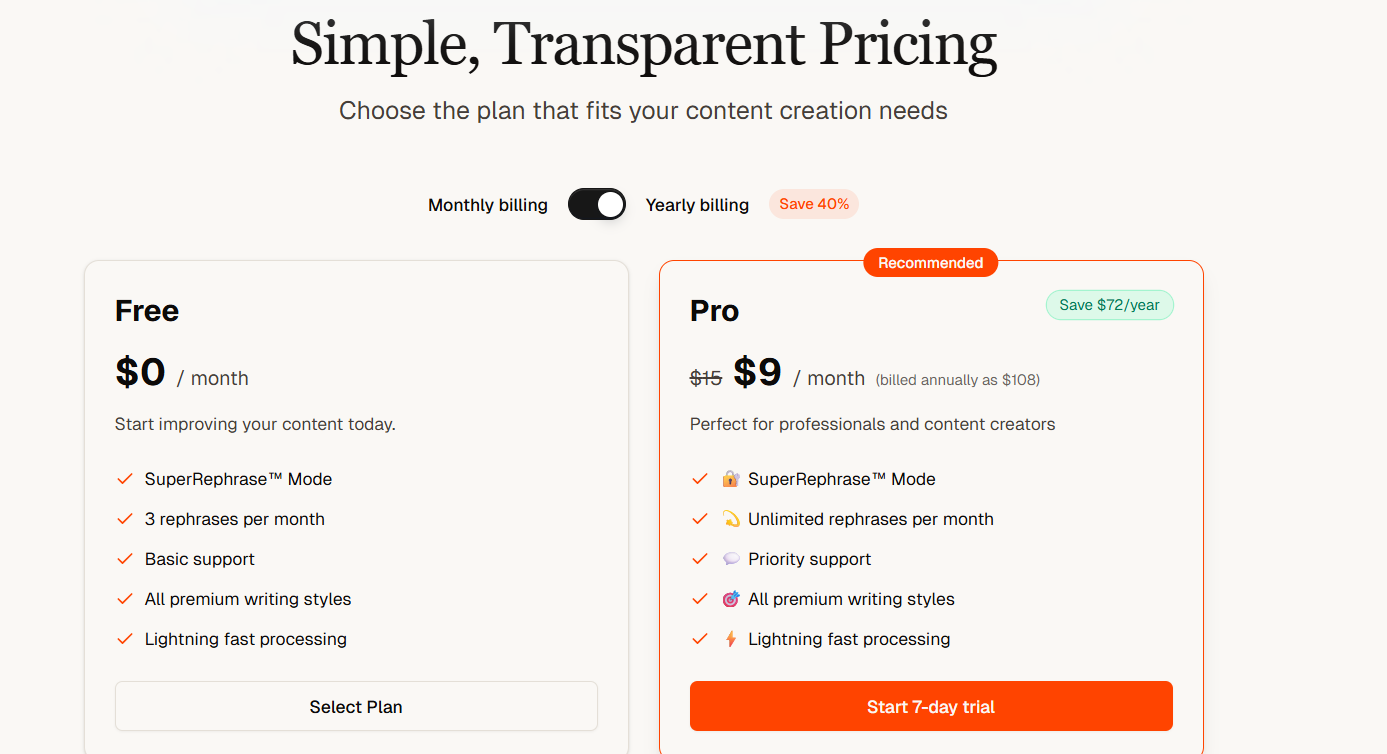
Free plan
- Limited trial access available
- Intended mainly for evaluation, not ongoing use
Pro plan
- Starts at $9 per month (billed annually)
- Suited for applications generating large numbers of rewrites programmatically
What users like:
- Fast sentence variation at scale
- Lightning fast processing
Limitations:
- Weak tone and voice control
- Unsuitable for long-form or editorial rewriting
Overall score: 5.8/10
Verdict:
Rephrase.ai works for automated sentence variation. It’s a developer tool first, and a writing tool only in the loosest sense.
16. NeuralText
(Source)
Best for:
SEO teams and content marketers who want to rewrite existing content as part of a research-driven SEO workflow, not as a standalone editing task.
NeuralText sits somewhere between a rewriting tool and an SEO content platform. Rewriting isn’t its headline feature—it’s something you do inside a broader process that includes keyword research, SERP analysis, outlines, and optimization. That context shapes how its rewrites behave.
Key rewriting features:
NeuralText supports rewriting primarily within its content editor:
- Section-level rewriting inside an SEO editor
- Content refresh and expansion based on SERP insights
- Paragraph rewording aligned with target keywords
- AI assistance for improving clarity and topical coverage
It’s less about “rewrite this paragraph differently” and more about “improve this section so it better matches search intent.”
Rewrite quality:
The output is structured and readable, but rarely elegant. Rewrites tend to be safe and informational rather than expressive. That works well for SEO updates, but less so for voice-driven or persuasive content.
Tone & control:
Tone control is limited and indirect. You can influence clarity and emphasis through prompts, but you won’t get fine-grained control over voice, emotion, or brand personality. The tool prioritizes relevance and completeness over stylistic nuance.
Accuracy & meaning preservation:
Meaning preservation is generally solid for informational content. Because rewrites are guided by topic coverage and SERP alignment, NeuralText is less likely to introduce wild inaccuracies, but it can flatten nuance or overgeneralize if you’re not careful.
Ease of use:
If you’ve used SEO tools before, the interface will feel familiar. If not, there’s a learning curve. Rewriting is easy once you’re inside the editor, but it’s not a quick paste-and-go experience.
Pricing

(Source)
NeuralText uses subscription-based pricing.
Starter plan
- Starts around $19/month (typically billed annually)
- Limited AI credits
- Access to basic content editor, rewriting, and keyword research
- Best for solo users testing SEO-driven rewrites
Basic plan
- Around $49/month
- Higher AI and content limits
- Full access to content editor, rewriting tools, and SERP analysis
- Suitable for regular blog updates and content refreshes
Pro plan
- Around $119/month
- Multiple seats, shared projects, higher limits
- Intended for agencies or in-house SEO teams
What users like:
- Rewriting is tied directly to SEO research
- Helpful for updating existing blog content
- Structured editor keeps content focused
Limitations:
- Not a rewrite-first tool
- Weak tone and voice control
- Overkill if you just want simple paraphrasing
Overall score: 7.3/10
Verdict:
NeuralText is useful when rewriting is part of an SEO refresh workflow. If your priority is voice, persuasion, or stylistic control, it’s not the right primary tool.
17. Frase
(Source)
Best for:
Content marketers and SEO teams who want to rewrite and update existing blog content using SERP-driven guidance.
Frase is first and foremost an SEO research and content optimization tool. Rewriting happens inside that ecosystem, usually when you’re refreshing posts, filling gaps, or aligning sections more closely with search intent.
Key rewriting features:
Frase’s rewriting tools live within its content editor and research workflow:
- Section and paragraph-level rewriting inside the editor
- AI-assisted content refreshes based on SERP analysis
- Suggestions to improve clarity, coverage, and relevance
- Ability to rewrite individual sections without touching the rest of the article
Rewrite quality:
Rewrites are clear and serviceable, but not stylistically rich. Output tends to be neutral and informational, which works well for SEO updates but can feel flat for brand-driven or persuasive writing.
Tone & control:
Tone control is limited. You can guide clarity and structure, but you won’t get fine-grained voice shaping or emotional nuance. Frase optimizes for relevance and completeness over personality.
Accuracy & meaning preservation:
Generally reliable for blog and informational content. Because rewrites are grounded in SERP context, Frase is less likely to hallucinate, but it can oversimplify or generalize nuanced arguments if not reviewed.
Ease of use:
If you already work with SEO tools, Frase is easy to pick up. Rewriting fits naturally into the workflow once research is done, but it’s not a quick paste-and-rewrite tool.
Pricing
(Source)
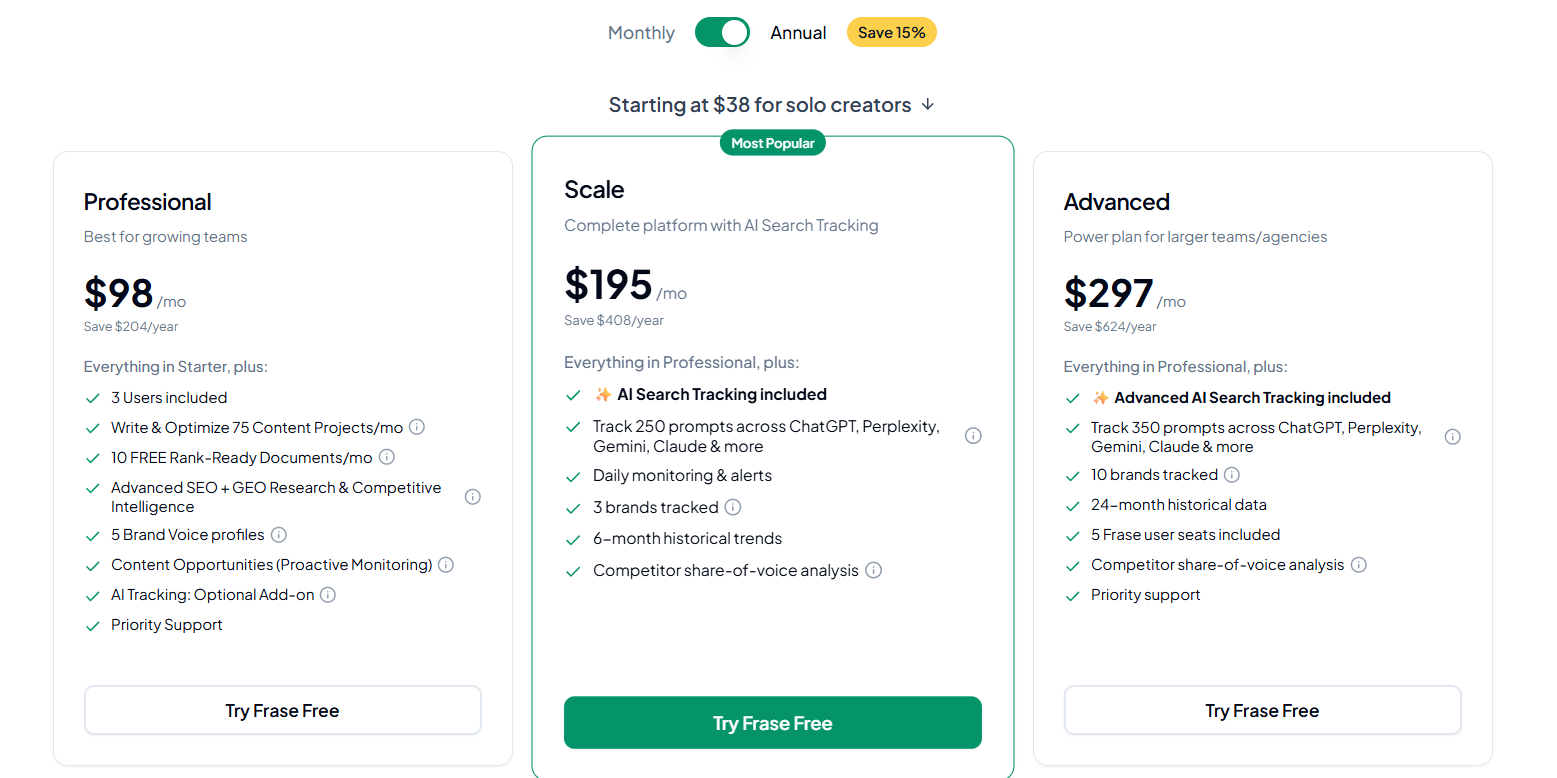
Frase uses subscription-based pricing, with plans differentiated mainly by document limits and collaboration features.
Professional plan
- $98/month (when billed annually)
- Limited number of documents per month
- Access to content editor, rewriting tools, and basic SERP research
- Best for solo bloggers updating content occasionally
Scale plan
- $195/month (annual billing)
- Higher document limits
- Full content editor and rewrite access
- Suitable for consistent blog updates and SEO refreshes
Advanced plan
- $297/month (annual billing)
- Multiple users
- Shared documents and collaboration features
- Intended for agencies or in-house teams
What users like:
- Strong SERP-based guidance for content updates
- Useful for refreshing existing posts rather than rewriting from scratch
- Keeps rewrites aligned with search intent
Limitations:
- Weak tone and voice control
- Not designed for creative or persuasive rewrites
- Overkill if you just want simple paraphrasing
Overall score: 7.4/10
Verdict:
Frase works best when rewriting is part of an SEO-driven content refresh. If your goal is stylistic improvement or brand voice refinement, you might need a different tool.
18. Chimp Rewriter

(Source)
Best for:
Users who need bulk article spinning or automated text variation at scale.
Chimp Rewriter is an older-school rewriting tool that predates most modern AI writers. While it has added AI features over time, its core philosophy is still spinning and automation. That distinction matters, because it strongly affects output quality.
Key rewriting features:
- Bulk article spinning and rewriting
- Synonym replacement and phrase variation
- AI-assisted rewrite modes layered on top of spinning logic
- Desktop-based software (Windows), not a browser app
- Supports mass processing of multiple articles at once
This makes it very different from modern editor-style tools.
Rewrite quality:
Rewrite quality is generally low by modern standards. Output often feels mechanical, awkward, or incoherent unless heavily edited afterward. Even with AI modes enabled, rewrites tend to prioritize variation over readability.
Tone & control:
Tone control is minimal. You can influence how aggressive the spinning is, but you cannot reliably control voice, persuasion, or stylistic nuance. The tool is not designed for brand-sensitive or audience-aware writing.
Accuracy & meaning preservation:
Meaning loss is common, especially when aggressive rewrite or spinning settings are used. Claims, qualifiers, and logical flow frequently break down, making the tool risky for any factual or professional content.
Ease of use:
Despite being feature-rich, the interface is dated and complex. There’s a significant learning curve, and the desktop-only setup feels clunky compared to modern web-based tools.
Pricing

(Source)
Monthly plan
- $15 per month
- Includes all core spinning and rewrite features
Yearly plan
- $99 per year
What users like
- Bulk processing and automation capabilities
- Works offline (desktop software)
Limitations
- Very poor rewrite quality by modern standards
- High risk of meaning distortion
- Outdated interface and workflow
- Unsuitable for professional or client-facing content
Overall score: 5.6/10
Verdict:
Chimp Rewriter is built for volume, not quality. It may suit bulk spinning use cases, but it should be avoided for serious rewriting, SEO content, or anything that needs to sound human.
19. Spinbot
(Source)
Best for:
Extremely low-stakes rewriting where speed matters more than quality — drafts, placeholders, or disposable text.
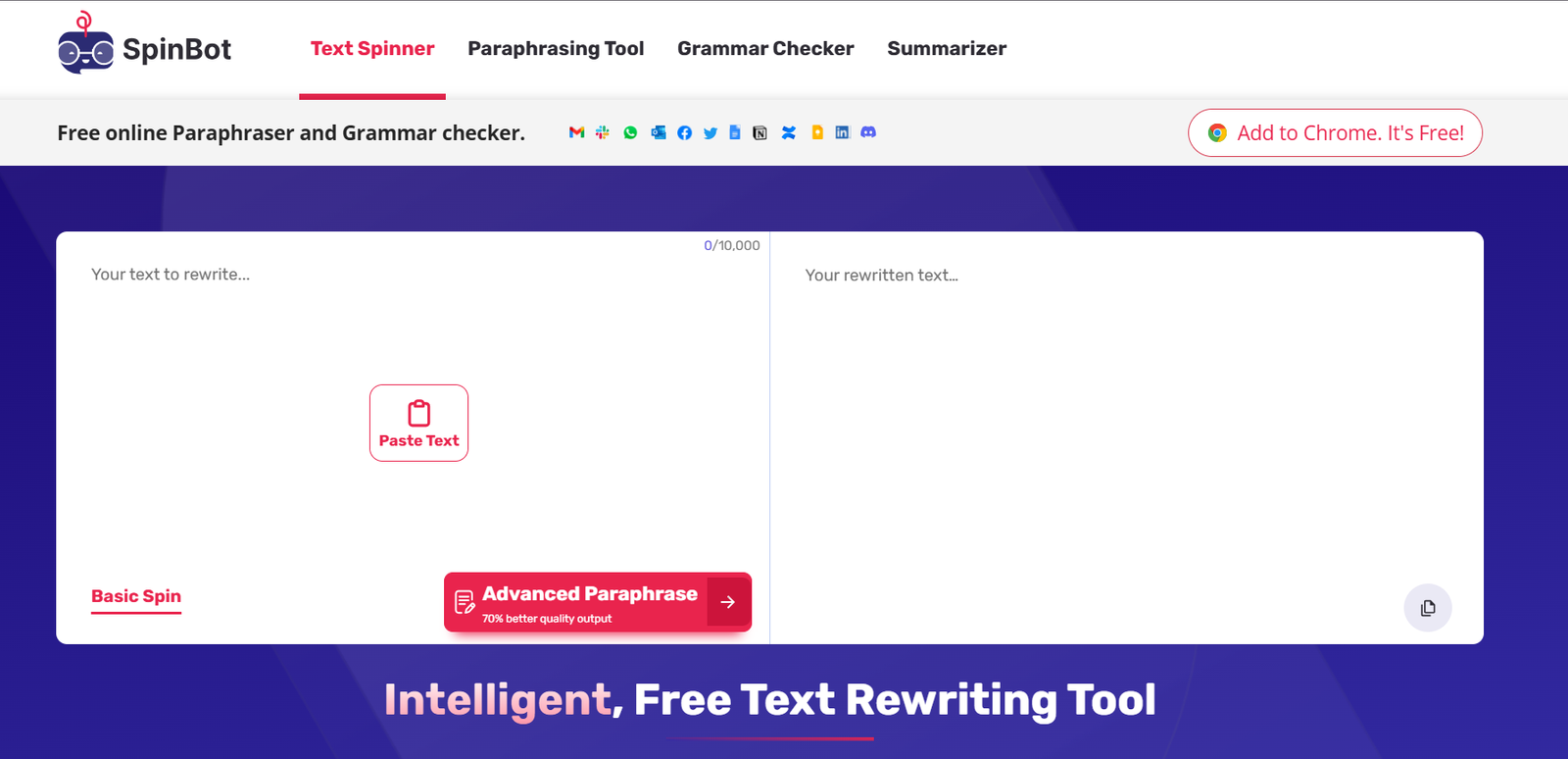
Spinbot is one of the simplest rewriting tools available. It’s essentially a one-click article spinner with minimal controls and no real editorial intelligence. It exists to produce variation quickly, not to improve writing.
Key rewriting features:
Spinbot’s feature set is intentionally barebones:
- One-click sentence and paragraph rewriting
- Basic synonym replacement
- No tone selection
- No structural control
- No long-form optimization
There’s no workflow, editor, or guidance layer — just input and output.
Rewrite quality:
Rewrite quality is very low. Output often sounds robotic, repetitive, or awkward, and sentence flow frequently breaks down. It’s not suitable for publishable content without heavy manual rewriting afterward.
Tone & control:
There is effectively no tone control. You can’t guide voice, audience intent, or stylistic direction in any meaningful way.
Accuracy & meaning preservation:
Meaning distortion is common. Because Spinbot relies heavily on surface-level synonym swapping, qualifiers and context are often lost. This makes it unsafe for factual, technical, or professional content.
Ease of use:
Extremely easy to use. Paste text, click a button, get output. That simplicity is its only real advantage.
Pricing
Spinbot is free to use.
What users like:
- Completely free entry point
- Very fast output
- No signup required for basic use
Limitations:
- Extremely poor rewrite quality
- No tone or intent control
- High risk of meaning loss
- Not suitable for SEO or client work
Overall score: 5.2/10
Verdict:
Spinbot is a utility for generating quick text variation, not a rewriting tool in any professional sense. Use only when quality truly doesn’t matter.
20. Article Rewriter Tool
(Source)
Best for:
Very basic sentence rewording when you need something different, fast, but quality expectations are low.
Key rewriting features:
The feature set is extremely limited:
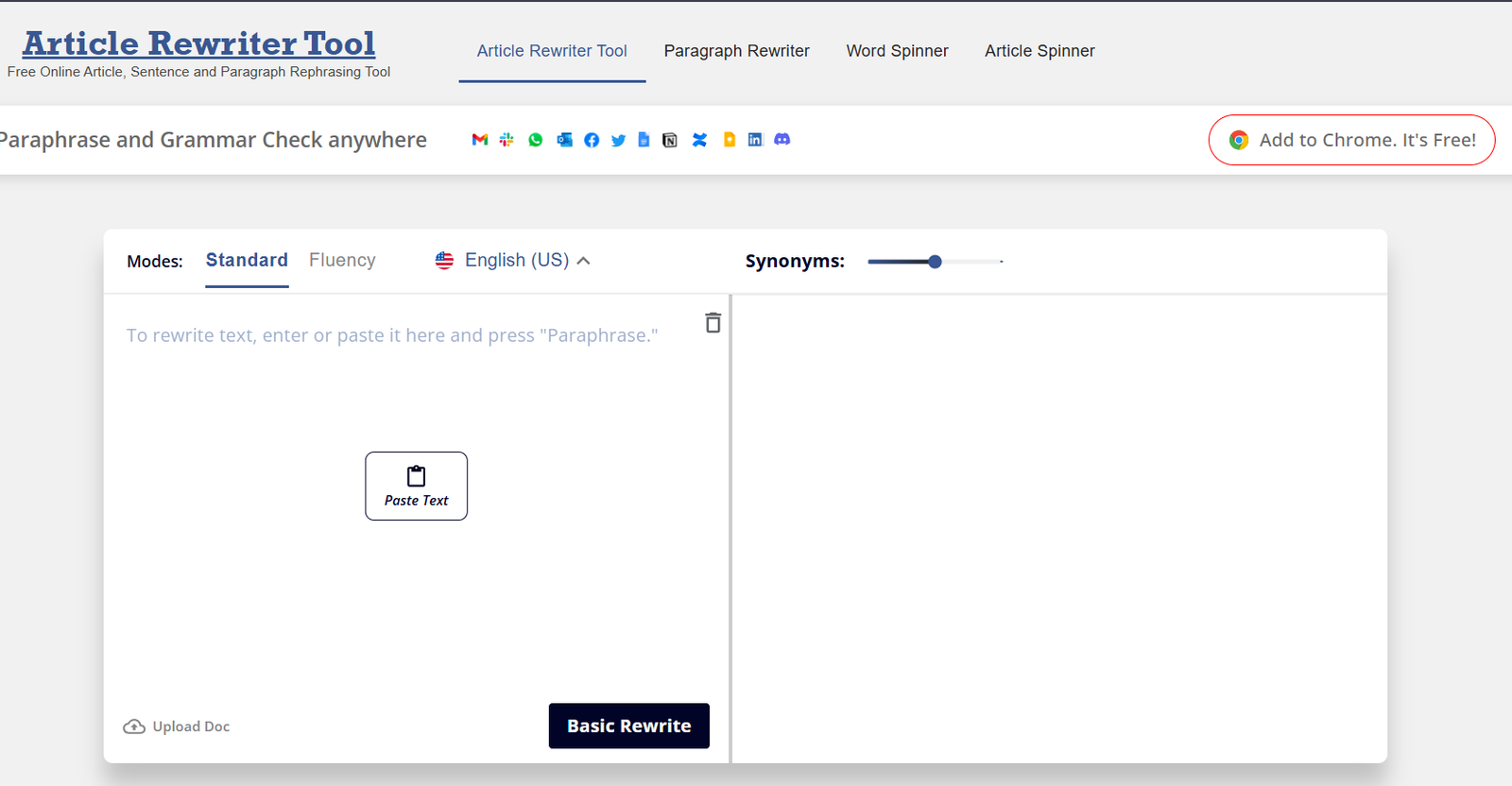
- Sentence and short-paragraph rewriting
- Basic synonym substitution
- One-click rewriting with no configuration
- No tone, intent, or audience controls
There’s no concept of structure, flow, or context.
Rewrite quality:
Rewrite quality is low. Output often reads awkwardly, with broken sentence flow and unnatural phrasing. It’s usually obvious that the text has been machine-rewritten, and most outputs require heavy manual correction.
Tone & control:
There is effectively no tone control. You can’t guide voice, persuasion level, or stylistic direction in any meaningful way.
Accuracy & meaning preservation:
Meaning preservation is inconsistent. While simple sentences may survive intact, anything with nuance, qualifiers, or technical detail is likely to be distorted.
Ease of use:
Very easy to use. Paste text, click rewrite, copy output. No learning curve at all.
Pricing
Free.
What users like:
- Extremely simple to use
- Free access for quick tests
- No signup required
Limitations:
- Very poor rewrite quality
- No control over tone or intent
- High risk of meaning loss
- Unsuitable for professional writing
Overall score: 5.5/10
Verdict:
Article Rewriter Tool functions as a last-resort paraphrasing utility. It’s not appropriate for SEO, client work, or any content where quality matters.
21. Peppertype
(Source)
Best for:
Marketing teams and founders who want quick rewrites of short-form marketing copy: ads, product descriptions, headlines, and landing-page sections.
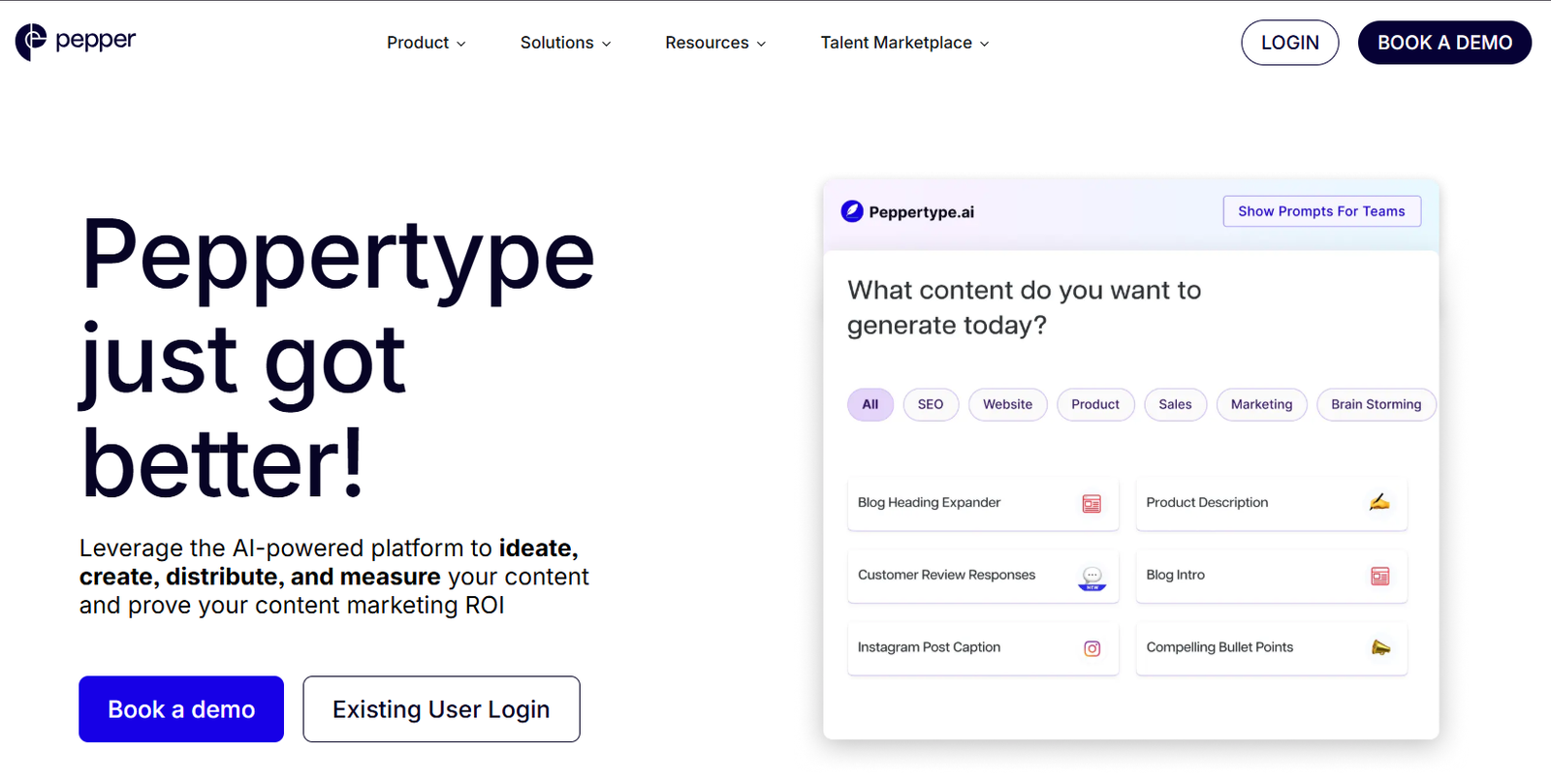
Peppertype is a marketing-first AI writing tool. Rewriting is framed around improving persuasion and clarity rather than restructuring long content. It’s strongest when you’re refining copy that already works and just needs tightening or variation.
Key rewriting features:
Peppertype’s rewriting tools are template-driven and marketing-oriented:
- Copy rewrite templates for ads, landing pages, and product pages
- Tone presets geared toward marketing (professional, persuasive, upbeat)
- Short-form paragraph and sentence rewrites
- Variant generation for A/B testing copy
It’s not designed for long blog posts or structural rewrites.
Rewrite quality:
For short marketing copy, output is usually clean, punchy, and usable with light edits. For longer text, quality drops off quickly and can feel repetitive or shallow.
Tone & control:
Tone control is decent within a marketing context. You can guide voice and energy, but control is limited to preset styles rather than fine-grained instructions.
Accuracy & meaning preservation:
Generally fine for marketing claims and non-technical content. Still, claims should be reviewed—especially for compliance-sensitive industries—since the tool prioritizes persuasion over precision.
Ease of use:
Very easy to use. The interface is clean, and templates make it simple to get rewrites quickly without prompt engineering.
Pricing:

(Source)
Peppertype uses subscription-based pricing, focused on teams rather than casual users.
Starter plan
- Starts around $35/month (annual billing is usually cheaper)
- Limited word credits
- Access to core rewrite and copy templates
- Best for solo marketers
Growth plan
- Higher monthly pricing at $199 per month (varies by seats and word limits)
- More credits, collaboration features, and priority support
- Designed for in-house marketing teams or agencies
Enterprise
- Custom pricing
- Advanced collaboration, usage controls, and support
What users like:
- Fast generation of marketing copy variations
- Simple interface and templates
- Useful for short-form, conversion-focused text
Limitations:
- Weak for long-form or structural rewriting
- Limited tone nuance outside marketing contexts
- Pricing can feel high for light users
Overall score: 7.5/10
Verdict:
Peppertype is effective for short marketing rewrites and copy variations, but it’s not built for articles, technical content, or deep editorial rewrites.
Which AI rewriting tools are best for different use cases
When you’ve gone through a long list of tool reviews, it’s still easy to feel stuck on “which one should I actually use?” This section pulls together practical recommendations so you can match the right tool to your specific rewriting goal.
1. Best tools for rewriting old blog posts
Rewriting an old post usually means improving clarity, tightening structure, and modernizing wording.
Best picks for blog rewrites:
- Writesonic – Strong structural rewrites and good meaning preservation make it reliable for updating content without misrepresenting the original.
- Jasper – Excellent tone control lets you reposition a blog piece for a new audience or brand voice.
- QuillBot – Simple interface and dependable rewrites help turn outdated phrasing into clearer, current language.
Why these work: they balance rewriting depth with meaning accuracy so the “refreshed” version still feels like the original article, but better.
2. Best tools for academic or technical rewriting
Academic and technical content depends on exact meaning and precise terminology. Many general-purpose rewrites risk meaning drift, subtle factual changes, or loss of technical nuance.
Best picks for academic/technical:
- Wordtune – Conservative rewrites with good control over paraphrase depth help preserve technical accuracy.
- TextCortex – Lets you refine terminology and keep key ideas intact while improving flow.
- NeuralText – Strong at structure and contextual rewriting, which is helpful for long-form technical sections.
3. Best tools for marketing and sales copy
Marketing and sales rewrites need persuasive tone, emotional resonance, and clarity of benefits.
Best picks for marketing
- Anyword – Built-in intent and audience guidance help tailor rewrites for specific campaign goals.
- Jasper – Excellent at generating persuasive variations and adjusting voice to fit brand style.
- Peppertype – Quick at producing engaging options with different tones (e.g., energetic, professional).
Why these matter: tone control and intent guidance let you rewrite with persuasion in mind.
4. Best tools for quick simplification
If your goal is clarity, condensation, or summarization — for notes, internal docs, or simplifying dense paragraphs — you want tools that make text easier to read without inventing new ideas.
Best picks for simplification
- Wordtune – Offers straightforward “simplify” modes that reliably reduce complexity.
- QuillBot – Good for shortening while keeping meaning clear.
- Smodin – Useful quick simplifier when you need fast, readable rewrites.
Frequently asked questions about ai rewriting tools
Is there any AI better than ChatGPT?
There are alternative AI models that excel in specific areas or tasks, and some people prefer them depending on use case. For example, tools like Google Gemini, Claude, and other specialized assistants are often cited as strong alternatives with strengths in multimodal tasks or tailored reasoning — but “better” depends on your needs (e.g., real-time web access, reasoning, niche writing tasks).
In other words: no single AI is universally better than ChatGPT, but some tools outperform it in particular contexts (like integrating with search, handling certain technical queries, or specific writing assistance).
Which is the best AI writing tool?
There’s no single “best” for everyone — it depends on what you need most:
- For general writing and conversational assistance: ChatGPT remains a versatile choice.
- For marketing and conversion-driven copy: tools like Anyword and Jasper are popular.
- For paraphrasing and rewriting: tools like QuillBot or Wordtune are frequently recommended.
The right tool varies with your priorities: tone control, SEO support, academic reliability, or performance feedback.
What is the best AI rephraser?
AI rephrasers focus on restating text while preserving meaning. Some widely recommended options include:
Grammarly’s paragraph rewriter — great for quick tone-aware rewrites.
QuillBot — known for multiple paraphrase modes and synonym controls.
Wordtune — focuses on rewriting with clarity and contextual understanding.
Can ChatGPT rewrite my essay?
Yes, ChatGPT can rewrite essays, and many users do exactly that — by pasting text and asking the model to rephrase, restructure, simplify, or adjust tone. It’s good for draft improvement, clarity, and style changes.
However:
- It won’t guarantee academic quality or error-free content without human editing.
- Best practice is to use it as an assistant (e.g., to get rewrites and then refine manually).
AI tools can help restructure and improve flow, but your own judgment is essential for accuracy, originality, and assignment requirements.
Final thoughts: How to choose the right AI rewriting tool
There isn’t a single “best” AI rewriting tool because rewriting itself isn’t one task.
The right choice depends on:
- content type (blog posts, landing pages, technical docs, internal notes)
- tone needs (neutral, persuasive, conversational, conservative)
- tolerance for manual editing (light polish vs deep review)
Some tools excel at structure, others at tone, and some are only useful for quick surface-level rewrites. Knowing what you’re asking the tool to do matters more than the tool’s feature list.
The common thread across every workflow in this guide is human judgment. AI can speed up rewriting, reduce friction, and offer alternatives, but it can’t decide what matters, what’s accurate, or what sounds right for your audience.