
Maillayer Review (2026): Is It Worth It?
Contents
TL;DR of this Maillayer review
Yes. Maillayer is worth it if you want to own your email marketing stack, keep long-term costs predictable, and you’re comfortable working with Amazon SES and light self-hosting.
It replaces recurring SaaS subscriptions with a one-time license while letting SES handle low-cost delivery. The trade-off is that setup, deliverability health, and infrastructure are your responsibility.
Maillayer is best for
– Indie hackers, startups, and agencies sending moderate to high email volume
– Teams tired of subscriber-based pricing
– Builders who want full data ownership and privacy
– Anyone already using (or willing to learn) Amazon SES
– Multi-brand setups that need unlimited domains and campaigns
Maillayer is not for
– Non-technical marketers who want a zero-setup tool
– Teams that expect managed deliverability
– Anyone who doesn’t want to touch AWS, DNS, or server setup
– Businesses that rely heavily on advanced CRM-level automation.
What is Maillayer?
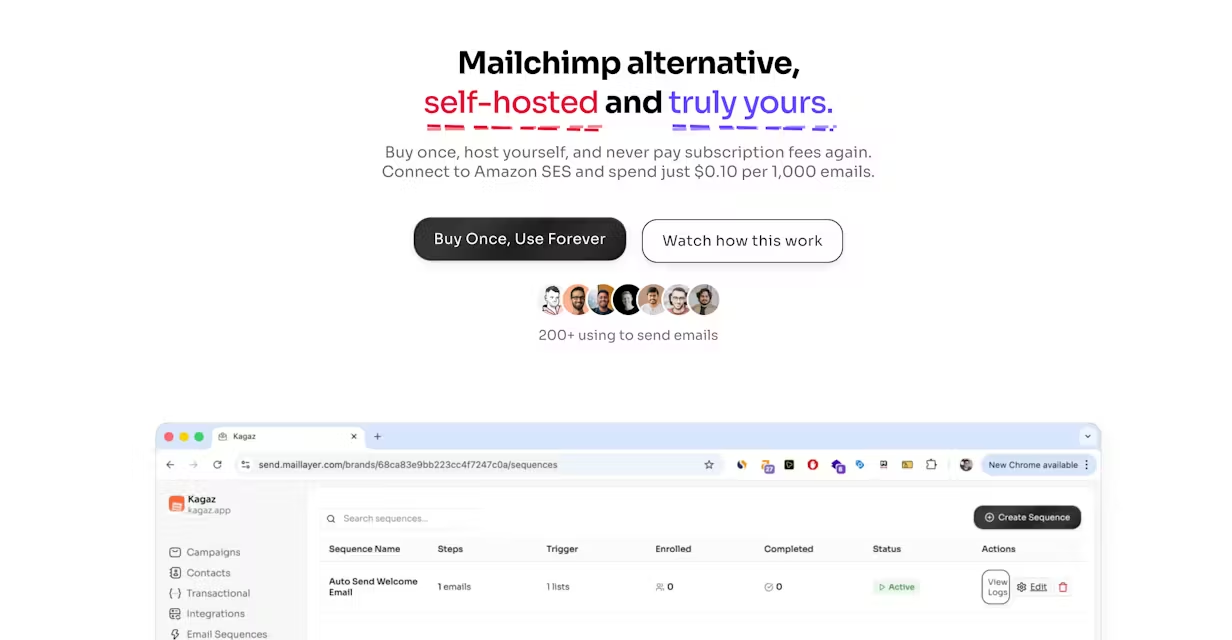
Maillayer is a self-hosted email marketing platform designed for teams that want more control over their email infrastructure and fewer recurring costs.
Instead of running on a provider’s managed servers, you deploy Maillayer on your own server and connect it to Amazon Simple Email Service (SES) for delivery.
(Source)
Rather than paying a monthly subscription based on contact count or feature tiers, you buy Maillayer once and then pay Amazon only for the emails you actually send.
In other words:
– Maillayer handles the application layer
Campaigns, templates, contact management, sequences, analytics, domain warmup, and transactional email logic all live inside the Maillayer app you control.
– Amazon SES handles the delivery layer
SES is responsible for sending emails, enforcing sending limits, and managing sender reputation at scale, with usage-based pricing.
Maillayer pricing: what you pay and what it really costs
Maillayer’s pricing is simple on the surface — a one-time license — but the real cost picture only makes sense once you include hosting and Amazon SES.
Lifetime license pricing (regular vs promo)
(Source)
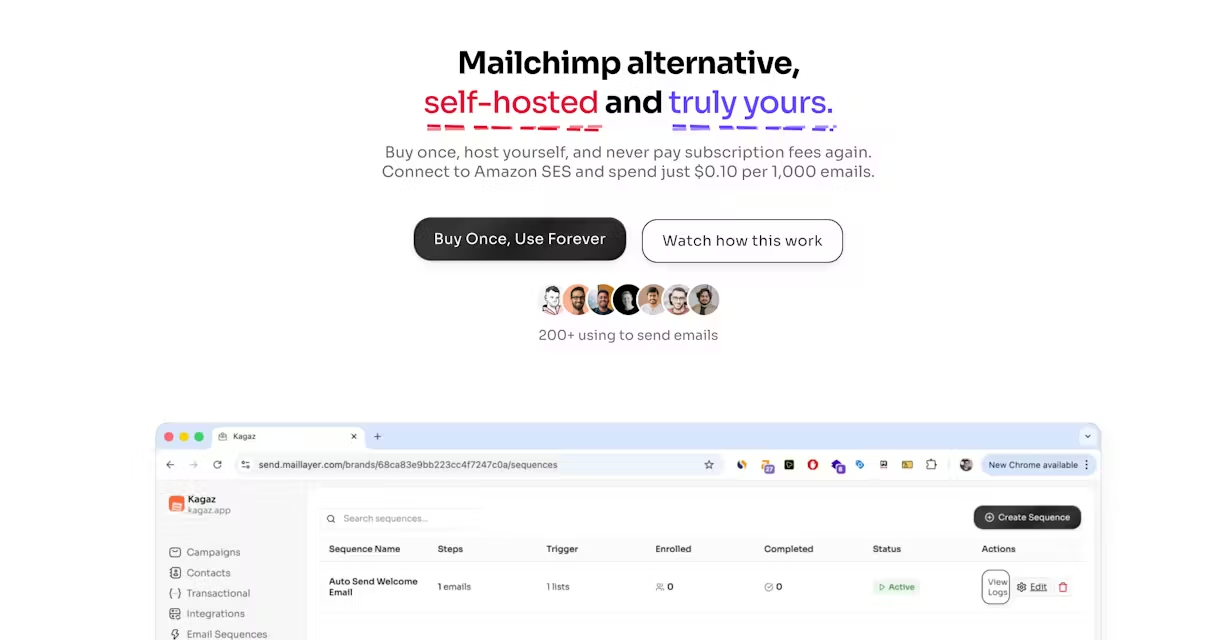
Maillayer is sold as a buy-once, use-forever product.
– Regular price: $249 (one-time)
– Discounted price via my affiliate link: Get $150 off (You pay $99)
What’s included in the one-time payment
Your license includes:
– Unlimited contacts
– Unlimited campaigns
– Unlimited domains and brands
– Email campaigns and basic automation (sequences)
– Built-in analytics (opens, clicks, bounces, geo, device)
– Domain warmup
– Transactional email API
– Contact management with CSV import
– Lifetime updates and support
– Full source code access
In other words, you’re not paying extra for “advanced” features later.
What you still pay for (hosting + Amazon SES)
The license does not include infrastructure or sending.
You’ll still cover:
| Cost type | What it means |
| Server hosting | A VPS to run Maillayer (you manage uptime, backups, security) |
| Email sending | Usage-based fees paid directly to Amazon SES |
Amazon SES charges roughly $0.10 per 1,000 emails sent, depending on region and usage.
Real sending cost examples (SES only)
To make this concrete, here’s what SES sending costs look like in practice (excluding hosting):
| Emails sent | Approx. SES cost |
| 10,000 | ~$1 |
| 100,000 | ~$10 |
| 1,000,000 | ~$100 |
These costs scale linearly. There are no sudden jumps when your list grows.
Your total spend over time is essentially:
Spend = One-time Maillayer license + VPS hosting + SES usage
How Maillayer’s pricing compares to Mailchimp and Sendy
Hosted tools like Mailchimp
– Monthly subscriptions
– Pricing tied to subscriber count
– Costs rise even if sending volume doesn’t
– Deliverability and infrastructure are abstracted away
Sendy SES tools
– One-time license
– SES-powered sending
– Extremely low ongoing costs
– Often more barebones UI and analytics
Where Maillayer fits
– Same low-cost SES model as Sendy
– More modern interface and built-in analytics
– Unlimited brands, campaigns, and contacts
– No recurring software fees
| Aspect | Maillayer | Hosted tools (E.g., Mailchimp) | SES tools (E.g., Sendy) |
| Pricing model | One-time lifetime license | Monthly subscriptions | One-time license |
| What pricing is tied to | Emails sent via SES | Subscriber count | Emails sent via SES |
| Cost behavior over time | Low and predictable | Costs rise as list grows, even if sending volume stays the same | Extremely low and predictable |
| Email delivery | Amazon SES | Fully managed by the platform | Amazon SES |
| Deliverability visibility | Transparent with built-in tools | Mostly abstracted away | More transparent |
| Interface & UX | Modern and clean | Polished, beginner-friendly | Often barebones |
| Analytics | Built-in analytics included | Included, varies by plan | Basic or limited |
| Automation | Sequences included | Included, often tiered | Basic autoresponders |
| Brands & domains | Unlimited | Limited or tier-based | Usually supported |
| Recurring software fees | No | Yes | No |
If you send at scale, Maillayer’s pricing model tends to get cheaper over time, while subscriber-based SaaS tools usually do the opposite.
What does Maillayer do well?
Maillayer focuses on getting the fundamentals right.
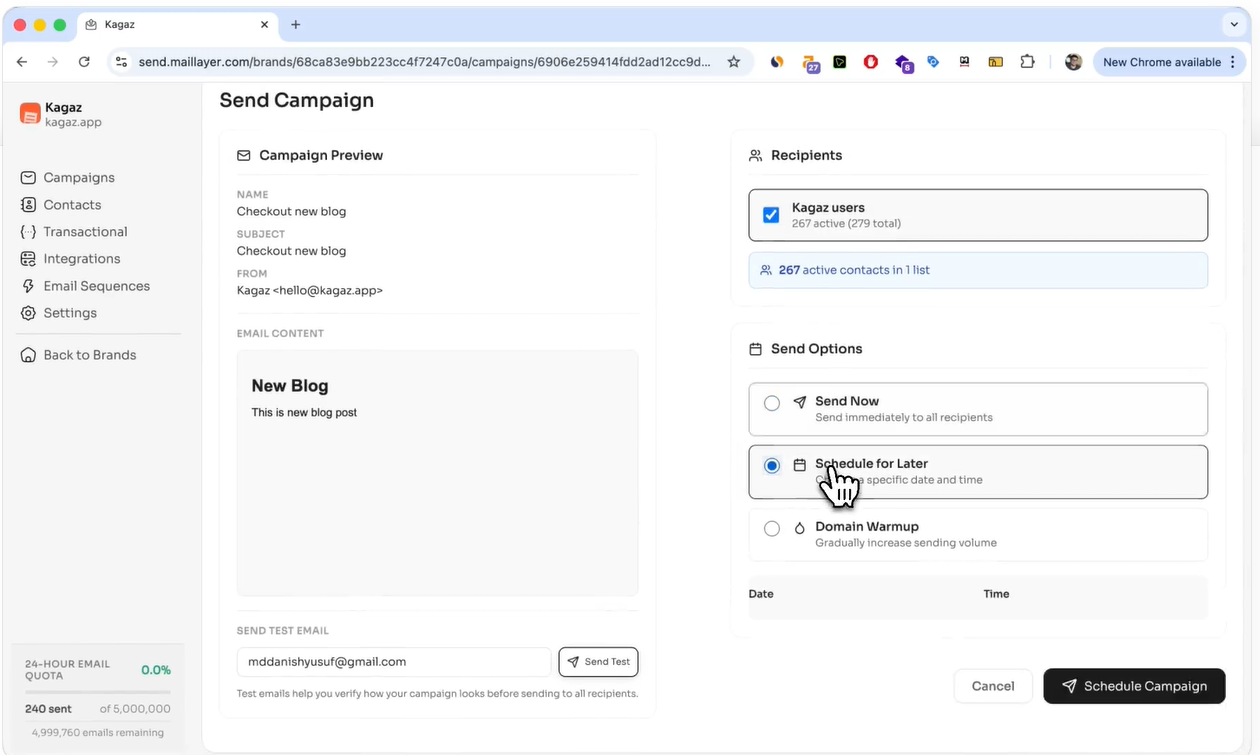
1. Clean UI for a self-hosted tool
Maillayer’s interface is clean, modern, and easy to navigate, especially considering it’s something you run yourself.
Campaigns, contacts, templates, analytics, and settings are all accessible from a single dashboard. If you’re coming from a hosted tool like Mailchimp, the learning curve is far gentler than you’d expect from a self-hosted setup.
(Source)
2. Built-in analytics that cover the essentials
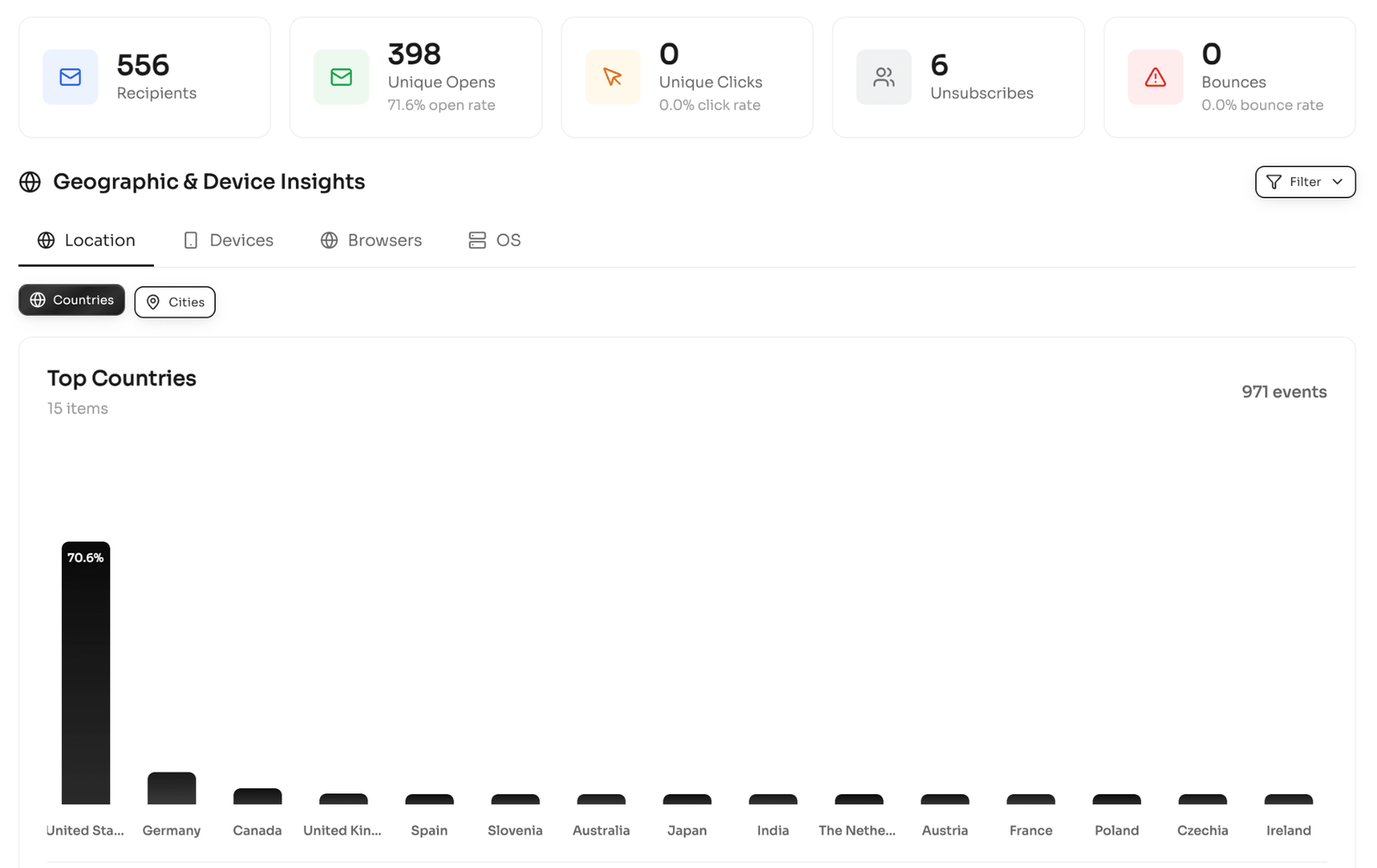
Maillayer includes native analytics out of the box, so you’re not forced to stitch together external tools just to see how campaigns perform.
You can track:
– Opens
– Clicks
– Bounces
– Geographic location
– Device and browser data
These metrics are especially important when you’re responsible for your own deliverability via SES. You get quick feedback on list health and engagement without analytics overload.
(Source)
3. Multi-brand and multi-domain support
Maillayer supports multiple brands and sending domains within a single installation.
This works well for:
– Agencies managing client campaigns
– Startups running multiple products
– Teams separating marketing and transactional domains
Each brand can have its own sender identity and verified domains, without extra licenses or artificial limits.
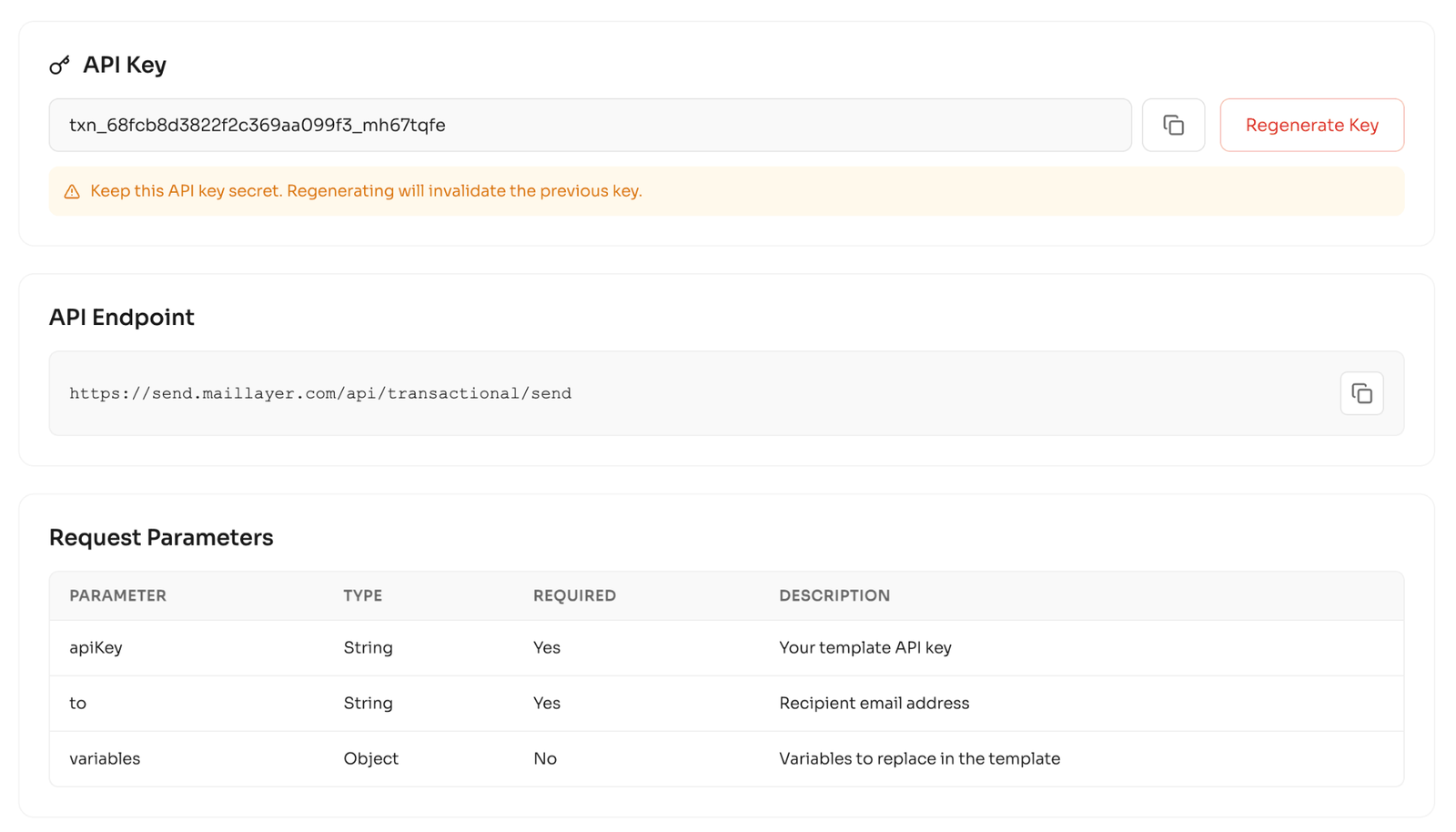
4. Transactional email API included
In addition to marketing campaigns, Maillayer includes a transactional email API.
This allows you to:
– Send application-triggered emails programmatically
– Use centrally managed templates
– Get consistent tracking for transactional messages
For product teams, this is a big quality-of-life improvement over working directly with raw SES for every transactional send.
(Source)
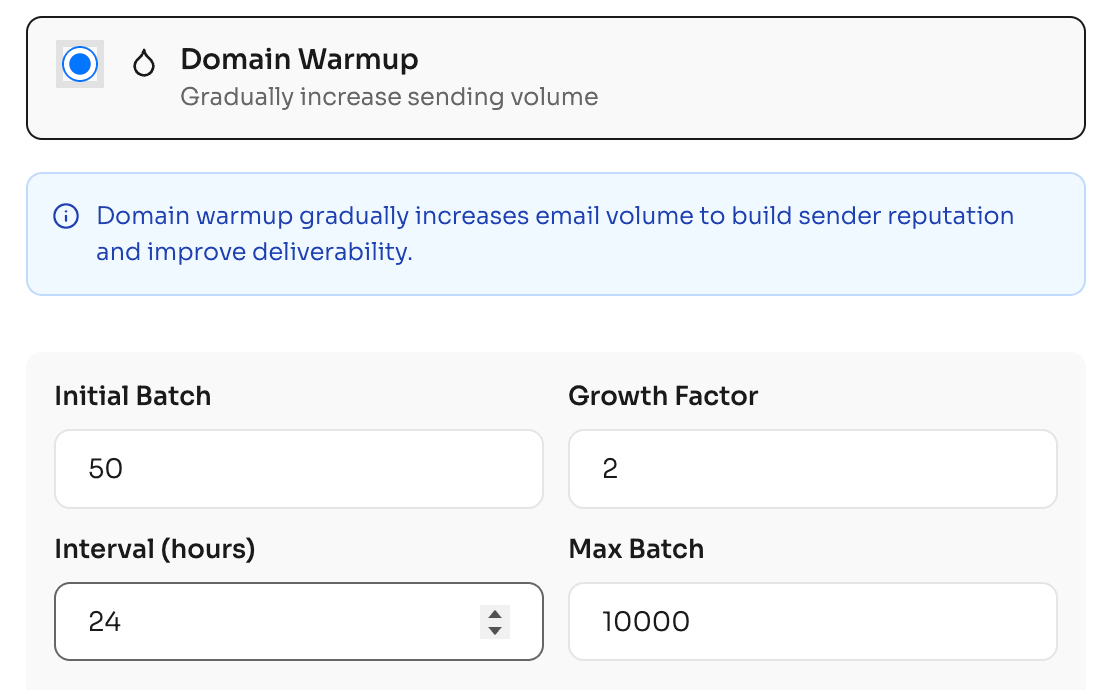
5. Domain warmup built in
Maillayer includes domain warmup functionality, which helps you gradually increase sending volume when starting fresh or migrating providers.
Warmup doesn’t guarantee inbox placement, but having it built in removes a major operational gap that many self-hosted tools leave entirely up to the user.
(Source)
6. Unlimited contacts and campaigns
There are no limits on:
– Contacts
– Campaigns
– Domains
– Brands
With Maillayer, growth doesn’t force you into higher pricing tiers.
Where Maillayer falls short (trade-offs you should know)
These are important to understand before you commit.
1. You’re responsible for self-hosting and maintenance
Maillayer runs on your server, which means you own:
– setup and deployment
– updates
– backups
– uptime and security
If you’re used to fully hosted tools where infrastructure is invisible, this will feel like extra work. For teams without any DevOps comfort, even “light” self-hosting can become a source of friction.
2. Amazon SES approval and compliance are on you
Maillayer doesn’t bypass SES rules.
You still need to:
– request production access from AWS
– verify domains and configure DNS/DKIM
– maintain low bounce and complaint rates
– respond to SES warnings if issues arise
This is the price of low-cost sending. SES is powerful and cheap, but it’s not forgiving if your list hygiene is questionable.
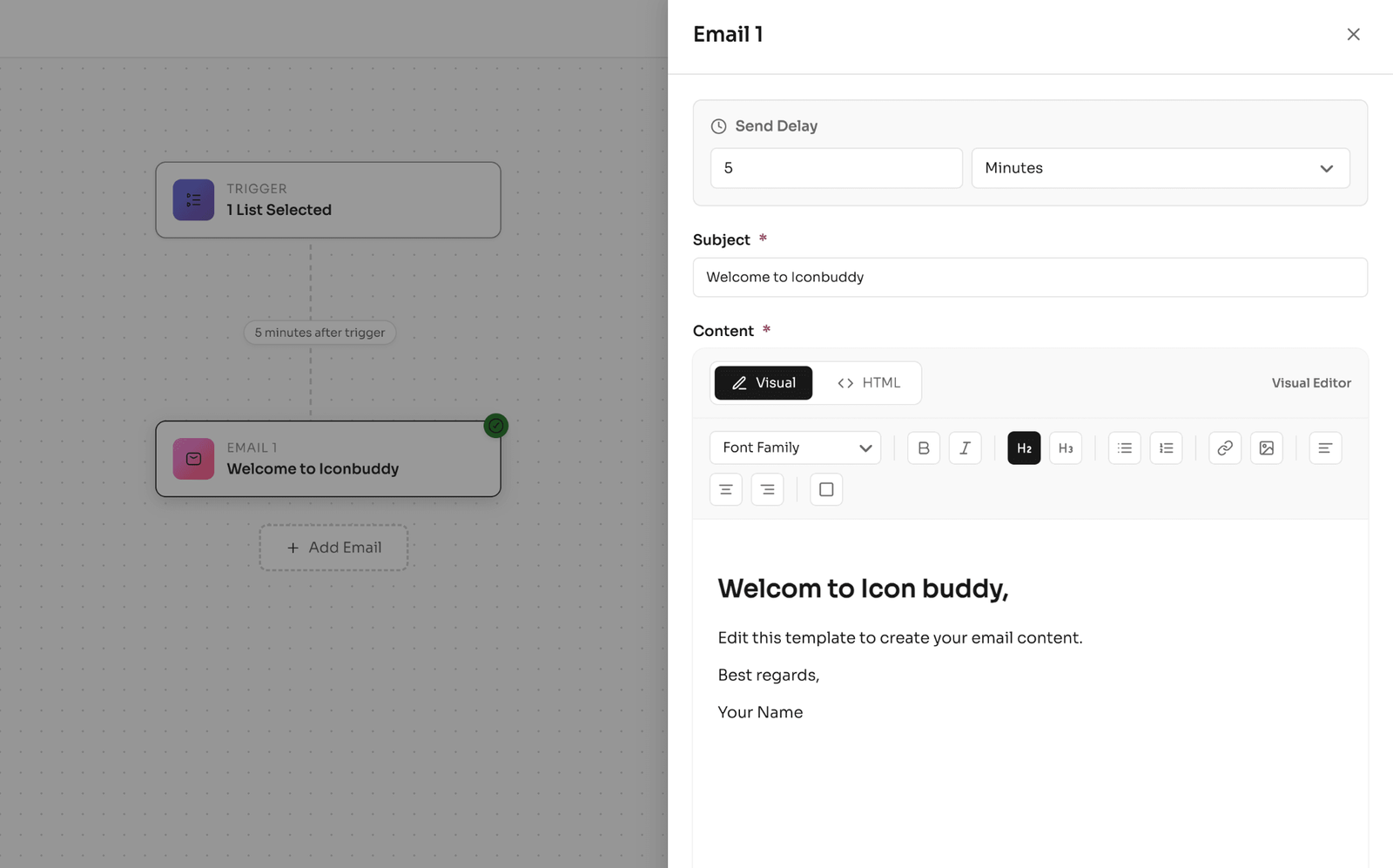
3. Automation is good enough, but not enterprise-grade
Maillayer supports campaigns, sequences, and basic triggers — enough for most onboarding and lifecycle emails, but it’s not a full CRM or enterprise automation suite.
(Source)
If you rely on:
– deep segmentation logic
– complex branching workflows
– revenue attribution or behavioral scoring
You may find Maillayer limiting compared to higher-end hosted platforms.
4. Deliverability isn’t “managed for you”
This is worth stating plainly.
Maillayer provides:
– warmup tools
– analytics
– visibility into bounces and engagement
But inbox placement depends on your practices, not the software. List quality, sending patterns, and domain reputation are still entirely your responsibility.
Who these trade-offs might affect
Maillayer may feel restrictive or stressful if you:
– want a plug-and-play email tool
– expect deliverability to be handled end-to-end
– don’t want to manage servers or AWS settings
– prefer support-led onboarding over documentation
If, however, you’re comfortable with these responsibilities, the trade-offs are often outweighed by cost savings and control.
Maillayer integrations and roadmap
Instead of trying to connect to everything at once, Maillayer covers common data sources today and signals clearly where automation is headed next.
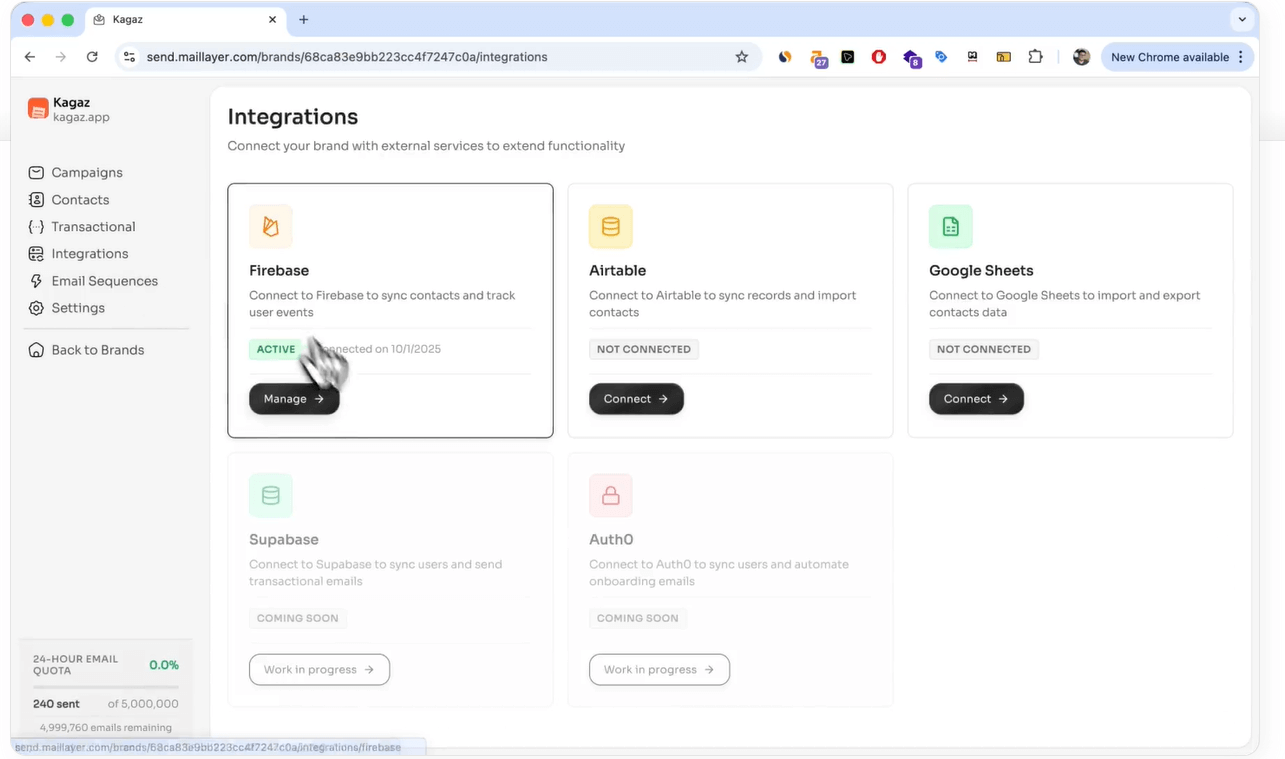
Maillayer integrations available today
Right now, Maillayer supports direct integrations with a small set of tools:
– Firebase – sync users and trigger emails from app activity
– Airtable – use tables as lightweight contact sources
– Google Sheets – sync contacts and lists without building custom pipelines
(Source)
These integrations are aimed at simple, reliable data flow. If your stack already lives in Sheets or Airtable, you can get emails out without extra middleware.
API-based workflows
Maillayer’s transactional email API allows you to connect almost any application manually.
This is how many teams handle:
– product-triggered emails
– onboarding flows
– notifications and updates
It’s more work than no-code automation tools, but far cleaner than wiring everything directly to raw Amazon SES.
What’s planned on the roadmap
According to the public roadmap, several integrations and features are planned or in progress, including:
– Google Sheets triggers (send emails when new rows are added)
– Shopify integration
– Notion triggers
– Auth providers (Clerk, Auth0)
– Custom webhooks
– Improved segmentation and tagging
– SMTP support
– More granular tracking controls
– Template enhancements (RTL, React Email support)
These roadmap items point toward stronger automation and segmentation, but they’re not available yet.
How much weight to give the roadmap
This is important: you should evaluate Maillayer based on what it does today, not what’s promised.
The roadmap:
– Shows active development
– Signals the direction of the product
– Helps you judge long-term fit
But if a missing feature is critical to your workflow right now, it’s better to assume it won’t arrive in time.
Maillayer vs alternatives: which should you choose?
Here’s how Maillayer stacks up against other common options.
Maillayer vs Mailchimp
| Feature | Maillayer | Mailchimp |
| Hosting model | Self-hosted | Fully hosted |
| Pricing model | One-time license + SES usage | Monthly, subscriber-based |
| Cost scaling | Scales with emails sent | Scales with list size |
| Long-term cost | Low at scale | Gets expensive fast |
| Setup required | Yes (server + AWS SES) | No |
| Deliverability | Your responsibility (via SES) | Managed |
| Data ownership | Full ownership | Platform-owned |
| Automation depth | Basic sequences | Advanced workflows |
| Best for | Builders who want control and low costs | Teams that want convenience |
If you want email marketing to “just work,” hosted tools like Mailchimp still make sense. If you want to stop paying rent on your email list, Maillayer becomes compelling.
Maillayer vs Sendy (SES self-hosted tools)
Both Maillayer and Sendy use Amazon SES and a one-time license, but the experience differs.
| Feature | Maillayer | Sendy |
| Hosting model | Self-hosted | Self-hosted |
| Pricing model | One-time license + SES usage | One-time license + SES usage |
| UI / UX | Modern, clean | Barebones |
| Built-in analytics | Yes | Limited |
| Multi-brand support | Yes | Limited |
| Transactional API | Yes | No (manual setup) |
| Ease of use | Moderate | Technical |
| Best for | Users who want SES + usability | Users who want the cheapest setup |
If you’re comfortable with a very barebones interface, Sendy still works. If you want a cleaner, more modern self-hosted experience without moving to SaaS pricing, Maillayer is the better fit.
Bottom line:
Choose Maillayer if you value ownership, transparency, and long-term savings. Choose hosted tools if you value convenience and managed complexity more.
Final verdict: Is Maillayer worth it in 2026?
Yes, Maillayer is worth it.
If you’re sending emails at scale, feel boxed in by subscriber-based pricing, and want full ownership of your data and infrastructure, Maillayer makes a lot of sense. The one-time license paired with Amazon SES can dramatically reduce long-term email costs, especially as your list grows. You also get a clean UI, built-in analytics, multi-brand support, and a transactional API without recurring software fees.
That said, Maillayer is not trying to replace fully managed email platforms for everyone. The trade-off for lower costs and control is responsibility. You’re expected to handle hosting, AWS setup, SES approval, and ongoing deliverability health.
Choose Maillayer if:
– You send moderate to high email volume
– You want to avoid paying monthly for subscribers
– You’re comfortable with Amazon SES and basic server setup
– You value data ownership and privacy
– You manage multiple brands or products from one platform
Skip Maillayer if:
– You want a plug-and-play, fully hosted solution
– You expect deliverability to be managed end-to-end
– You don’t want to deal with AWS, DNS, or infrastructure
– You need advanced CRM-style automation and attribution
Bottom line:
Maillayer is one of the most cost-efficient and transparent options available if you’re willing to own your email stack.
Frequently asked questions on Maillayer
Is Gmail email any good?
Gmail is excellent for personal and day-to-day business communication. It’s reliable, easy to use, and has strong spam filtering, making it great for one-to-one or small-volume emails.
However, Gmail isn’t designed for email marketing. It has strict sending limits, no built-in analytics or automation, and limited deliverability controls, which makes dedicated email marketing tools a better choice for newsletters or campaigns.
Is Mailrelay good?
Mailrelay is a solid hosted email marketing tool, especially for beginners and small lists. It offers a generous free tier, built-in templates, basic automation, and analytics without requiring any technical setup.
That said, like most hosted tools, costs and limits increase as your list grows, and you have less control over deliverability and infrastructure compared to self-hosted, SES-powered tools. It’s good for simplicity, but not ideal if you’re optimizing for long-term cost efficiency or control.
Do I need my own AWS account to use Maillayer?
Yes. Maillayer relies on Amazon Simple Email Service (SES) for sending, so you’ll need your own AWS account. You’re responsible for setting up SES, verifying your domain, and requesting production access before sending emails at scale.
Is Maillayer really a one-time payment?
Yes. Maillayer is sold as a one-time lifetime license. There are no recurring software subscriptions. Your ongoing costs come only from:
– server hosting
– Amazon SES usage (pay-per-email)
Can Maillayer replace Mailchimp?
Yes, Maillayer can replace MailChimp. Maillayer can replace Mailchimp if you:
– don’t want subscriber-based pricing
– are comfortable self-hosting
– don’t need advanced CRM-style automation
– prefer owning your data and infrastructure
If you want zero setup and fully managed deliverability, Mailchimp and similar hosted tools may still be the easier option.
Is my data secure and private with Maillayer?
Yes. Maillayer is self-hosted, which means your email data, analytics, and contact lists live on your own server, not on a third-party SaaS platform’s infrastructure.
This gives you:
– full data ownership
– more control over compliance and privacy
– fewer external data-sharing concerns
The trade-off is that security and backups are your responsibility, just like with any self-hosted software.